Getting Started with LangChain: Build Your First AI Agent in Just a Few Lines with create_agent()

create_agent() automates schema, history, and the agent loop — but understanding that hidden loop is what interviews actually test.
This article uses a weather tool example to compare the effort required when building an Agent with the bare OpenAI SDK versus using LangChain's create_agent() factory function (built on LangGraph). The bare approach requires manually handling tool schemas, LLM calls, output parsing, tool invocation, and message history — the full agent loop. LangChain reduces this to just tools, model, and system prompt, auto-generating schemas from type annotations. The article also highlights two common interview topics: detecting and stopping a model stuck in a tool-calling dead loop, and handling errors thrown by tools calling external APIs.
Why You Need an Agent Framework
Before writing your first LangChain Agent, it's worth understanding a core question: if you skip the framework entirely and build an Agent directly with an LLM's SDK (say, the OpenAI SDK), how much work are you actually signing up for?
The answer is — quite a lot. In the bare-SDK approach, you're responsible for managing an entire chain of logic yourself: manually defining tool schemas, calling the LLM, parsing the response, checking whether it's a tool call, extracting arguments, invoking the corresponding tool, appending the result back to the messages history, and then calling the LLM again. This back-and-forth is what's known as the agent loop, and in the bare-SDK approach, every single step of that loop is exposed and yours to maintain.
That said, this "fully manual" approach isn't without value. Quite the opposite — it gives you a solid grasp of the underlying mechanics: what a tool schema looks like, how the model decides to call a tool, how arguments get passed, and how tools get executed. These fundamentals will come in handy repeatedly as you build more complex, advanced applications later on.
LangChain's Solution: Integrations for Hundreds of LLMs
The LangChain documentation includes a key phrase: it provides integrations for hundreds of LLMs. That means when you use the OpenAI SDK directly, you're locked into OpenAI's models — but LangChain pre-packages integrations for OpenAI, Anthropic, Gemini, Grok, Bedrock, and many other providers.
The workflow is straightforward:
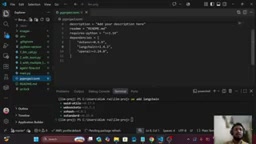
- Install the main LangChain package, e.g. with uv:
uv add langchain - Install the provider-specific package for your model — for OpenAI, run
uv add langchain-openai - To switch to Anthropic or another provider, just install the corresponding integration package
Once installed, the new dependencies will show up in project.toml. The cost of switching providers is reduced to "swap one package" — a direct engineering efficiency win that frameworks are built to deliver.
create_agent(): A Factory Function That Hides All the Complexity
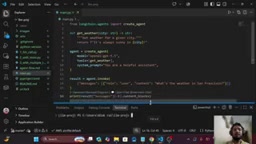
Here's the main attraction. LangChain's create_agent() is essentially a factory function — one that's internally built on top of LangGraph. All you need to provide are three things:
- tools: your tool functions
- model: the model to use (the example sticks with gpt-4o)
- system prompt: an instruction that assigns the model a role, such as
you are a helpful assistant
The most notable part: you no longer need to manually declare tool schemas. In the bare-SDK approach, we spent a significant chunk of code preparing schemas to tell the LLM "here are the tools I have." With LangChain, you simply pass in the function as a tool, and the framework internally reads all of its metadata — including type annotations (typecasts) and descriptions — to auto-generate the required schema.
At runtime, just pass the user's query via agent.invoke(). Maintaining message history, controlling the agent loop, calling tools and passing results back — all of that logic you'd have written by hand in the bare-SDK approach is now tucked inside the factory function.
from langchain.agents import create_agent

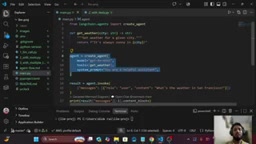
agent = create_agent(
    model="gpt-4o",
    tools=[get_weather],
    system_prompt="you are a helpful assistant",
)

result = agent.invoke(...)
Compare the line counts: the bare-SDK version needs dozens of lines to handle schema prep, parsing, the loop, and history appending. The LangChain version gets a functionally equivalent Agent in just a handful of lines.
LangGraph is the underlying library in the LangChain ecosystem specifically designed for building stateful, cyclical workflows. create_agent() is a high-level API built on top of it. LangGraph's core abstraction is the "Graph": Nodes represent execution steps (like calling an LLM or running a tool), and Edges determine the flow of execution — including Conditional Edges used to decide "does this need to call a tool again?" It's this graph structure that lets the agent loop run automatically. Each time the LLM returns a tool call request, the graph routes along a conditional edge to the tool node, executes it, then routes back to the LLM node — repeating until the LLM finally returns a plain text answer. Understanding this layer is helpful when debugging runaway loops: LangGraph exposes a recursion_limit parameter to cap the maximum number of iterations, which is one of its built-in mechanisms for handling the "model keeps calling the same tool over and over" scenario.
A Common Pitfall: Loading Environment Variables
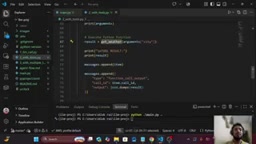
There's one practical gotcha worth noting. When you first run python main.py, the program may throw an error — not because of any logic issue, but because the OpenAI API key wasn't loaded. If the values in your .env file haven't been brought into the runtime, remember to call load_dotenv(). Without it, the OpenAI library will reject the request outright because it can't find the API key. Add that step and the Agent will produce output just fine.
The Framework Hides the Loop — But Interviews Ask About the Loop
This is where the tutorial gets genuinely valuable. create_agent() conceals the agent loop, but the loop still exists — it's just gone from "visible" to "hidden." In the bare-SDK while loop, you can clearly see the iteration running until the task completes. In LangChain, that same loop is present — you just can't see it.
Precisely because it's hidden, two classic interview questions emerge:
Question 1: What happens if the model keeps calling the same tool repeatedly?
Suppose something goes wrong and the model enters a dead loop, recursively requesting the same get_weather tool over and over. In the bare-SDK approach you can see the loop; in the framework it's hidden. So how do you detect and control a situation where the model is "requesting the same tool again and again"? In a real system with potentially hundreds of tools, you must have a handle on this kind of runaway loop.
LangGraph sets a recursion_limit by default at the create_agent() layer (typically 25), and will raise a GraphRecursionError once that threshold is exceeded — preventing infinite loops from burning through tokens and compute. Beyond that, more fine-grained control options include: maintaining a call counter inside the tool function and raising an exception proactively; using LangGraph's interrupt_before / interrupt_after hooks to inject checks before or after specific nodes; and setting a timeout on the entire graph invocation. In production, it's also good practice to generate a unique run_id for each agent run and log the tool call chain for post-hoc auditing of loop paths. In interviews, this topic usually surfaces as "how do you prevent an agent from getting stuck in an infinite loop?" — being able to name recursion_limit and explain when it triggers is a solid differentiator.
Question 2: What happens when a tool throws an error?
In real-world scenarios, tools often call external APIs. If get_weather's API returns an error, do you pass that error back to the model and let it retry, or do you raise it directly to the user? The strategy for handling tool errors — when a tool is raising an error — is an unavoidable design question when working with any agent framework.
The author makes a point worth emphasizing: interviewers typically won't ask "how is create_agent() implemented internally?" — they'll ask "how is the agent loop controlled?" or "how does the looping mechanism work?" In other words, copy-pasting framework code from the docs is something anyone can do. What actually separates skill levels is a deep understanding of loop control, life cycle hooks, and error handling at the underlying layer.
Wrap-Up
The point of this section isn't to introduce a new language or API — it's to use the same weather example to give you a direct, visceral comparison between the bare-SDK and LangChain implementations. The value of the framework lies in automating the repetitive work: schema generation, message history management, and agent loop control — so you can get an Agent running with minimal code.
But the flip side of that convenience is this: when you need to control the loop, handle tool errors, or inject lifecycle logic, the details the framework hid from you become homework you'll have to catch up on. The right learning path is to internalize the fundamentals first, then enjoy the efficiency the framework provides.
As planned in the tutorial series, the next installment will focus specifically on answers to those two interview questions — covering the mechanisms LangChain actually provides to help manage both the runaway loop and the tool error scenarios in practice.
Related articles

Chain of Thought Isn't Just for AI: How Humans Can Use CoT to Improve Thinking Quality
Chain of Thought isn't just a prompt trick for large models. Starting from a Hacker News discussion, this article analyzes why CoT works for human thinking too, breaks down actionable ways to transfer it, and highlights the key differences between human CoT and machine CoT.
Cloudflare Teams Up with OpenAI: Closi…
Cloudflare Teams Up with OpenAI: Closing the Loop from Vulnerability Discovery to Defense with AI
Cloudflare uses OpenAI Daybreak to investigate security vulnerabilities and generate reviewable remediation plans, while developers use Codex to boost coding efficiency and quality.

Orca Multi-Agent Orchestration in Practice: A Guide to Parallel Collaboration with Claude and Codex
Orca is Stable AI's free open-source agent workbench supporting 34 agents like Claude Code and Codex in parallel. Learn its Git worktree isolation, multi-model orchestration, and mobile management.