Getting Started with MCP Servers: Multi-Language SDKs and Real-Time Streaming in Practice

A Microsoft tutorial details the complete path to building an MCP server from scratch, covering multi-language implementation, streaming, and deployment.
The Microsoft Developer channel released a tutorial guiding developers to build their first MCP server from scratch. It provides multi-language examples in C#, Java, JavaScript, TypeScript, and Python based on official open-source SDKs. The learning path includes creating a server and inspecting it, writing a client, integrating an LLM for negotiation, using SSE and HTTP streaming for real-time interaction, and deploying locally or to the cloud. Each language version includes a calculator agent exercise to master tools, prompts, and resources. The environment requires an IDE, package manager, and API key, and the entire process can be done in VS Code with GitHub Copilot agent mode. The tutorial also offers sample apps, official docs, and a Microsoft Learn walkthrough.
Why MCP Is Becoming a Popular Protocol for Agent Development
MCP (Model Context Protocol) is becoming a key protocol for connecting AI applications with external tools. A tutorial released by the Microsoft Developer channel on Bilibili focuses on "building your first MCP server," covering the complete path from environment setup to cloud deployment. The tutorial emphasizes language flexibility, providing examples in C#, Java, JavaScript, TypeScript, and Python, all based on the official open-source SDKs, so developers can focus on the service functionality itself without digging into protocol details.
MCP (Model Context Protocol) is an open protocol proposed by Anthropic in late 2024, aimed at standardizing how AI applications connect to external data sources and tools. It adopts a client-server architecture: MCP servers expose three types of capabilities—tools, prompts, and resources—and clients (such as AI assistants) interact with servers via JSON-RPC messages. The core value of MCP lies in decoupling—developers don't need to adapt tool interfaces separately for each AI platform; they only need to implement an MCP server once, and it can be called by any client that supports the protocol. It is model-agnostic and not tied to any specific vendor, which is why it quickly gained support from ecosystems like Microsoft and GitHub. The protocol also defines a capability negotiation mechanism, allowing clients and servers to dynamically discover each other's supported features, providing a foundation for autonomous decision-making by agents.
Building from Scratch: Environment Setup and Core Steps
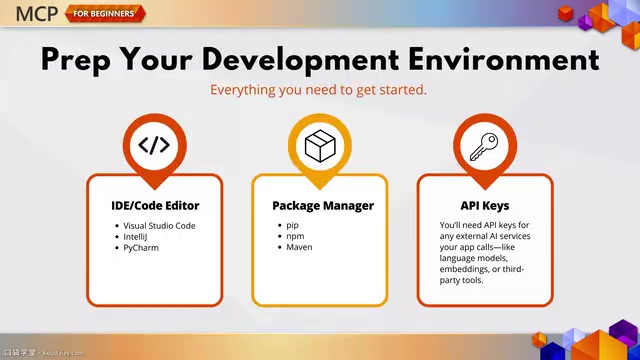
The tutorial begins by clarifying the development environment requirements: an IDE such as VS Code, IntelliJ, or PyCharm, the package manager for the corresponding language, and the API key needed to connect to AI services. Official links and guidance are provided to help developers configure everything smoothly.
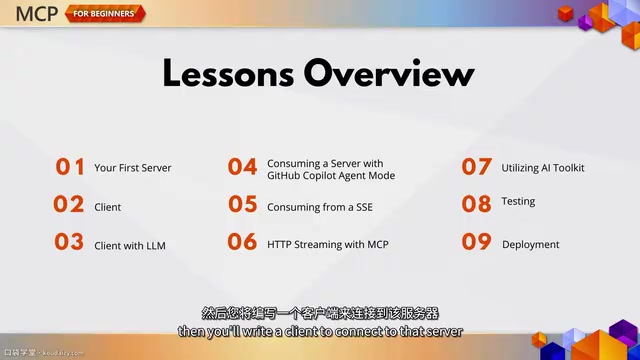
The core learning path is divided into several steps: first, create your first MCP server and inspect it with the built-in inspector tool; then write a client to connect to that server; next, introduce an LLM so the client has "negotiation" capabilities rather than simply sending commands. The entire process is completed within VS Code, and GitHub Copilot's agent mode is introduced for testing.
MCP Inspector is the official debugging tool provided by the protocol. It runs as a web interface and can connect to any MCP server and visualize its exposed tools, prompts, and resources. Developers can directly invoke tools, view input/output structures, and verify error handling without writing client code. Inspector also supports real-time logs and message tracing, helping to locate protocol-level issues. In the development workflow, it typically serves as the first verification step after the server implementation, ensuring the server conforms to the MCP specification before moving on to client integration.
Real-Time Streaming and AI Toolkit
The tutorial highlights two streaming approaches: Server-Sent Events (SSE) and HTTP streaming, the latter being suitable for scalable real-time applications. Meanwhile, VS Code's AI Toolkit is used for rapid testing and iteration. These capabilities allow MCP servers to go beyond the request-response model and support more dynamic interactions.
Server-Sent Events (SSE) is a lightweight HTTP-based push technology in which the server continuously sends a stream of text data to the client over a single long-lived connection, suitable for one-way real-time notifications from server to client. In MCP, SSE is often used for servers to proactively push resource updates or tool execution progress. HTTP streaming (Streamable HTTP) is a transport method introduced later in MCP; it allows bidirectional streaming of JSON-RPC messages over a single HTTP connection, making it better suited for serverless architectures and scalable deployments. The difference between the two: SSE relies on the EventSource API and has a single connection direction; HTTP streaming is more flexible, supports a mix of request-response and push, and is easier to route through standard load balancers.
Practice and Deployment: From Calculator to Cloud
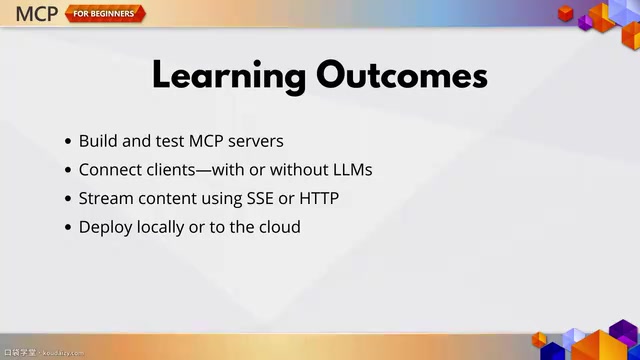
Each language version comes with a simple calculator agent as a hands-on exercise. The tutorial emphasizes that these are not simple "hello world" examples, but rather let developers experience the full usage of tools, prompts, and resources. After completing this chapter, developers should be able to independently build and test an MCP server, connect clients with or without an LLM, implement server-to-client streaming, and deploy the project locally or to the cloud.
In the MCP protocol, tools are executable functions exposed by the server that clients can invoke with parameters, typically used for actions such as performing calculations or querying databases; prompts are predefined templates that guide the LLM to generate replies in a specific format; and resources are read-only data provided by the server, such as file contents or API responses, for clients to read as context. Together, these three form the capability surface of an MCP server, enabling AI applications to dynamically discover and leverage external capabilities. The calculator example implements arithmetic operations through tools, and may also include prompt templates and resource examples to help developers understand how the three primitives work together.
Learning Resources and Next Steps
The tutorial provides sample applications, official documentation, and a complete walkthrough on Microsoft Learn. The next chapter will move from environment setup to practical scenarios, exploring how MCP can be applied to specific problems. For developers who want to systematically master MCP, this path—from creation to connection, enhancement, and deployment—constitutes a solid starting point.
One-line Summary
A Microsoft tutorial explains the complete path to building an MCP server from scratch, covering multi-language implementations, streaming, and deployment.
Paragraph Summary
The Microsoft Developer channel released a tutorial guiding developers to build their first MCP server from scratch. The tutorial provides multi-language examples in C#, Java, JavaScript, TypeScript, and Python, based on the official open-source SDKs. The learning path includes: creating a server and inspecting it with the inspector, writing a client to connect, integrating an LLM for negotiation capabilities, using SSE and HTTP streaming to support real-time interaction, and deploying locally or to the cloud. Each language version comes with a calculator agent exercise to help master the use of tools, prompts, and resources. The development environment requires an IDE, package manager, and API key, and the entire process can be completed in VS Code with GitHub Copilot agent mode. The tutorial also provides sample applications, official documentation, and a complete Microsoft Learn walkthrough, laying the foundation for systematically mastering MCP.
Related articles
 Tech Frontiers
Stylome Bot Slammed as Useless Junk: Why Do AI Detection Tools Keep Failing?
Reddit users test the Stylome AI detection bot: Gemini-rewritten text judged human-written, consistently low confidence. An analysis of AI text detection's technical dilemmas, privacy concerns, and credibility crisis in community governance.
 Tech Frontiers
When AI Becomes a Productivity Divide: Clarity or "AI Psychosis"?
A civil engineer's deep use of agentic AI boosted efficiency but bred contempt for peers who refuse to learn. Is this clarity or AI psychosis? An analysis of the cognitive and psychological challenges behind the AI productivity divide.
 Tech Frontiers
Opus 5.5 Benchmark Scores Climb, Community Says Its "Weights Are Blessed"
Reddit community discusses Opus 5.5's rising scores on the Benchmaxxing Bench, with users describing its performance as "weights are blessed." This article interprets the community reaction and cautions against conflating benchmark scores with real capability.