Hands-On with Mixar: An AI-Native Blender Fork That Handles Baking and LOD with a Single Prompt

Hands-on with Mixar: an open-source AI-native Blender fork that handles baking and LOD via prompts.
Mixar is a fork based on Blender 5.0 that embeds AI Agent capabilities directly into the kernel rather than as an external plugin. This hands-on review tests texture baking, multi-part LOD generation, mood boards, image-to-3D, and full scene workflows, comparing it to MCP-based approaches. Fully open source and free to try.
When AI Gets "Stitched" Directly Into Blender's Core
Connecting AI Agents to Blender via plugins or MCP (Model Context Protocol) is the most common approach today—but this method always keeps a layer of separation: the AI operates as an external tool, invoking Blender's functions indirectly through interfaces, which imposes a clear ceiling on its capabilities.
MCP is a standardized protocol proposed and open-sourced by Anthropic in late 2024, designed to solve the problem of connecting AI large language models to external tools and data sources. Its design philosophy resembles the unified standard of a USB-C interface—whether it's a file system, database, API service, or desktop software, as long as an MCP server is implemented, AI models can invoke it through a unified protocol. In the Blender context, the MCP approach means the AI acts as an "external client," sending commands to Blender over a network interface. Every operation must traverse the complete chain of "model inference → protocol packaging → interface transmission → Blender execution → result return," resulting in significantly higher latency and failure rates than native integration. Notably, the MCP protocol itself was not designed specifically for 3D tools; its very generality becomes a bottleneck in deep integration scenarios: the protocol layer cannot perceive Blender's internal state (such as the currently selected object or the topology of the active material node tree), so every invocation is essentially a "blind operation" that relies on the AI model to infer context on its own, rather than directly reading engine memory.
Now, one team has done something more radical: they forked Blender directly, integrating AI capabilities into the core, creating an "AI-first" 3D creation tool.
In the open-source software ecosystem, a "fork" refers to creating an independent branch based on a project's source code and developing it autonomously. Blender is licensed under GPL v2+ (General Public License)—one of the strongest "Copyleft" constraints in the open-source ecosystem, requiring any derivative project based on its code to be open-sourced under the same license. This clause is both the legal prerequisite for Mixar being fully open source and a profound influence on its commercialization path: compared to competitors (like Spline and Womp, which build AI 3D tools on proprietary engines), Mixar cannot build a moat through closed-source code and must differentiate itself through feature experience and ecosystem integration. From a technical standpoint, the cost of forking the core is significant: it requires continuously tracking upstream Blender updates, manually merging bug fixes and performance improvements from new versions, while maintaining its own AI-related custom code. This high maintenance cost buys a core advantage—the AI gains direct low-level access to the rendering pipeline, data-block system, and Python API, without the indirect invocation of external interfaces. More specifically, kernel-level integration means the AI can directly manipulate Blender's bpy data layer, read and modify the properties of any object in the scene, modifier stacks, material node graphs, and even directly trigger specific stages of the rendering pipeline—an architectural barrier that no external-interface-based approach can overcome.
This tool is called Mixar, essentially a fork based on Blender 5.0. It's not a layer of AI wrapped around the outside of Blender—it gives the AI Agent low-level access to all core functions. Even more noteworthy, it is currently fully open source and free to try, which is quite rare in the AI 3D tool space.
Hands-on testing shows that the most direct advantage of this "embedded" architecture is speed. Compared to approaches that connect external Agents like Claude via MCP, Mixar is noticeably faster at executing complex tasks, with a higher first-attempt success rate.
Core Test: Baking Capabilities Are Surprising
Multi-Part Baking with a Single Prompt
Texture baking is widely recognized in Blender as a tedious and error-prone manual step, making it the focus of this test. Texture baking essentially involves "projecting" and recording complex lighting and geometric details from a high-precision model (high-poly) onto the UV-unwrapped texture of a low-precision model (low-poly). The underlying principle involves ray casting algorithms: from each UV pixel on the low-poly surface, a ray is cast along the normal direction, and upon hitting the high-poly model, the normal difference or occlusion information between the two is recorded. This process is extremely sensitive to parameters—which is precisely why even experienced 3D artists often need to repeatedly tweak settings when dealing with complex multi-part characters, making it one of the most valuable scenarios for AI automation.
This technique is widely used in game asset production—a high-poly model may have millions of faces, while the low-poly model actually running in the game engine has only a few thousand faces. The visual gap between the two is bridged precisely by baked results like normal maps and AO maps. Manual baking in Blender requires precisely setting more than a dozen parameters like Ray Distance, Cage offset, and UV seam handling; any misconfiguration can cause light leaks, seam errors, or baking failures—which is exactly why it's recognized as a "tedious and error-prone" step.
It's worth adding that the Cage is a key concept in baking that's easily overlooked: it's a dilated copy surrounding the outer surface of the low-poly model, used to define the starting position of ray casting. Setting the Cage offset too large blurs texture details, while too small produces self-occlusion artifacts. Understood mathematically, the entire baking process is essentially a problem of finding the global optimal solution in a parameter space: if Ray Distance is too small, rays cast from the "back-facing" areas of the low-poly surface cannot reach the high-poly model (i.e., "miss"), producing baking dark spots; if too large, rays cross the geometric boundaries of the high-poly model and hit the wrong surface, producing "stretching" or "bleeding" artifacts. This is precisely why even experienced 3D artists often need to repeatedly tweak these parameters when dealing with complex multi-part characters, consuming a great deal of time.
The test scenario was a high-poly and low-poly character, with a single-sentence prompt: "Bake all parts (isolated), generating AO (ambient occlusion) and normal maps," with no baking parameters provided whatsoever.
The result was surprising: the AI inferred reasonable settings on its own and successfully baked all parts. The distance parameter had minor flaws (about 95% completion), but considering the zero-parameter input, this result was quite excellent. During execution, the interface displayed a green "cooking" animation and locked relevant operations to prevent accidental interference, yet users could still freely browse, select, and even rename objects—the interaction logic was quite restrained and reasonable.
Upgraded Challenge: Merged Baking of 10+ Armor Parts
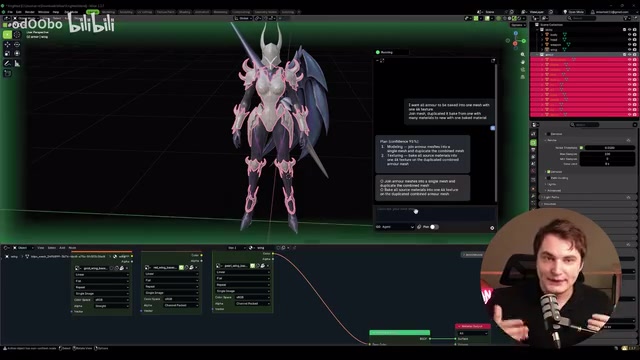
The more hardcore test was having the AI merge more than 10 armor parts on the character—merging meshes, unifying UVs, and baking into a single texture. Under the free-tier model, the AI completed the task within a few minutes.
UV unwrapping is the process of "flattening" a 3D mesh's surface into a 2D plane, like cutting open a globe's skin and spreading it flat into a map. When it was discovered that the AI used Smart UV Projection—Blender's automated UV tool that automatically cuts and unwraps by analyzing angle differences between faces, suitable for quickly handling single objects but prone to producing many fragmented UV islands in complex scenes involving multiple merged objects, leading to low texture utilization and excessive seams—simply adding the phrase "don't use Smart UV, use the existing UV packing instead" prompted the AI to re-bake, with noticeably more reasonable texture resolution. The "pack existing UV" strategy preserves each part's original UV information, merely rearranging it to maximize texture space utilization, usually resulting in a cleaner UV layout and higher texture density—precisely the standard practice in professional game asset production. UV island packing efficiency is an important metric for professional-grade UV tools; optimal rectangular packing is essentially an NP-hard problem, and the industry typically uses heuristic algorithms (such as contour-based bin packing) to find near-optimal solutions in acceptable time. The gap between Blender's built-in packer and professional tools like RizomUV and UVPackmaster is mainly reflected in the efficiency of this step.
After further requesting the generation of complete PBR maps including metallic, roughness, and normal, the final result was a clean output of one object with one 4K texture. PBR (Physically Based Rendering) is the mainstream material standard for modern games and film CG, with its core philosophy being to use mathematical models that conform to real physical laws to simulate the interaction of light and materials. This system has a clear historical lineage: early games used Phong or Blinn-Phong shading models, whose material parameters lacked physical basis and behaved inconsistently under different lighting conditions. In 2012, Disney released the "Principled BRDF," mapping material parameters to physical quantities that artists could intuitively understand, and Epic Games subsequently introduced it into Unreal Engine 4 and heavily promoted it, ultimately making it the industry standard. A complete PBR material set typically includes multiple maps with different functions: normal maps simulate surface bump details, metallic maps distinguish metallic and non-metallic regions, roughness maps control the sharpness of surface gloss, and AO maps simulate shadow accumulation in crevices. Notably, PBR is not a single unique specification; the industry has two parallel standards—the "Metal/Roughness workflow" (used by default in Unity and Unreal) and the "Specular/Glossiness workflow" (used by some legacy DCC software). They are mathematically equivalent but express parameters differently, requiring conversion attention when transferring assets between different engines. Blender's Principled BSDF node is precisely the implementation of the Metal/Roughness workflow, and also the target format when Mixar outputs PBR maps. The same task would be nearly impossible to run through with Blender MCP plus Claude Code, and even if successful, it would take much longer.
Interface Design: Features Blender's Official Team Should Seriously Study
Zen Mode and Mood Board
Mixar's installation and usage are almost identical to Blender's, and it can directly open any .blend file (including version 5.1). It offers a simplified "Zen Mode" for beginners to quickly get started, while retaining full Blender functionality—switching to engine mode reveals the familiar Blender 5.0 interface.
The new feature most worth mentioning separately is the Mood Board: users can directly drag and drop images onto the canvas for organization and visual reference management. Even better, the mood board is deeply linked with AI chat—clicking an image on the canvas automatically adds it to the conversation context, and selected scene objects are also automatically associated, saving a great deal of manual operation.
The mood board, as a creative aid, originated in the fashion and graphic design fields, used to collect and organize visual reference materials before formal creation, in order to unify team members' understanding of style, tone, and atmosphere. Introducing this concept into 3D creation software and deeply binding it to AI context is a genuine innovation in Mixar's interaction design: the traditional Blender reference-image workflow typically requires using the Image Editor panel or external image viewers, unable to directly associate with operational commands; Mixar's implementation, however, merges "visual intent expression" and "command execution" into the same interaction layer, fundamentally changing how artists convey stylistic intent to the AI. This design philosophy is essentially an interface-based implementation of Multimodal Prompt Engineering—allowing users to build context by directly dragging and dropping visual materials rather than writing complex text descriptions. From a cognitive science perspective, this design also alleviates the classic problem of "description equals distortion": human linguistic descriptions of visual styles are inherently vague and subjective. Words like "cyberpunk feel" or "cold-toned industrial style" evoke vastly different visual images in different people's minds; providing reference images directly bypasses the intermediate layer of linguistic symbols, injecting high-dimensional visual information directly into the AI's context, which from an information theory perspective significantly reduces information loss in the intent transmission process. The refinement of this design makes the original Blender workflow look somewhat crude by comparison.
Built-In AI Generation Capability Matrix
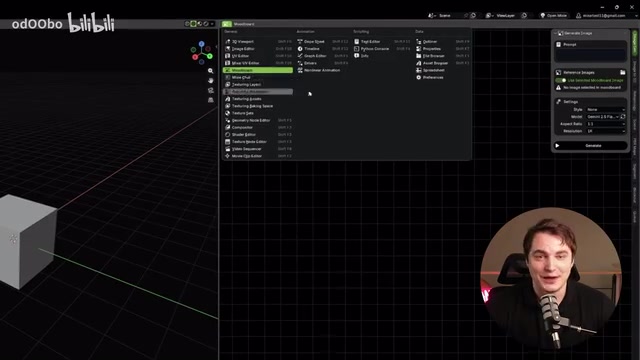
Mixar's AI assistant is called Mixi, offering two interaction modes—Agent mode and Ask mode—and integrating multiple generation capabilities:
- Image generation/editing: Currently uses the Gemini model
- Image-to-3D: Integrates TripoAI and Hunyuan, supporting multi-view input
- Scene generation: Drop in a reference image to extract parts and assemble them into a 3D scene
- PBR map generation, segmentation, Blockout, and more
Regarding model access, besides Mixar's own subscription, users can connect their own API keys, supporting OpenAI, Gemini, Anthropic, and the orchestration model Sakana—official benchmarks show that Sakana even outperforms the expensive Fable 5 on some tasks.
Image-to-3D technology has developed rapidly over the past two years, with its core challenge being reconstructing 3D models with reasonable geometric structure and materials from single or few images. Early approaches relied on NeRF (Neural Radiance Fields) technology, learning the volumetric radiance distribution of a scene through implicit representation, but inference was slow and difficult to export as editable explicit meshes. In recent years, approaches based on 3D Gaussian Splatting have made breakthroughs in speed, but still fall short of generative approaches specifically designed for downstream production in terms of topology quality. The TripoAI and Hunyuan integrated in Mixar represent the two current mainstream technical routes: TripoAI is a generative model trained on large-scale 3D datasets, performing robustly on general object reconstruction; Hunyuan comes from Tencent's Hunyuan team, offering better adaptation to Asian-style assets and supporting video-sequence-based reconstruction. Multi-view input support means users can provide references from multiple angles—front view, side view, back view, etc.—significantly improving reconstruction accuracy by constraining the ambiguity space of 3D reconstruction. This workflow aligns closely with the traditional concept design "three-view" convention, lowering the barrier to entry for 3D artists.
Animation and LOD: Automation Attempts for Professional Game Development Pipelines
Generating LOD Levels with a Single Prompt
LOD (Level of Detail) generation, common in game development, was also part of the test. LOD is a core performance optimization technique in real-time rendering, originating from the geometric simplification idea proposed by Clark in 1976, and is now a standard feature of game engines. Its principle is to dynamically switch between versions of different precision based on the distance between the model and the camera: high-precision models (LOD0) are displayed up close, while simplified versions (LOD1, LOD2) are switched to at a distance, greatly reducing the GPU rendering burden without noticeably affecting visual quality. A standard game character typically needs 3 to 5 LOD levels, each with about 25% to 50% of the polygon count of the previous level.
At the technical implementation level, LOD geometric simplification typically uses the "Edge Collapse" algorithm—more precisely, an implementation based on "Quadric Error Metrics (QEM)," proposed by Garland and Heckbert in 1997, still the mainstream geometric simplification approach today. Its core is calculating the vertex position error after collapsing each edge, prioritizing collapsing the edge with the smallest error to preserve visually key features. Blender's Decimate modifier and Unreal's automatic LOD generator are both based on this idea, but each has different strategies for UV boundary locking, hard edge preservation, and skin weight handling—whether Mixar's AI-assisted generation can correctly handle these details while preserving animation bone rigging is an important metric for measuring its professional usability. Especially the handling of Skinning Weights: after LOD simplification, the vertex count is greatly reduced, and the original vertex weight information needs to be re-interpolated or mapped onto the new topology. If handled improperly, skeletal animation will produce obvious deformation errors at low LOD levels, which is the fundamental reason why LOD is deeply coupled with the character animation system in game engines. In mainstream engines like Unreal Engine and Unity, LOD systems are highly automated, but preparing compliant LOD assets in Blender still requires a lot of manual operation.
The prompt requested: use the current model as LOD0, generate two additional levels, progressively reduce polygon count, and step down textures from 4K to 2K (LOD1) and 1K (LOD2).
The result fully met expectations: LOD2 retained its basic shape despite significantly simplified polygons, texture resolutions precisely matched the target values, and shaders and all texture node connections were correct. Upon saving, the system indicated that a total of 52 new textures had been created—the same task under the MCP approach typically requires multiple attempts to succeed.
Free Model vs. Fable 5: How Big Is the Gap?
In the keyboard animation test, the free model generated rigged animation for the keycaps and correctly split the objects in just three minutes. After switching to the paid Fable 5, the AI showed stronger "initiative"—it automatically checked timeframes, added initial rotation states and extra bounce details to the keycaps, resulting in a more vivid and refined final product.
However, one detail worth noting: Fable 5 isn't cheap, and more economical models like Sakana and Sonnet 5 can likely achieve nearly comparable results, so in practice it's best to choose based on need.
Full Workflow Test: From a Single Image to a Complete 3D Room
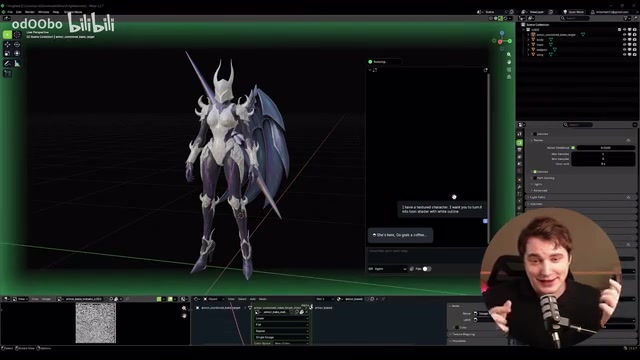
To verify Mixar's comprehensive capabilities, the test demonstrated an end-to-end workflow—starting from a bedroom reference image and generating a complete 3D scene.
The process began with dragging the reference image into the mood board, then generating more detailed references. Thanks to the linkage mechanism between the mood board and chat, selecting an image automatically enters it into the conversation context, solving the pain point of CLI tools (like the Claude Code command-line version) struggling to conveniently pass in images. The Agent separately executes image-to-3D and image generation tasks, with progress trackable in real time via the queue panel.
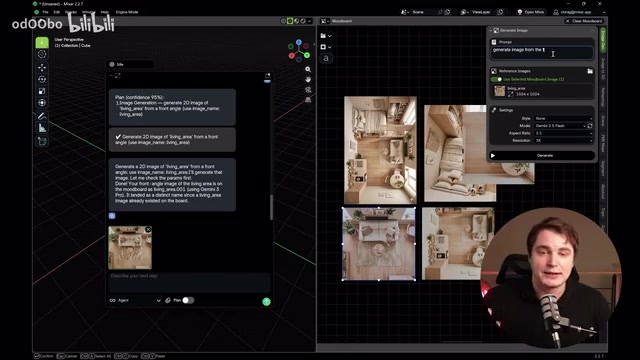
The most surprising aspect was the spatial accuracy of scene construction: the AI not only correctly generated the room structure and wall and floor textures, but also placed most furniture in relatively reasonable positions within the space. Scaling and rotation still require manual fine-tuning, but the overall layout's reasonableness far exceeds the performance of other Agent approaches.
The core technical challenge behind this capability is "spatial semantic understanding"—the AI needs not only to identify object categories in the image, but also to infer their relative positional relationships in 3D space, size proportions, and perspective rules. This problem technically involves two core subtasks: Monocular Depth Estimation (inferring scene depth from a single image) and Scene Graph Parsing (understanding the spatial topological relationships between objects). Current mainstream Vision Language Models (VLMs) are already quite mature in 2D image understanding, and foundation models like Depth Anything can provide reasonable depth priors, but directly converting 2D perception results into usable 3D coordinates remains a research hotspot—monocular depth estimation is essentially an ill-posed problem, where the same image can correspond to infinitely many geometric interpretations. From an information theory perspective, when a monocular image is projected from the 3D world onto a 2D plane, information of one dimension is lost, and depth estimation is essentially using statistical prior knowledge (such as "floors are usually at the bottom of the image" or "larger objects are usually closer to the camera") to compensate for this information loss—which is why depth estimation models often perform dramatically worse in scenes outside the training data distribution (such as unconventional interior layouts or stylized artistic scenes). Mixar's ability to produce reasonable layouts without requiring users to manually annotate spatial relationships indicates it has done targeted engineering optimization in this step, likely combining statistical priors of interior scenes (such as room size distributions and furniture placement patterns) with the visual semantic understanding of VLMs, rather than simply invoking a general-purpose model.
Format Compatibility and Overall Evaluation
Mixar saves files in an internal format called Nixar, but supports exporting to the standard .blend format, making it convenient to interoperate with collaborators who only use the original Blender—a thoughtful touch.
Overall, Mixar represents a direction worth watching for 3D creation tools: upgrading AI from an add-on plugin to a kernel-level native capability. Its core value can be summarized in four points:
- Deep access: The AI has low-level permissions across all Blender functions, raising the ceiling of its capabilities
- Execution efficiency: Compared to the MCP approach, task execution speed and first-attempt success rate improve significantly
- Ease of use: Zen Mode and the mood board make Blender friendly to beginners again, without sacrificing professional functionality
- Open-source ecosystem: The code is fully open, allowing self-review, debugging, and even secondary customization
For Blender users and 3D creators, this tool is worth taking the time to try. Of course, the current evaluation comes from a single scenario, and whether it remains stable in more complex production environments still requires broader validation. But at least from the existing demos, the path of "stitching AI directly into Blender's core" has already shown enough potential to inspire genuine anticipation.
Key Takeaways
Related articles
LLaMA-Factory in Practice: A Complete No-Code Guide to Fine-Tuning Large Models
An introduction to LLaMA-Factory, the open-source fine-tuning tool: its 60.1K-star background, supported models and algorithms, local vs. cloud deployment, and CUDA setup steps.

Zeng Ming's Deep Retrospective: Why OpenAI May Not Be the Ultimate Winner — and Why the Corporate System Will Disappear
Zeng Ming's deep retrospective on the AI endgame: model companies are just infrastructure, OpenAI and Anthropic won't be the final winners; the next battle is the Agent entry point standard; the corporate system will disappear as AI restructures collaboration, and only mission-driven companies can survive the cycle.

OpenHands v1.28.0: OpenCode and PI Added as Built-in Agents, API Keys Requestable In-Conversation
OpenHands ships 5 releases in 21 days: v1.27.0 adds OpenCode and PI as built-in agents, v1.28.0 enables in-chat key requests. ACP integration, credential reuse, model list changes, and upgrade advice.