Hands-On with the REA Reverse Engineering Tool: Letting AI Replicate Any App's Workflow
REA reverse engineering tool demonstrates a workflow from dissecting apps to AI-rebuilt prototypes, along with its legal and engineering boundaries.
Based on a Bilibili creator's hands-on demo, this article introduces the REA reverse engineering tool's workflow: it enters a target app to analyze how features are implemented, generates structured prompts, hands them to automated build platforms like Lovable to produce prototypes, and finally returns to Cloud Code for refinement. The hands-on section emphasizes three security prerequisites—scanning GitHub repositories for malicious code first, installing in an isolated folder, and then enabling bypass permissions. Three cases (a screen recording editor, a screenshot tool, and a voice transcription alternative) validate the "reverse analysis + prompt intermediary layer + automated build" chain as viable, but all remain at the proof-of-concept stage. The author also points out legal red lines (terms of service generally prohibit copying and rebuilding) and hard productization constraints (customer support, security, compliance), concluding that such tools are suited to shortening the distance from idea to prototype but cannot replace productization work.
AI coding tools are evolving from "helping you write code" to "helping you take apart and rebuild an entire application." Recently, a reverse engineering tool called REA has been topping the GitHub trending charts for over a week—according to a Bilibili creator's hands-on test, it racked up nearly 200,000 stars in less than a week. The tool's core capability: break down the functional logic of any app, then hand it to AI to rebuild a version of your own. This article, based on that creator's complete hands-on demo, walks through how this workflow actually comes together and where its boundaries lie.
Why "Reverse Engineering" Suddenly Became a Necessity
The creator used a locksmith analogy: locks are for security, and most people don't go around picking them, but a locksmith knows exactly what's inside a lock and how it works. Software is the same—many people pay for complex tools but only ever use one or two basic features.
In the past, you'd tell Claude "make me something like Trello," and it could only guess what the interface looks like and how features interact based on its training data. What sets REA apart is that it actually goes into the target app, analyzes how each feature works, produces evidence, and then lets you rebuild based on that evidence.
According to the creator's analysis, this logic does not encourage outright copying. He explicitly warns that many software terms of service state "you may not copy this software or rebuild it in any form," and ignoring those terms carries legal consequences. His recommended approach: extract the specific feature you actually need and integrate it into your own product, rather than copying the whole package.
Reverse Engineering in software refers to the process of inferring a program's internal structure, data flows, and functional implementation logic without owning the source code—by observing its behavior, analyzing its binaries, or examining its network communications. Traditionally it has been used for security auditing, vulnerability discovery, malware analysis, and interoperability adaptation. In recent years, as large language models have become able to read decompiled code and runtime logs, the barrier to reverse engineering has dropped dramatically: AI can assist with everything from dynamic tracing to generating requirements documents, turning "taking apart an app" from an expert-level task into something that can be packaged as a workflow. This is the backdrop against which tools like REA emerged.
Step One: Isolated Environment and Code Security Scanning
The creator stresses that you should be extremely careful before downloading anything from GitHub, because there are many counterfeit versions circulating. His repository is at GitHub.com/MORLUTORE—always verify the source before downloading.
His approach: create a separate folder on the development drive called "Reverse Engineering Lab," install all reverse-engineering-related skills and agents there, and avoid polluting the Cloud Code environment of other projects. Then he pastes the repository link to the AI with explicit instructions—first scan the entire repository to confirm there's no malicious content, then install.
After installation, there's one more critical setting: enabling "bypass permissions" mode. Without it, every file installation or operation triggers a confirmation prompt, interrupting the flow; but he also emphasizes that bypassing permissions requires completing the scan first and ensuring everything is installed only in that isolated folder.
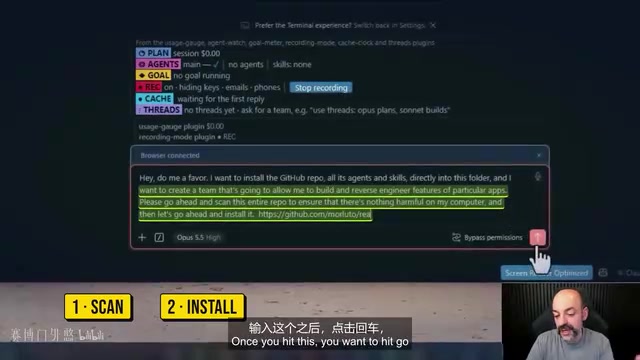
This detail deserves special mention: the more operational permissions an AI agent has, the more important environment isolation becomes. Splitting "scan—isolate—grant permissions" into three separate steps is currently the more prudent approach.
MCP (Model Context Protocol) is an open protocol proposed by Anthropic that enables AI agents to connect to external tools and data sources in a standardized way. In this article's case, adding an MCP to the screen recording editor means letting the AI actively call video-editing-related interfaces (such as cutting and exporting), rather than just generating code in a chat box. MCP extends "what AI can do" from the model's internal capabilities to external systems, which also amplifies the need for permission management: a misconfigured MCP service could let an agent access files or network resources it should never touch—one of the technical reasons the article emphasizes "isolated folder + scan before granting permissions."
Three Hands-On Cases: From Screen Recorder to Voice Transcription
The creator demonstrated with three free open-source tools on GitHub, each following the same process: copy the repository link, have the reverse engineering team generate prompts, hand them to a platform like Lovable that can auto-build backends, and finally return to Cloud Code for refinement.
Case One: ShareX → Custom Screen Recording Editor
The first target was ShareX, an open-source screen capture tool. The creator's needs went beyond screen recording: he wanted to split screen, camera, and microphone feeds into independently editable tracks, plus add an MCP so that recording automatically flows into video editing when finished.
About half an hour later, the first version was running. He demonstrated live: cutting video by text, AI editing suggestions, blurring/censoring, and adding lower-third caption bars. According to his description, the blur effect applies instantly during playback, and caption bars are automatically generated at the bottom of the frame.
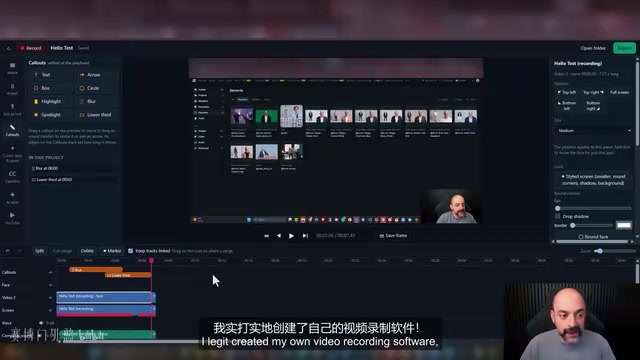
To be clear, this case was built from scratch in Cloud Code, which took a long time and consumed a fair amount of credits. The creator himself admits this version is "pretty good for a first run," but still far from product-grade.
Case Two: Screenshot Tool → Leverage Snap
The second case took a different approach. Instead of building from scratch, the creator had the reverse engineering team first write a high-quality Lovable prompt capturing all the target app's functional logic, then handed it to Lovable to build the frontend and backend.
The result was Leverage Snap: a screenshot tool that supports adding arrows, boxes, numbered steps, and mosaic blur in seconds, ready to paste directly into documents or chats. The creator drew circles, added arrows, and wrote annotations live, and also discovered auto-generated usage documentation pages and shortcut key lists. Any project built with Lovable automatically generates a GitHub repository that can be cloned and further refined in Cloud Code.
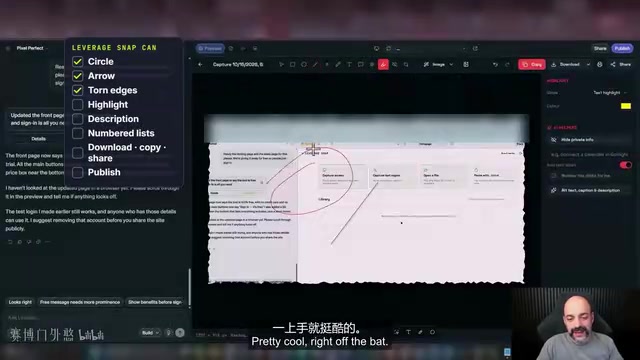
The value of this case lies in validating the "prompt intermediary layer" approach: having the reverse engineering tool first produce structured requirements, then handing them to the build tool for execution, is far more precise than describing requirements directly in the build tool.
Lovable is a type of "prompt-to-full-stack-app" automated build platform: users describe requirements in natural language, and the platform generates the frontend interface, backend logic, and database structure, automatically creating the corresponding GitHub repository. These platforms (along with Bolt, v0, etc.) share the common trait of lowering the prototyping barrier, but the quality of the output depends heavily on the precision of the input prompt. The article's approach of "having the reverse engineering tool produce structured prompts first, then handing them to Lovable" is essentially front-loading requirements engineering: reverse analysis answers "what states and interactions make up this feature," while the build platform answers "how to write them"—this division of labor reduces the room for the model to improvise under vague descriptions.
Case Three: A Whisper Flow Alternative
The third target was an open-source Whisper alternative tool, benchmarked against the creator's own daily driver, Whisper Flow. His requirements were specific: run locally, transcribe meetings like Zoom calls, distinguish between different speakers, clean up the text, and export meeting minutes.
The process was the same as the previous case, except this time he noted a limitation: Whisper Flow runs on his computer, but the final solution sends transcription results off for processing to achieve consistent results. The creator admits this case "might take a little while," and the demo only went as far as verifying basic functionality.
The Real Value and Boundaries of This Workflow
Across the three cases, the process can be abstracted into four steps: identify the target app → generate reverse engineering analysis prompts → hand to an automated build platform to produce a prototype → return to the local environment for refinement. The creator repeatedly emphasizes that he chose Lovable because it can auto-generate backends, but you can use Cloud, Grok, or any other editor.
However, there are several practical constraints that need to be stated openly. First, releasing software is no joke: the creator lists three essentials—being able to ship the product, having customer support to handle user issues, and understanding security and ensuring the app's content is compliant—all unavoidable whether you're publishing to the Apple App Store or Google Play. Second, reverse analysis has legal red lines; the no-copying clauses in terms of service are real. Third, the outputs in the demo are all still at the "proof of concept" stage—the demo doesn't show complete security audit results, nor does it prove that the automated build platform's output can meet production standards.
A more pragmatic assessment: these tools are best suited for situations where you already know exactly which feature you want and how it should work, but don't know the implementation path. They can shorten the time from idea to prototype, but the hard work of productization, compliance, and security is something AI can't do for you yet.
Proof of Concept (PoC) refers to a minimal implementation built to verify whether a technical approach is feasible; it typically does not include complete error handling, performance optimization, security hardening, or operational support. The three cases in this article are called "proofs of concept," meaning they demonstrate that the chain of "reverse analysis → prompts → automated build → local refinement" can work, but they do not prove that the output can withstand real user volumes, pass app store review, or meet data compliance requirements. Going from PoC to production-grade product typically requires filling in engineering gaps such as test coverage, dependency auditing, privacy policies, crash monitoring, and continuous integration—all of which still rely mainly on human judgment.
Related articles

AI Digital Twin in Action: Using DOT to Automatically Track Bugs and User Feedback
DOTS engineers demonstrate how AI digital twin DOT collects cross-platform user feedback, categorizes issue themes, opens threads to investigate bug root causes, and submits PRs—showcasing a complete AI agent workflow for defect triage with auditable design.

Why Transistors Are No Longer Flat: The Evolution from Planar to Gate-All-Around
Transistor evolution from planar to FinFET to gate-all-around: why gates went from three-sided to four-sided wrapping to suppress short-channel effects and leakage current, extending Moore's Law.

Swarm Intelligence = a Single RL Agent? A Proof of Multi-Armed Bandit Equivalence
A paper proves that collective decision-making through local imitation in swarms is mathematically equivalent to single-agent reinforcement learning: N blind imitators act as N parallel environment samples, with an effective learning rate of 1/N. This article explains the derivation and implications of the Maynard-Cross Learning algorithm.