Installing Skills for AI Coding Assistants: A Security-First Skills Management Approach

An open-source, security-first skills manager for AI coding assistants with CLI and MCP support.
As Cursor and Claude Code gain popularity, managing AI assistant skills is evolving from ad-hoc prompt copying to structured engineering. This open-source tool performs security scans before publishing skills and adds path protection during installation. It offers two acquisition paths — CLI (list then install) and MCP service (search then read) — and supports direct injection into Cursor and Claude Code with update management and audit logging. The project has 7,017 GitHub stars, 559 forks, and uses the MIT License, making it ideal for teams with compliance requirements or large-scale AI assistant usage.
Why Security Comes First When Installing Skills for AI Assistants
As AI coding assistants like Cursor and Claude Code become part of everyday development workflows, "installing skills for your assistant" is emerging as a new usage pattern. Yet many developers still rely on simple copy-paste of prompts — an approach that's not only inefficient but harbors overlooked security risks.
The core issue is: where do skills come from, and where do they land? Injecting skills of unknown origin into your development environment is essentially handing execution permissions to unvetted third-party content. This is precisely why a mature skills management tool must treat security as the very first step in the process.

According to the content creator's introduction, the repository runs security scans before publishing skills, and includes path protection mechanisms during installation. These two safeguards address "trustworthy source" and "controlled deployment" respectively — a far more reliable approach than the bare-bones method of simply copying prompts.
The Complete Skills Installation Flow: CLI and MCP, Two Paths
This toolset offers two ways to acquire skills, accommodating different usage preferences.
Command Line: List First, Then Install
The command-line approach follows a "list skills first, then download as needed" logic. Users can browse the available skills catalog and understand what each skill does before selectively installing, avoiding the bulk download of content they'll never use. This on-demand design conserves resources and minimizes the potential security exposure surface.

MCP Service: Search First, Then Read
The second path uses an MCP (Model Context Protocol) service. It lets the AI assistant first search available skills, then fetch the specific content it needs. Compared to manual command-line operations, the MCP approach better fits scenarios where the assistant calls skills autonomously — dynamically retrieving and loading the right skill based on the current task, with minimal human intervention.
Both approaches ultimately serve the same goal: making the skill acquisition process transparent, controllable, and traceable.
MCP (Model Context Protocol) is an open standard proposed and open-sourced by Anthropic in late 2024, designed to unify how AI assistants communicate with external tools and data sources. Its core idea: let AI models dynamically invoke external capabilities through a standardized interface, rather than hardcoding all functionality into prompts. An MCP server can expose a set of "tools" and "resources" that an AI assistant calls on demand during a conversation — similar to how a browser invokes browser extensions. Major clients including Cursor and Claude Desktop now support MCP, making MCP-based skill distribution and loading an increasingly mainstream engineering practice.
Install into Cursor and Claude Code, with Updates and Auditing
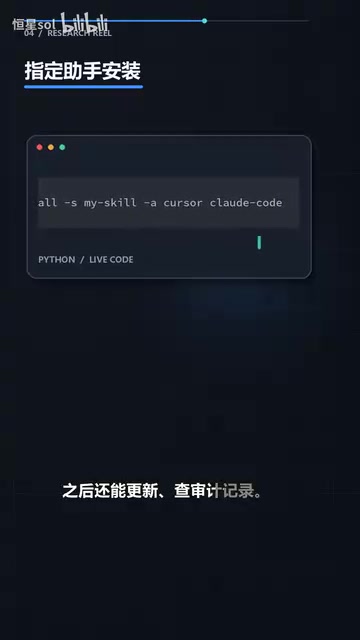
Once you've selected your skills, you can install them directly into Cursor or Claude Code — the two most widely used AI coding assistants. This means skills integrate seamlessly into your existing editor environment without any workflow overhaul.

Even more noteworthy is what happens after installation. The tool supports ongoing updates, ensuring you're always running a maintained version. It also provides audit logs, making every installation and change traceable. For team collaboration or compliance-sensitive environments, audit capability is an indispensable feature.
Project Traction and Open Source License
Community data shows this project has built meaningful momentum.
The repository currently has 7,017 stars and 559 forks, with 29 commits in the past 30 days — a sign that the project is still actively iterating. The software engine uses the MIT License, one of the most permissive in the open source world. It allows free use, modification, and commercial use, making it highly developer-friendly for anyone looking to fork, extend, or integrate it into their own toolchain.
The MIT License is one of the most widely used licenses in open source software. Its core requirement is simply to retain the original copyright notice when distributing — beyond that, it imposes almost no restrictions. You can freely use, modify, and distribute the code, including in commercial products, without needing to open-source your modifications. This stands in sharp contrast to "copyleft" licenses like GPL, which require derivative works to be released under the same license. For teams looking to integrate a skills management tool into an internal development platform or commercial product, the MIT License means the lowest possible legal compliance overhead.
Conclusion: Skill-Based AI Coding Is the Next Step
Encapsulating capabilities into reusable, distributable "skills" — backed by security scanning, path protection, update management, and audit logging — represents the engineering evolution of AI coding assistants from "able to chat" to "able to get work done." Compared to scattered prompt copying, this structured approach to skills management is far better suited for long-term, large-scale use of AI assistants.
For developers already using Cursor or Claude Code, this kind of tooling provides a more principled path for extending assistant capabilities. Before you dive in, remember what the creator repeatedly emphasized: when installing skills, don't just copy prompts — make sure you clear the security bar first.
Related articles

Free Unlimited Claude Code Solution: Agnes AI + CC Switch Setup Guide
No paid subscription needed — pair the free AI platform Agnes AI with the open-source tool CC Switch to provide a backend for Claude Code, enabling unlimited free calls to text, image, and video models. This guide covers the full setup, test results, and usage boundaries.

A Complete Zero-Cost Guide to Getting Started with Claude Code for Beginners in China
A beginner's guide to Claude Code for users in China: two installation methods (command line and IDE plugin), full configuration steps for replacing the official API with the free domestic LongCat model, and a hands-on demo of building a small tool with natural language, plus tips.

When the NSA Gets Involved: The AI Supply Chain Crisis Behind Open-Source CVEs and API Key Hijacking
Multiple open-source projects disclosed severe CVEs in one day, PHP flaws alarmed the FBI, and Railway and OpenCode were breached with API keys stolen. This article breaks down the vulnerability window, AI-accelerated exploitation, and the AI supply chain crisis behind the API key black market, with a developer defense checklist.