LangGraph Beginner's Guide: From Environment Setup to Building AI Agents
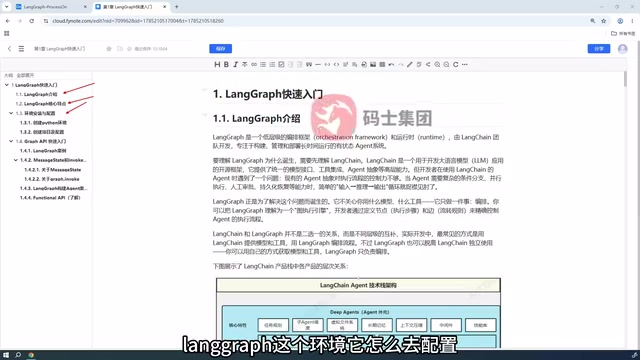
A step-by-step LangGraph introduction covering setup, core concepts, and API selection for building AI Agents.
LangGraph is a graph orchestration framework in the LangChain ecosystem designed for building enterprise-level AI Agents, using State and Graph as its core abstractions to support conditional branching, loops, and fine-grained flow control. This article follows the first chapter of a structured tutorial, covering Python environment setup, a first hands-on example, a comparative LangChain Agent refactor, and Graph API vs. Functional API selection. It highlights that LangGraph offers greater controllability than LangChain's high-level abstractions, making it a key tool for moving from demos to production systems.
What Is LangGraph?
As AI Agent applications move from concept to enterprise-level deployment, developers are increasingly focused on how to build controllable, reusable, and scalable agent workflows. LangGraph was created precisely to address this challenge.
In short, LangGraph is an advanced tool within the LangChain ecosystem that abstracts an agent's execution flow into a Graph. Compared to traditional chain-based calls, a graph structure more naturally expresses complex branching, looping, and state management logic — which is why it holds a clear advantage when building multi-step, multi-role AI Agent applications.
This article is based on the first chapter of a comprehensive LangGraph tutorial series. It maps out the core learning path from zero to deployment, helping beginners build a solid conceptual foundation.
Core Features of LangGraph
- State-driven: The entire execution process revolves around state (State) transitions, with built-in support for memory and context management.
- Graph-based orchestration: Flows are organized using nodes and edges, supporting conditional jumps, loops, and other complex logic.
- Observable and controllable: Every step in the execution process can be monitored and intervened upon, making it easier to debug and deploy to production.

Environment Setup: From Python to LangGraph Project Initialization
Before diving in, you need a clean and complete development environment. The tutorial starts from the very basics of Python installation, making it accessible even for complete beginners.
Key Steps for Environment Setup
- Install Python: Use a recent stable version and isolate dependencies with a virtual environment (e.g., venv or conda) to avoid conflicts between projects.
- Create a LangGraph project: Initialize the project directory with a clean, well-organized structure.
- Install dependencies: The core packages are
langgraphand its companionlangchain-related libraries. You'll also need to prepare the appropriate API Key for whichever LLM you plan to use.
This step may seem basic, but it's where many beginners run into trouble. Mismatched dependency versions and misconfigured API keys are common culprits that prevent code from running later. Always verify that your environment is fully set up before writing a single line of code.
Your First LangGraph Example: Understanding State and Graph
Once your environment is ready, the tutorial walks you through a simple example to introduce LangGraph's programming paradigm, focusing on two core concepts.

Message State: State Is at the Heart of Everything
In LangGraph, Message State carries all the data flowing through the execution pipeline. It stores conversation messages, intermediate results, and other information — acting as the bridge that passes context between nodes. Understanding how state is defined and updated is a prerequisite for mastering LangGraph.
Graph: Defining the Agent's Execution Path
Whether you call it a "flow" or a "graph," a Graph fundamentally defines the agent's execution path. Developers need to complete three steps:
- Define nodes: Each node is a processing function responsible for specific logic.
- Connect edges: Determine execution order and transition conditions, including conditional branching.
- Compile and invoke: Compile the entire Graph and run it.
There are a few details worth paying attention to during invocation — such as how states are merged and how node return values are handled — as these directly affect program behavior.

Refactoring a LangChain Agent with LangGraph
One highlight of the tutorial is a side-by-side reimplementation: an Agent previously built with LangChain is rebuilt from scratch using the lower-level LangGraph. This comparative approach is extremely valuable.
LangChain's Agent abstraction is highly encapsulated and convenient, but it has limitations when it comes to fine-grained control over complex logic. LangGraph, as a more foundational framework, gives developers precise control over every decision and execution step of an Agent. By implementing the same functionality in both frameworks, learners can clearly see that LangGraph is effectively the underlying foundation for building advanced Agent capabilities.
This explains why a growing number of enterprise-level AI Agent projects are opting to build directly on LangGraph — it delivers greater controllability and extensibility.
Two API Styles: Graph API vs. Functional API — How to Choose
LangGraph offers two parallel API styles. Understanding their respective roles will help you make better architectural decisions in real projects.

Graph API: The Go-To Choice for Production Projects
Graph API is the most widely used approach. It orchestrates workflows through an explicit graph structure, offering clear logic and strong maintainability. It's well-suited for complex, production-grade applications and is the primary focus of LangGraph learning.
Functional API: A Functional Programming Alternative
Functional API offers a more functional programming style and exists as a supplementary option. For beginners, it's enough to understand the concept — in practice, prioritizing Graph API is the more pragmatic approach.
Wrap-Up: LangGraph Learning Path and Next Steps
This chapter serves as the starting point for learning LangGraph, outlining a clear progression: Understand the concepts → Set up the environment → Write your first example → Refactor an Agent for comparison → Master API selection.
For developers aiming to build enterprise-level AI Agent applications, LangGraph's state management and graph orchestration capabilities represent a critical step from "toy-level demos" to "production-ready systems." Beginners are encouraged to start with environment setup and the first hands-on example, then gradually work toward a deep understanding of the State and Graph mechanisms — laying a solid foundation for building more complex agents down the road.
Related articles

AI Comic Drama with WorkBuddy from Scratch: A Step-by-Step Skill Pack Installation Guide
Learn how to create AI comic dramas with WorkBuddy from scratch. This guide covers installation, Skill pack import and invocation, plus a script generation demo with manual revision tips to get you through the first step from script to storyboard.

WorkBuddy Agent Runs the Entire GEO Database Mining Pipeline with a Single Prompt
WorkBuddy agent automates GEO database mining: from data search and curation to batch correction, differential analysis, co-expression networks, feature gene screening, and immune infiltration—a single prompt generates a complete bioinformatics report, greatly lowering the barrier to bioinformatics analysis.

PC Memory Wasted? Hacker News Debates Centralized Data Centers
Hacker News users argue that personal computer memory is wasted and should be centralized in data centers, sparking debate on centralized vs. distributed computing resource allocation. This article analyzes the logic behind the claim, the costs of centralization, and new tensions in memory resource allocation in the AI era.