LangGraph Beginner's Guide: The Complete OS for AI Agents

LangGraph is the foundational orchestration framework for building reliable, enterprise-grade AI Agents.
This article draws from a comprehensive LangGraph tutorial to outline the framework's positioning, core capabilities, and learning path. LangGraph serves as the "operating system for AI Agents," complementing LangChain's high-level application design with low-level orchestration. Its three core elements — State, Node, and Edge — underpin control flow, persistent checkpoints with time-travel rollback, human-in-the-loop dynamic interrupts, and advanced features like streaming and subgraphs, collectively bridging the gap between toy demos and enterprise-grade Agent products.
If you want to build an AI Agent from the ground up, LangGraph is nearly unavoidable. As companies race to ship their own Agent products, understanding the underlying orchestration framework is becoming increasingly important. This article is based on a comprehensive LangGraph tutorial series and helps you understand LangGraph's role, core capabilities, and the best learning path to follow.
Why Learn LangGraph
We've fully entered the AI Agent era, and virtually every company is building its own unique Agent products. LangGraph is called the "operating system for Agents" because it provides a reliable persistent execution engine and robust human-in-the-loop capabilities — making it indispensable for deploying AI Agents in production.
Unlike simple wrappers that just call LLM APIs, LangGraph focuses on orchestrating complex Agent workflows: how state flows, how nodes connect, and how execution persists and recovers. These are exactly the capabilities that separate a "toy demo" from an "enterprise-grade product."
The Relationship Between LangGraph and LangChain
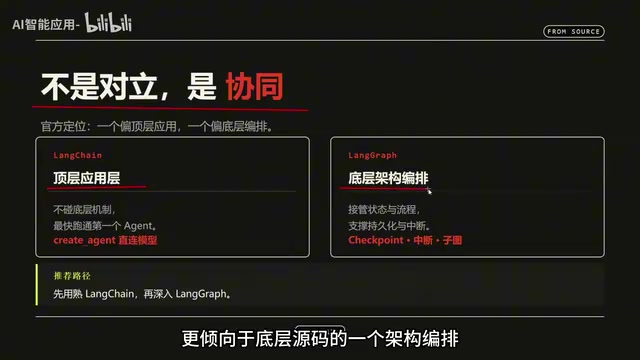
Comparing LangGraph with LangChain is inevitable when learning the framework. To be clear, they're not competing alternatives — they're complementary. The official positioning gives each framework a distinct role:
- LangChain leans toward high-level application design, letting users get started building Agents in the simplest, most intuitive, and fastest way possible. Most AI Agent projects begin with LangChain's basic
create_agent, connecting directly to a large model to get things running. - LangGraph leans toward low-level source code orchestration. When you need complex orchestration logic — such as persistent checkpoints or human-in-the-loop architecture — that's when LangGraph comes in.
The recommended learning order is therefore: master LangChain's application-layer usage first, then dive into LangGraph's lower-level orchestration.
From a technical evolution perspective, LangChain was born in late 2022, originally centered around "chain calls" (Chain) as the core abstraction — connecting prompt templates, model calls, and output parsers into reusable pipelines. As Agent scenarios grew in complexity, the linear limitations of chain structures became apparent: they struggled to express loops, conditional branching, and concurrent non-linear control flows. LangGraph was released in early 2024 as an independent sub-project, using directed graphs (DAGs or graphs with cycles) as its core abstraction. This natively supports cyclic execution and complex branching, solving the problem at its root. Both frameworks share the same ecosystem (model integration layer, tool-calling conventions, LangSmith observability platform), so the transition cost is relatively low — developers with an existing LangChain foundation can move to LangGraph fairly smoothly.
Overview of the Six Course Modules
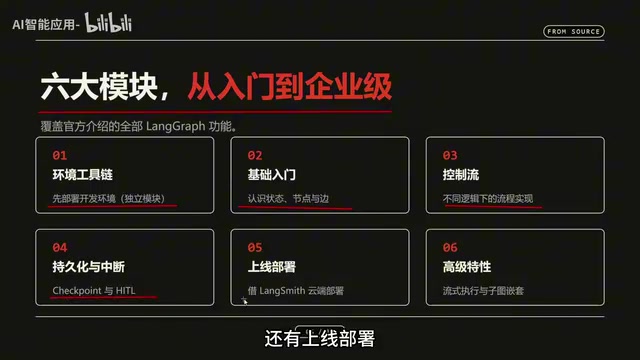
This tutorial series is divided into six modules, covering the complete journey from beginner basics to enterprise-grade deployment. One module — "Environment Toolchain" — is somewhat unique in that it requires setting up the development environment independently, so it's listed separately.
The remaining modules progress in learning depth:
- Foundations: Get acquainted with the three core components — State, Node, and Edge — and start writing code from scratch.
- Control Flow: Implement LangGraph workflows under different logical control conditions.
- Core Features: Persistent checkpoints, interrupts (human-in-the-loop), and going live.
- Deployment: Full UI interface and cloud deployment using LangSmith.
- Advanced Features: Streaming execution and subgraphs (nesting graphs within graphs).
The course claims to cover all LangGraph features introduced in the official documentation, giving you complete bottom-up mastery of the framework.
Core Capabilities Breakdown
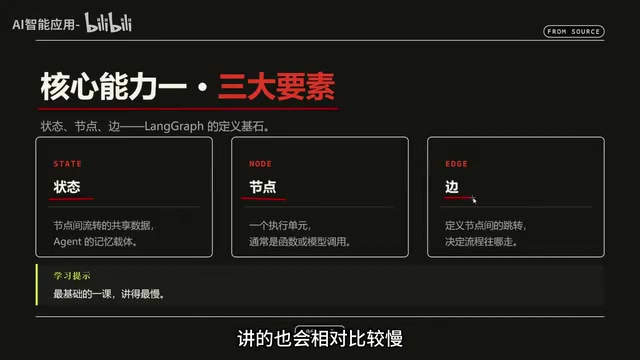
The Three Fundamentals: State, Node, Edge
This is the most foundational knowledge for learning LangGraph. When defining a graph, the three most essential elements are State, Node, and Edge. This section is the foundation of the entire course and is covered at a deliberately slower pace to ensure learners truly grasp it.
Control Flow
To use an analogy: learning control flow in LangGraph is like learning a programming language — once you understand the most basic syntax structures, the next step is making your logic run the way you want. Control flow determines how execution paths in the graph branch conditionally and loop.
Persistence and Recoverable Execution
The third core capability is persistence and recoverable execution. By using checkpoints to persist state to disk, you can implement what's called "time travel" — checkpoint rollback functionality. This means that if an Agent fails during execution, it can recover from a checkpoint, which is a critical fault-tolerance capability for enterprise applications.
The core idea behind the Checkpoint mechanism comes from snapshot fault tolerance in distributed systems: at key points during computation, the complete state is serialized and stored to a persistent layer (SQLite, PostgreSQL, or a custom backend). If execution fails or rollback is needed, execution can resume from any historical snapshot without rerunning from the beginning. LangGraph's "Time Travel" feature is built on top of this — developers can select a historical checkpoint in the LangSmith interface, modify the state, and re-execute subsequent nodes, making debugging and behavior reproduction significantly easier. This capability is especially critical for long-running tasks (such as multi-round autonomous research or iterative code generation), where a single failure could mean losing minutes or even tens of minutes of inference cost.
Human-in-the-Loop
The fourth capability is human-in-the-loop — adding human decision-making steps to the AI Agent's execution process. The tutorial uses a vivid analogy: with AI in the picture, human workers in some ways become the AI's "manager" — most of the work is handed off to the AI, while humans act like an executive stamping approvals and making review decisions.
To implement this ability to have humans intervene at critical nodes, you need to use LangGraph's dynamic interrupt mechanism.
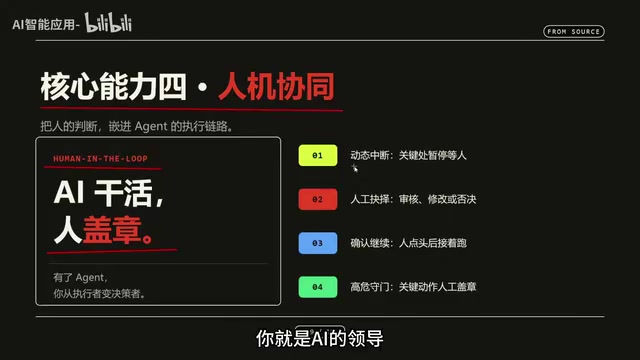
Dynamic Interrupt is the underlying mechanism LangGraph uses to implement human-in-the-loop: before or after any node executes in the graph, developers can insert an interrupt() call, which suspends the entire graph's execution at that point and persists the current state. External systems (frontend interfaces, approval flows, message queues, etc.) receive the suspension signal, present the context to a human, and wait for input. Once the human's decision is written back to the state, the graph resumes execution from the breakpoint. This is conceptually similar to the "manual approval node" in traditional RPA or workflow automation, but LangGraph's implementation is non-blocking and asynchronous — the suspension does not occupy server threads, and supports state recovery across processes or even across machines. Typical use cases include: waiting for legal review after AI generates a contract draft, or requesting human confirmation when an automated trading system exceeds a threshold.
Advanced Features: Streaming and Subgraphs
The fifth area covers advanced features, including streaming execution and subgraphs. Streaming focuses on producing real-time output incrementally during execution; subgraphs allow you to nest one graph inside another, enabling more modular and reusable complex workflows.
Streaming in LangGraph operates at multiple granularity levels: token-level streaming (outputting LLM responses token by token), node-level streaming (pushing state updates when each node completes), and event streaming (a complete log of all intermediate events). Subgraphs correspond to the "modularization" concept in software engineering — encapsulating reusable sub-workflows as independent graphs that are embedded in a parent graph as nodes. Parent and child graphs each maintain independent state spaces and pass data through well-defined interfaces. This allows large Multi-Agent systems to be split by responsibility into multiple independently developed and tested subgraphs, then combined into complex overall orchestrations — significantly improving code maintainability and team collaboration efficiency.
What Level Will You Reach After Completion
According to the course objectives, you'll have the following capabilities after finishing:
- Write LangGraph code from scratch and build AI Agent workflows;
- Master enterprise-grade persistence, fault recovery, and human-in-the-loop core capabilities;
- Use LangSmith for cloud-based debugging and deployment;
- Deeply understand the LangChain / LangGraph ecosystem and learn to integrate various large language models.
Summary
LangGraph's value lies in moving AI Agents from "functional" to "reliably usable." It fills the gaps that simple API calls leave open — state management, fault recovery, and human-machine collaboration — and serves as the foundational layer for building complex Agent systems. For those who want to go deep in Agent development, a practical progression path is to first build a solid foundation with LangChain's application layer, then tackle LangGraph's lower-level orchestration.
Related articles

AI Comic Drama with WorkBuddy from Scratch: A Step-by-Step Skill Pack Installation Guide
Learn how to create AI comic dramas with WorkBuddy from scratch. This guide covers installation, Skill pack import and invocation, plus a script generation demo with manual revision tips to get you through the first step from script to storyboard.

WorkBuddy Agent Runs the Entire GEO Database Mining Pipeline with a Single Prompt
WorkBuddy agent automates GEO database mining: from data search and curation to batch correction, differential analysis, co-expression networks, feature gene screening, and immune infiltration—a single prompt generates a complete bioinformatics report, greatly lowering the barrier to bioinformatics analysis.

PC Memory Wasted? Hacker News Debates Centralized Data Centers
Hacker News users argue that personal computer memory is wasted and should be centralized in data centers, sparking debate on centralized vs. distributed computing resource allocation. This article analyzes the logic behind the claim, the costs of centralization, and new tensions in memory resource allocation in the AI era.