MCP Call Failure Troubleshooting Guide: Handshake, Authentication, Timeouts, and Response Anomalies
MCP wraps software capabilities into tools callable by large models; troubleshoot failures across handshake, authentication, timeout, and response layers.
Starting from MCP's value proposition, this article notes that traditional interfaces are designed for programs — large models can't directly understand method names, parameters, or return structures — while MCP wraps existing software capabilities into tools with names, descriptions, and schemas so models can proactively invoke them and answer from real data. It then lays out an outside-in layered troubleshooting sequence: confirm initialization handshake, protocol version, and capability declarations; verify authentication and distinguish authn vs. authz failures; time timeouts in segments and focus on downstream dependencies rather than raising thresholds; and finally check response structure and error flags. Response anomalies, it stresses, are more dangerous than explicit failures.
MCP (Model Context Protocol) is becoming a key protocol in AI Agent development for connecting large models with external tools. But in practice, call failures are often more subtle than expected — handshake failures, rejected authentication, timeouts with no response, and malformed response data can each break at any layer. Based on a systematic walkthrough, this article outlines MCP's value proposition and a practical troubleshooting sequence.
Why MCP Is Needed: From "Interfaces for Programs" to "Tools for Large Models"
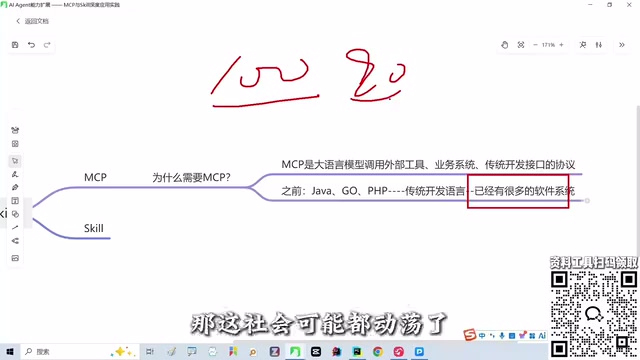
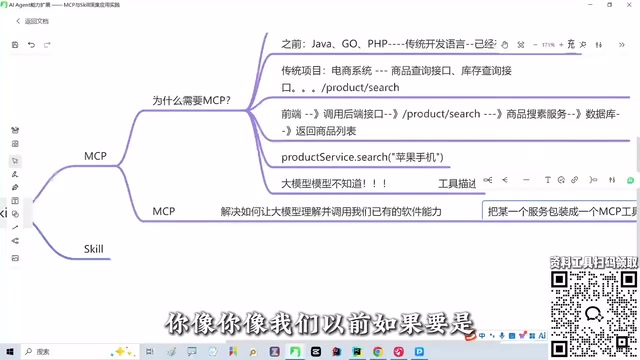
In traditional development, we've accumulated a huge number of software systems — e-commerce, inventory, product queries — each backed by hundreds or thousands of interfaces. These interfaces are designed for programs: Java service layers, PHP method calls, with parameters and return values that any programmer can read at a glance.
But large models are not programmers. You can't just tell DeepSeekAd "go call that search method" — it doesn't know the method exists, how to pass parameters, when to use it, or what structure it returns. As noted in the walkthrough, large models facing traditional interfaces are "like someone without a CS background trying to read a line of code."
MCP solves exactly this problem: it wraps existing software capabilities into "tools" that large models can understand and invoke — telling the model the tool's name, what it does, and how its parameters and return values are defined. So when a user asks "recommend a laptop suitable for development," the model realizes its training data isn't enough and proactively calls the MCP tool you've wrapped. The tool then requests internal company interfaces, queries the database, retrieves real inventory and pricing, and returns the result — and the model generates its answer based on real data.
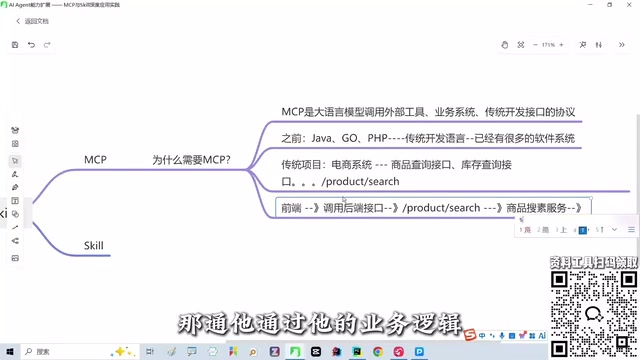
Once you understand this chain, you have a map for troubleshooting: a single MCP call involves protocol handshake, identity authentication, network transport, tool execution, and result return — a break at any link manifests as a "call failure."
Model Context Protocol (MCP) is an open protocol proposed by Anthropic in late 2024, using a client-server architecture: MCP clients (typically embedded in AI applications or IDEs) and MCP servers (wrapping specific tool capabilities) interact through standardized messages. The protocol is based on JSON-RPC 2.0, defining three message types — requests, responses, and notifications — and negotiates protocol version and mutually supported capabilities (such as tools, resources, and prompt templates) during initialization. This standardized capability declaration and tool description mechanism is what allows large models to discover and invoke external systems without hardcoding. Understanding MCP's protocol layering — transport layer (e.g., stdio, Streamable HTTP), message layer (JSON-RPC), and capability layer (tools/resources/prompts) — is the foundation for layer-by-layer troubleshooting.
Step One: Confirm Whether the Handshake Completed
When an MCP call fails, the first thing to confirm is not the tool logic but whether the session was actually established. The handshake phase negotiates protocol version and exchanges capability declarations; if this step doesn't complete, no subsequent tool call can succeed.
Common handshake issues in practice include: protocol version mismatch between client and server, missing capability declarations resulting in an empty tool list, and calls being made before the transport connection is ready. During troubleshooting, first confirm whether the initialization response returns normally, then check whether the tool list can be correctly enumerated. If the tool list is empty, the problem is almost certainly not in business code but in the handshake and capability negotiation stage.
MCP's initialization handshake (initialize) is an explicit three-step process: the client sends an initialize request carrying its supported protocol version and capabilities; the server returns its protocol version and capability declarations; the client then sends an initialized notification, and only then does the session become usable. If protocol versions don't match, the server should return an error rather than silently downgrade; if either side's capability declaration doesn't include tools, the tool list will naturally be empty. Additionally, the handshake must occur after the transport-layer connection is established — with stdio transport, the process must already be running; with HTTP transport, the connection must be ready. During troubleshooting, you can directly inspect the protocolVersion and capabilities fields in the initialize response — this is the most direct evidence of whether the handshake truly completed.
Step Two: Does Authentication Pass?
Once the handshake succeeds, the next blocker is authentication. MCP servers typically need to verify the caller's identity — missing credentials, expired credentials, or insufficient permission scope will all cause requests to be rejected.
The key here is to distinguish "authentication failure" from "authorization failure": the former means the identity isn't recognized; the latter means the identity is valid but lacks permission to access that tool. The error messages returned are usually different, and conflating the two wastes a lot of time. During troubleshooting, verify credential validity separately with a minimal request first, then check the specific tool's permission configuration step by step.
Step Three: How to Locate Timeout Issues
Timeouts are the most easily misdiagnosed type of MCP call failure — on the surface it looks like "no response," but the actual problem may occur at different points in the chain.
Locating timeouts requires segmented timing: connection establishment time, time from request sent to server received, actual tool execution time, and result return time. If the tool internally queries a database or calls downstream interfaces, the execution phase is often the hotspot for timeouts. In this case, prioritize confirming downstream dependency response times rather than blindly increasing the timeout threshold — raising the threshold only masks the problem; it doesn't solve it.
Timeouts in MCP calls can result from multiple independent timeout configurations stacking: transport-layer connection timeout, overall JSON-RPC request timeout, server-side internal downstream dependency timeouts (database, third-party APIs), and client-side response wait timeout. These thresholds are often set separately by different components, and whichever layer fires first manifests as "call unresponsive." Therefore, the key to segmented timing is distinguishing "whether the request reached the server" from "whether the server started executing the tool": the former can be confirmed via server access logs, the latter via instrumentation inside the tool or downstream dependency call logs. Only after pinpointing which segment is abnormally slow does raising the corresponding threshold make sense; otherwise, simply loosening the client timeout only prolongs the wait without addressing the root cause.
Step Four: Response Anomalies and Data Format Issues
Even if the request successfully arrives and executes, the returned result can still go wrong. Common cases include: return structure not conforming to the tool's declared schema, missing fields or type mismatches, and error messages wrapped as successful responses causing the model to misjudge.
This class of problems is characterized by "the call appears successful, but the large model can't use the result." During troubleshooting, verify that the actual return matches the return structure defined in the tool definition and check whether error branches are correctly flagged. For Agent development, response anomalies are more dangerous than explicit failures, because they lead the large model to continue reasoning based on incorrect data.
A Reusable Troubleshooting Sequence
Connecting the above steps, MCP call failure troubleshooting should follow an outside-in order: first confirm handshake and session establishment, then verify authentication and permissions, then locate timeouts in segments, and finally check response structure and error flags. The value of this sequence is that each layer eliminates a set of possibilities, avoiding aimless wandering in business logic.
MCP's essence is enabling large models to understand and invoke existing software capabilities — the longer the chain, the more failure points. Building a habit of layered troubleshooting is more valuable long-term than memorizing any specific error message.
One-line Summary
MCP wraps software capabilities into tools callable by large models; failures should be troubleshot in four layers: handshake, authentication, timeout, and response.
Paragraph Summary
The article starts from MCP (Model Context Protocol)'s value proposition, noting that traditional interfaces are designed for programs — large models can't directly understand method names, parameters, or return structures — and that MCP wraps existing software capabilities into tools with names, functional descriptions, and schema definitions, enabling large models to proactively invoke them when needed and generate answers based on real data. On this basis, the article proposes an outside-in layered troubleshooting sequence: first confirm initialization handshake completion, correct protocol version and capability declarations, and enumerable tool lists; then verify authentication, distinguishing authentication failure from authorization failure; then time timeouts in segments, focusing on downstream dependencies in the tool execution phase rather than blindly raising thresholds; and finally check whether response structure matches the tool declaration and whether errors are correctly flagged. The article emphasizes that response anomalies are more dangerous than explicit failures, and that building a habit of layered troubleshooting is more valuable long-term than memorizing specific error messages.
Related articles

Multi-Agent Collaborative Development: Task Card-Driven Practices for Medium-to-Large AI Projects
A Bilibili creator shares a task card-driven, PM-orchestrated multi-Agent collaboration model with local-first repository state, so any Agent tool can take over a project anytime.
Cursor vs Copilot vs Claude Code: How Laravel Developers Should Choose
Compare Cursor, GitHub Copilot, and Claude Code for Laravel development: an AI-first editor, a plugin for existing editors, and a terminal agent for multi-file tasks and testing — plus workflow-based recommendations.
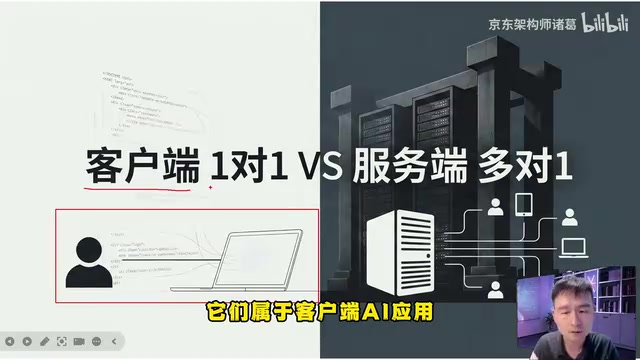
AgentScope Java Edition: A Practical Guide to Enterprise-Level Agent Frameworks
An in-depth analysis of Alibaba's AgentScope Java enterprise agent framework: contrasting client-side AI and server-side AI, explaining Java's natural advantages in high concurrency and distributed state management, and outlining a complete learning path from core principles to multi-agent collaboration.