MCP vs API: When AI Agents Post to Social Media, Which One Replaces the Other?
MCP doesn't replace platform APIs — it lets an Agent drive the underlying APIs with a single sentence.
The article clears up the common misconception that "with MCP, you don't need the Instagram API." APIs solve deterministic machine-to-machine calls with developer-planned workflows; MCP solves the problem of the model not knowing what to do next, providing platform capabilities to Agents in a standardized way through tools and MCP servers. In practice, the MCP server acts as an adapter: the Agent calls tools, and underneath those tools still go through Instagram, Threads, and YouTube APIs, with account credentials never handed to the model. MCP's real value lies in lowering integration cost — no need to handle developer apps, keys, and reviews separately for each platform — and because it's an open standard, Claude, ChatGPT, and others can share the same server and automatically discover newly added tools.
AI agents posting to social media on our behalf is moving from demo to daily reality. Along with this comes a recurring claim: with MCP, you no longer need the Instagram API. It sounds satisfying, but it isn't accurate. To understand the real relationship between MCP and APIs, we first need to look at what each of them actually solves.
APIs Solve Deterministic Machine-to-Machine Calls
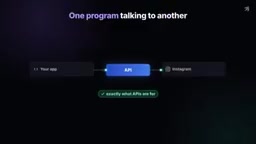
Picture a social media scheduling tool that many brands use every day. You write your copy, attach your video, and hit publish. The app calls the Instagram API to create a media container, then polls that container until Instagram says it's ready, then makes another API call to actually publish. Threads follows a similar flow. YouTube has yet another upload sequence. The app has to take a different path for each platform.
Throughout this process, it's the developer who decides which API to call, when to call it, and in what order. The workflow is hardcoded in advance, stable and predictable. This is exactly what APIs were designed for — one program talking to another.
MCP Solves the Problem of the Model Not Knowing "What to Do Next"
Now consider a different scenario. You open Claude and type directly: post this clip to Instagram, Threads, and YouTube tomorrow at 9 AM. The nature of the problem has changed. The model understands your intent, but it doesn't know which accounts you've connected, doesn't know each platform's rules (like copy length limits), doesn't know what steps a single upload requires, and doesn't even know where to begin. Cramming every platform's API documentation into the prompt is clearly not the answer.
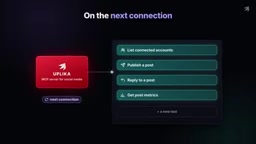
There are two key concepts here. The first is a tool: an action an AI application can perform, such as "find connected accounts," "publish a post," or "reply to a comment." Each tool has a name, a short description, and the inputs it expects. For YouTube, these might be "upload video," "read comments," and "get views and likes." A tool is a capability the model can choose to use.
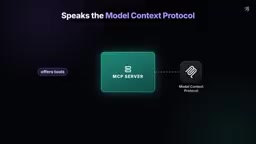
The second is an MCP server: a program that provides these tools through the Model Context Protocol. It can offer tools that perform actions, as well as share information — such as which accounts are connected and what each platform allows. Take Uplika, for example: it's a social media MCP server that wraps the capabilities of Instagram, Threads, YouTube, and other platforms into tools. Since MCP is an open standard, Claude, ChatGPT, and other AI applications can all connect to the same server — Claude never touches your Instagram login credentials from start to finish; it simply connects to the MCP server and discovers what that server can do.
Model Context Protocol (MCP) is a communication standard proposed and open-sourced by Anthropic in late 2024, designed to establish a unified way for AI applications to connect with external tools and data sources. You can think of MCP as "USB-C for AI": in the past, every AI application that wanted to integrate an external service had to write its own adapter code; with MCP, any standards-compliant server can be discovered and invoked by any MCP-supporting client. The protocol defines two types of primitives: tools (executable actions), resources (readable data), and prompts (preset prompt templates). On the transport layer, MCP supports both local stdio and remote HTTP/SSE. Because it's an open standard, AI applications from different vendors — Claude, ChatGPT, Cursor, and others — don't have to build siloed integrations; implementing a client is enough to reuse the same server ecosystem.
Agent here refers to an AI application capable of autonomously planning and using tools to accomplish goals. Unlike traditional chatbots that only output text, an Agent repeatedly invokes tools in a "perceive—decide—act—observe" loop: it first reads the list of available tools, determines which one is needed, issues the call, and after getting the result decides the next step until the task is complete. The core capability of an Agent isn't "memorizing all API documentation" but rather discovering capabilities and dynamically orchestrating them at runtime. This is also the fundamental difference from a hardcoded scheduling tool — the latter's workflow is predefined by the developer, while the former's workflow is generated on the fly by the model based on context. Precisely because of this, the clarity of tool descriptions and the degree to which inputs and outputs are structured directly affect whether an Agent can reliably complete a task.
The Full Chain of a Single Request: Tools Below, APIs Above
Back to the brand account scenario. Your Instagram, Threads, and YouTube accounts work as usual — nothing needs to be rebuilt, and no integration code needs to be written. You simply add an MCP server on top, with tools like "list connected accounts," "publish a post," and "get post metrics."
Now walk through a single request. You tell Claude to post the clip to three accounts. Claude connects to Uplika, reads the tool list along with each tool's description and input requirements, then picks the right tools: first list connected accounts, then publish the post, and wait for the post to actually go live. And before anything is sent, Uplika has Claude confirm the copy and accounts with you.
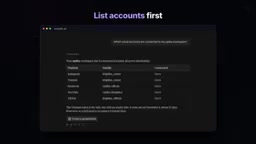
Under the hood, these tool calls still hit the platforms' own APIs. Posting to Instagram goes through the Instagram API, posting to Threads goes through the Threads API, and video uploads go through the YouTube API. Nothing has been replaced.
Where the Difference Really Lies: Who Decides the Flow
With APIs, the developer plans the workflow: which steps, in what order, and every rule along the way. With MCP, capabilities are provided in the form of tools. You say what you want, and the Agent picks the tools to get it done.
There's another layer of difference in integration cost. To post through platform APIs yourself, you need developer apps, keys, and a lot of documentation. Each major platform runs its own app review, and each one takes time. With MCP, every tool comes with a standardized description — what it does, what it needs — and the Agent can use it as soon as it finds it. This also leaves room to grow: when a new tool is added to the server, the Agent sees it the next time it connects.
When we talk about integration cost, we mainly mean three things: credentials, review, and maintenance. Going through platform APIs yourself typically requires registering a developer account on each platform, creating an app, applying for permission scopes — and some platforms (like the Instagram Graph API and YouTube Data API) also require submitting a use-case description and waiting for manual review, which can take anywhere from days to weeks. Once you have the keys, you still have to handle OAuth refresh tokens, quota limits, and breaking changes caused by API version upgrades. The MCP server model wraps this one-time engineering inside the server, so the AI application only needs to know "what tools exist and how to call them" — it doesn't need to care about each platform's authentication details and lifecycle management. Adding a new platform, for the Agent, is often just a few more entries in the tool list, with no client code changes required.
Will MCP Replace Social Media APIs?
No. An MCP server is built on top of those APIs — think of it as an adapter. The platforms already know how to publish, the model already knows what you want, and the MCP server connects the two ends. You log in once using each platform's own login method, and your password is never handed to the model. Your accounts become tools that Claude can discover and invoke through MCP.
What actually happens in a single call: the server calls each platform's API, then hands the results back to Claude along with the link to each post. The posts genuinely live on Instagram, Threads, and YouTube. Then, in the same conversation, Claude can read replies and pull views and likes through the same set of tools. You can see everything without opening each app. The APIs are still doing the real work underneath.
MCP doesn't replace APIs — it makes them drivable with a single sentence. APIs are the foundation; MCP gives Agents a standard way to discover and use them.
Related articles

WorkBuddy Full Tutorial: Build an AI Office Automation Agent from Scratch
A complete WorkBuddy tutorial: installation, three working modes, multimodal picture book video practice, expert team agent building, and workflow configuration for low-cost AI office automation.

WorkBuddy Agent Complete Guide: From Beginner to Automation in 7 Days
Based on Bilibili's 256-episode WorkBuddy masterclass, this systematically breaks down Tencent's AI office workbench core capabilities: Agent principles, Skill encapsulation, cross-platform connectors, scheduled automation, knowledge bases, and zero-code development, with learning path recommendations.

8 AI Accounts, 7 Failed: An Honest Review of Using AI to Get Work Done
Only 1 of 8 AI-run Bilibili accounts succeeded. We break down the real difference between "performing AI" and "using AI to get work done."