Ollama + OpenWebUI Private Deployment: Build Your Team's Own ChatGPT Alternative

Deploy open-source LLMs on your own server with Ollama and OpenWebUI for a fully private ChatGPT alternative.
This article walks through a private AI deployment stack centered on Ollama and OpenWebUI. Facing data security concerns and ongoing subscription costs from closed-source cloud services like ChatGPT, private deployment runs open-source models on your own servers — keeping data local and enabling one-time setup for entire teams. The solution supports both dedicated and shared multi-user modes, scales horizontally via node management, and can serve external users through intranet tunneling. The article also notes that Ollama and OpenWebUI are mature, free, open-source tools in their own right — third-party management panels add node scheduling and billing features, but individual users can get fully functional deployments without any paid tooling.
Why Privatize Your AI Infrastructure
More and more businesses and individuals are confronting an uncomfortable reality: today's mainstream large model services — whether ChatGPT or Claude — are fundamentally closed-source, cloud-based offerings. Using them means two things: your data must be uploaded to third-party servers, and you're locked into ongoing subscription fees or pay-per-use billing.
For teams that prioritize data security and want predictable long-term costs, both of these are genuine pain points. The core idea put forward by the original video creator is clear: deploy open-source models on your own servers to achieve full privatization of both compute and data. This eliminates the risk of data leaving your environment and lets a team deploy once and share broadly — no ongoing payments to big tech required.
The value of private deployment goes beyond simply replacing ChatGPT. The open-source AI ecosystem spans far more than conversational models — search engines, knowledge bases, inference frameworks, and more can all be run locally and assembled into custom workflows tailored to your team's actual needs.
The Core Stack: Ollama + OpenWebUI
The minimal tech stack needed to replicate a private conversational AI experience is surprisingly straightforward:
- Ollama (or vLLM): Runs the local large language model — this is the compute layer
- OpenWebUI: Provides a ChatGPT-style conversational interface — this is the user-facing frontend
Together, they deliver a complete conversational AI application running entirely on your own infrastructure. The deployment flow demonstrated in the original video is simplified to three steps: select a node → one-click deploy → click run. Once the model is up, you can start chatting immediately — writing plans, generating code, whatever you need.
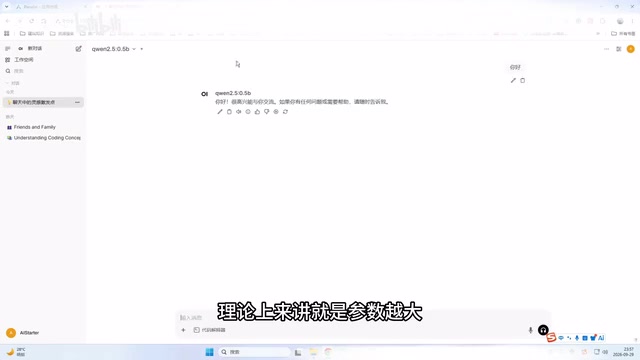
One important point worth emphasizing is the relationship between model choice and hardware. The original demo used a minimal 0.5B model purely for speed of demonstration. In real-world use, larger parameter counts mean more capable models, but also higher demands on GPU VRAM and system RAM. The test machine in the demo was configured with an i5-12400F, 32GB RAM, and a GPU with around 22GB of VRAM — a reminder that the actual experience of private deployment depends heavily on how much hardware you're willing to invest in.
Ollama is an open-source tool designed specifically for running large language models locally. It supports macOS, Linux, and Windows, and lets you pull and run dozens of open-source models — including Llama, Mistral, and Qwen — with simple command-line instructions. Under the hood, it handles model quantization, context management, and inference acceleration, exposing a Docker-like experience to the user: a single command like ollama run llama3 is all it takes to start a conversation. vLLM, developed by the UC Berkeley team, is another popular option known for high throughput and Continuous Batching — better suited to production environments with multiple concurrent users, though it carries a steeper configuration curve. OpenWebUI (formerly Ollama WebUI) is an open-source frontend project offering conversation history management, multi-model switching, prompt templates, RAG document uploads, and more. Its design deliberately mirrors ChatGPT's interaction patterns to lower the barrier for non-technical users. All three can be deployed via Docker containers, making them the most widely used open-source combination in the private AI deployment space today.
Multi-User and Team Collaboration Deployment Modes
What truly separates serious private deployment from hobbyist experimentation is team collaboration capability. The original video highlighted two key deployment modes:
Dedicated Mode vs. Shared Mode
Projects like Ollama default to single-instance, isolated use — each person on the platform has their own independent instance with no data overlap. This works well for individual projects with strict data privacy requirements.
OpenWebUI natively supports multiple users, enabling flexible configuration:
- Global (shared) mode: All users share a single instance running on one server
- Dedicated (isolated) mode: The system automatically schedules resources — whichever server has available capacity handles the request — offering greater flexibility
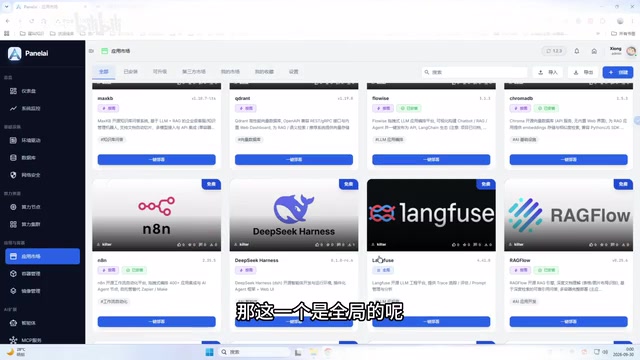
This design lets team administrators choose the right model for each project — global mode for collaborative scenarios, dedicated mode where data isolation is paramount.
External Access and Node Management
Beyond internal team use, the original video demonstrated a more advanced scenario: opening your private compute resources to external users.
By binding and exposing ports via an intranet tunneling tool, external users can connect to your local compute. The accompanying operational configuration allows different user permission tiers — free, VIP, dedicated, on-demand — effectively turning your self-hosted AI service into an externally accessible product.
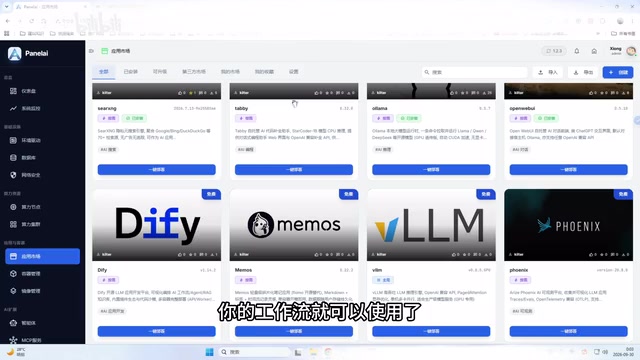
For scaling compute, the node management mechanism addresses single-machine performance bottlenecks. When one server isn't enough, you can add compute nodes and manage all of them through a unified monitoring dashboard — including real-time GPU, CPU, and memory utilization. When a node goes offline, the system alerts you clearly; once it's back online, rejoining the pool is a single click.
Intranet tunneling maps a port on a LAN server to a publicly accessible address, allowing external users to reach locally deployed services without a VPN. Common tools include frp, ngrok, and Cloudflare Tunnel. For home broadband or corporate networks without a fixed public IP, tunneling is the key infrastructure that makes "serving external users" possible. Worth noting: exposing local compute to the public internet introduces security risks — access control, HTTPS encryption, and rate limiting are non-negotiable companion requirements. Multi-node management is architecturally similar to lightweight GPU cluster scheduling: a unified control plane aggregates compute across multiple machines and dispatches inference tasks to whichever nodes have available resources, breaking through single-machine VRAM limits and increasing overall concurrency.
Permission Controls and the Application Ecosystem
At the application layer, this setup provides fine-grained visibility controls. Administrators can configure whether each application is visible to end users — disabling the visibility toggle hides the app from the frontend entirely.
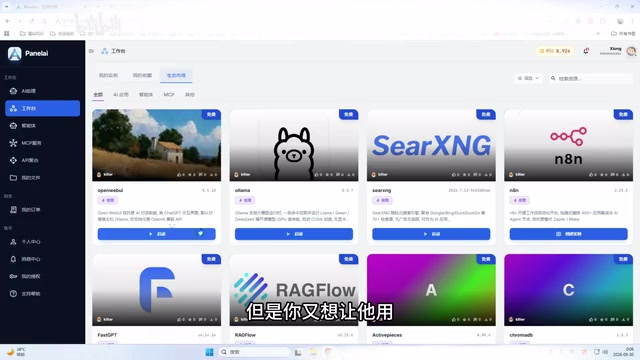
Combined with VIP permission tiers, administrators can precisely control who sees what and who can use what: globally open for everyone, VIP-only for select users, or on-demand authorization for cases where you want both openness and some restriction.
The original video also mentions that the system integrates over 100 application projects, covering unified access to both local models and commercial APIs, along with AI assistant, workspace, agent, MCP, and API integration modules (note that MCP services, agents, and certain other features are not yet fully available).
An Honest Assessment of This Approach
It's worth noting that the original video has a strong product promotion angle — the creator repeatedly emphasizes that their system is "probably the only one of its kind" with "core functionality proven," and directs viewers toward paid membership. Readers should apply reasonable skepticism to such self-promotional claims.
From a purely technical standpoint, Ollama + OpenWebUI is a mature, well-established open-source combination that can be deployed independently without relying on any third-party management panel — the official documentation and community resources include extensive public tutorials. The "one-click deployment" panel demonstrated in the original video is essentially an opinionated wrapper around these open-source components, adding node management, multi-user support, and billing features on top. It's a reasonable fit for users who don't want to deal with the command line and have team operational requirements.
If you're an individual user, deploying Ollama and OpenWebUI directly on a Linux server with a few commands is entirely feasible and completely free. If you have complex needs around team collaboration, external service provision, or multi-node management, a management panel like this can save significant operational overhead. Whether it's worth paying for ultimately depends on how much you actually rely on those value-added features.
A few practical dimensions for deciding whether you need a third-party management panel: concurrent users — Ollama defaults to single-concurrency; supporting multiple simultaneous requests requires additional configuration; model-switching frequency — teams that frequently switch between models benefit from a unified panel that reduces command-line friction; billing and permission requirements — pure open-source solutions lack native user-tiering and billing modules; OpenWebUI provides basic multi-user permission management, but commercial-grade billing logic typically still requires custom development. For technical teams comfortable maintaining a Linux environment, the Ollama official docs, the OpenWebUI GitHub repository, and the r/LocalLLaMA community on Reddit cover the vast majority of deployment scenarios — no commercial wrapper product required.
Conclusion
The drive toward private AI infrastructure reflects a dual demand: data sovereignty and cost control. The Ollama + OpenWebUI combination offers a practical technical path toward both — data stays local, the team shares resources, and hardware can be scaled as needed. Whether you go with a fully manual deployment or a management panel, understanding the underlying architecture matters far more than following any single product.
Related articles

Free Unlimited Claude Code Solution: Agnes AI + CC Switch Setup Guide
No paid subscription needed — pair the free AI platform Agnes AI with the open-source tool CC Switch to provide a backend for Claude Code, enabling unlimited free calls to text, image, and video models. This guide covers the full setup, test results, and usage boundaries.

A Complete Zero-Cost Guide to Getting Started with Claude Code for Beginners in China
A beginner's guide to Claude Code for users in China: two installation methods (command line and IDE plugin), full configuration steps for replacing the official API with the free domestic LongCat model, and a hands-on demo of building a small tool with natural language, plus tips.

When the NSA Gets Involved: The AI Supply Chain Crisis Behind Open-Source CVEs and API Key Hijacking
Multiple open-source projects disclosed severe CVEs in one day, PHP flaws alarmed the FBI, and Railway and OpenCode were breached with API keys stolen. This article breaks down the vulnerability window, AI-accelerated exploitation, and the AI supply chain crisis behind the API key black market, with a developer defense checklist.