Ollama vs VLLM Deployment in Practice: A Guide to Local Deployment of Qwen3-0.6B
From demo to production: deploy Qwen3-0.6B with VLLM and select tools based on four core goals.
The article distinguishes running a large model demo locally from production-grade deployment: the former uses transformers to load weights and call model.generate, tightly coupling code with the model; the latter needs to expose an HTTP service and support concurrent access from multiple machines. The tutorial categorizes deployment goals into four dimensions: GPU memory cost-effectiveness, deployment convenience, high concurrency support, and broad accessibility, and compares two tools: Ollama for lightweight convenience and quick verification, and VLLM for high-throughput production and concurrency. Using Qwen3-0.6B as an example, it explains the low GPU memory threshold and the full deployment pipeline, emphasizing that tool selection should be derived from GPU memory budget, concurrency level, and caller distribution.
Running a large model demo locally and deploying a large model as a production-grade service are two completely different things. The former only requires loading weights with transformers and calling model.generate to generate text, while the latter must answer a series of engineering questions: how to spend GPU memory, how to expose the service, how to handle concurrency, and whether the deployment code can be written with fewer lines. This article, based on the content of a Bilibili tutorial, outlines the goals and tool selection for local deployment of large models, and provides a practical path for deploying the Qwen3-0.6B model using VLLM.
From Demo to Production: Why Local Invocation Scripts Are Not Enough
The invocation script demonstrated in the previous lesson essentially uses ModelScope or transformers to load the tokenizer and model, instantiates them, and then passes in a sentence to complete text generation. This process has an obvious limitation: it can only run on the server where the model weights reside, and the code is tightly coupled with the model.
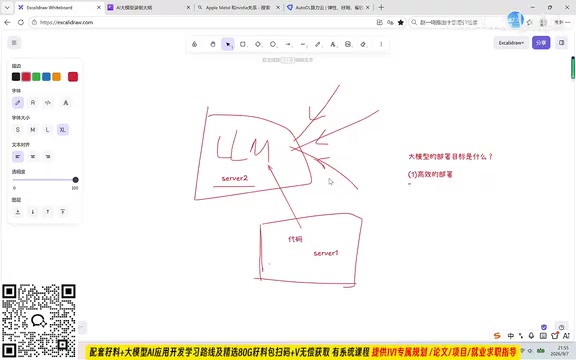
In a production environment, the LLM needs to accept requests from multiple servers, and the code files and model deployment location are often not on the same machine—it is common for the code to be on server1 and the model on server2. At this point, what is needed is a model service that exposes a port and communicates via a general HTTP protocol, rather than a local inference script.
Transformers and model.generate
Hugging Face's transformers is currently the most mainstream model loading and inference library. It unifies the loading interfaces for tokenizers, model weights, and configuration files, and a few lines of code can complete the entire "load-encode-generate-decode" pipeline. model.generate() is the entry point for autoregressive text generation, which internally encapsulates decoding strategies such as greedy search, beam search, and sampling (top-k / top-p / temperature), and supports parameters like max_new_tokens and do_sample to control the output.
However, the positioning of model.generate is "single inference call" rather than "service": it lacks request queuing, batch scheduling, concurrent connection management, streaming returns, and does not expose network ports. Each request runs an independent forward pass, resulting in low GPU utilization. This is exactly why it is suitable for local verification but difficult to directly support production—production requires packaging inference capabilities into a service that can be accessed concurrently by multiple clients, rather than a single function call.
The Four Core Goals of Large Model Deployment
The tutorial summarizes deployment goals into four dimensions, which also form the evaluation criteria for subsequent tool selection.
Goal 1: Cost-Effective GPU Memory Usage
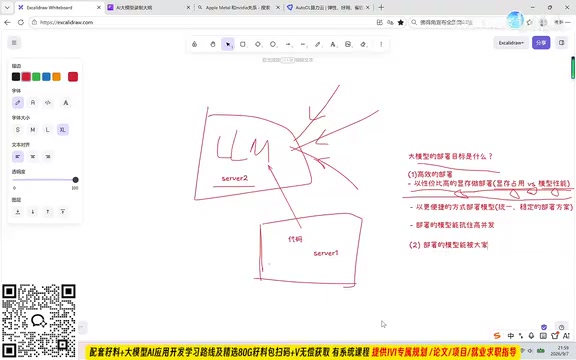
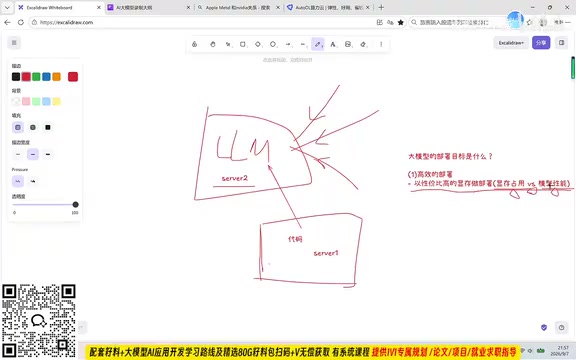
Deployment is not about minimizing GPU memory, nor is it about cramming all parameters into the GPU. Running inference with all parameters on the GPU yields the best results but incurs the highest GPU memory cost; putting everything on the CPU saves the most GPU memory but makes inference unbearably slow. The real goal is to find the balance between GPU memory usage and inference speed, and to design deployment solutions under cost accounting. This is an unavoidable prerequisite for production-oriented model application development.
Goal 2: Faster and More Convenient Deployment
The ideal deployment method is to accomplish it with one or two lines of code, rather than writing a bunch of code and then debugging. A unified and robust API can cover the deployment needs of different types of models, and deployment efficiency itself is a competitive advantage.
Goal 3: Withstand High Concurrency
In production-grade applications, there may be dozens or even hundreds of users simultaneously requesting the model service. The solution that can handle higher user concurrency is more advantageous.
Goal 4: Service Can Be Widely Accessed
The model service needs to expose a port so that, as long as the network is connected, whether the requester is a mobile phone or another server, it can be called via the general HTTP protocol. The more basic and universal the protocol, the lower the integration cost.
Trade-off Between GPU Memory and Inference Speed: Quantization and KV Cache
"How to spend GPU memory" in deployment mainly consists of two parts: the model weights themselves and the KV Cache generated during inference. A common compromise for weights is quantization—compressing FP16 weights into INT8 or INT4, which can reduce GPU memory to 1/2 or 1/4 of the original, at the cost of precision and some inference speed. The KV Cache grows linearly with the number of concurrent requests and context length, and in long-text, high-concurrency scenarios it often consumes more GPU memory than the weights.
Therefore, "cost-effective GPU memory usage" is not simply about pursuing the minimum GPU memory, but rather configuration tuning that comprehensively considers quantization precision, batch size, and maximum context length. Small models like Qwen3-0.6B have weights of only about 1-2GB, and the GPU memory pressure mainly comes from the KV Cache and concurrency, making them perfect for practicing these tuning steps.
Ollama vs VLLM: Positioning Differences Between Two Deployment Paths
Around the above goals, local deployment tools can be roughly divided into two types of approaches.
Ollama takes a lightweight and convenient route: after installation, you can pull models and start services, suitable for individual developers for quick verification, local debugging, and lightweight application scenarios. The deployment experience is close to "solved with one or two commands."
VLLM takes a high-throughput and production service route, with core advantages in inference scheduling and GPU memory management, targeting engineering scenarios that require handling concurrency and stable API services. The tutorial chooses VLLM to deploy Qwen3-0.6B precisely because it is closer to the goals of production deployment.
The trade-off between the two is essentially a trade-off of deployment goals: if you just want to run it locally and quickly see the results, Ollama is more convenient; if you want to provide external services and consider concurrency and GPU memory efficiency, VLLM is more suitable. In actual projects, the two are not mutually exclusive; it is common practice to use lightweight tools for verification during development and switch to production-grade solutions during launch.
VLLM's Core Mechanisms: PagedAttention and Continuous Batching
VLLM's ability to handle high concurrency lies in two key technologies. The first is PagedAttention, which borrows the idea of virtual memory paging from operating systems, dividing the KV Cache into fixed-size blocks for non-contiguous storage, thereby greatly reducing GPU memory fragmentation and improving GPU memory utilization, allowing the same GPU memory to accommodate more concurrent sequences. The second is Continuous Batching, where traditional batching waits for the entire batch of requests to finish generating before releasing resources, while VLLM dynamically schedules at the sequence level, immediately inserting new requests as soon as one finishes, significantly improving throughput.
These two mechanisms together explain why VLLM outperforms naive transformers inference on the two goals of "GPU memory cost-effectiveness" and "high concurrency." Understanding this also clarifies the positioning divide between VLLM and Ollama: the former is a production-grade inference engine oriented toward throughput optimization, while the latter focuses more on out-of-the-box ease of use.
Key Practical Points for Deploying Qwen3-0.6B with VLLM
Choosing a Qwen3 model of the 0.6B scale for deployment practice has the advantage of a low GPU memory threshold, allowing you to complete the entire process of service startup, API calls, and concurrency verification on a single GPU, focusing on the deployment pipeline itself rather than hardware resources.
In practice, several aspects need attention: local preparation and path configuration of model weights; starting the VLLM service and confirming the port is exposed externally; verifying service availability with HTTP requests; and observing service response performance under multiple request scenarios. Once this process is mastered, the deployment structure remains largely unchanged when switching to larger models or more complex business interfaces.
It should be noted that the choice of deployment solution should always be derived from business goals. Once the three questions of GPU memory budget, concurrency level, and caller distribution are clarified, tool selection becomes clear; conversely, choosing a tool first and then supplementing requirements often leads to rework during the launch phase.
One-line Summary
From demo to production, deploy Qwen3-0.6B with VLLM and select tools around four core goals.
Paragraph Summary
The article distinguishes the essential difference between running a large model demo locally and production-grade deployment: the former only loads weights with transformers and calls model.generate, tightly coupling code with the model; the latter requires exposing an HTTP service and supporting concurrent access from multiple machines. The tutorial summarizes deployment goals into four dimensions: GPU memory cost-effectiveness, deployment convenience, high concurrency support, and broad service accessibility, and compares two types of tools accordingly: Ollama takes a lightweight and convenient route for quick verification; VLLM takes a high-throughput production route, more suitable for handling concurrency and stable services. Using Qwen3-0.6B as an example, the article explains its low GPU memory threshold and how it can complete the deployment pipeline of weight preparation, service startup, API calls, and concurrency verification, and emphasizes that tool selection should be derived from GPU memory budget, concurrency level, and caller distribution, rather than choosing a tool first and then supplementing requirements.
Related articles
FlyEnv Plugin Review: Visually Running llama.cpp and Managing GGUF Models
FlyEnv launches the official llama.cpp plugin with side-by-side Metal runtime management, public GGUF repository indexing with file type labels, and visual configuration of context, threads, and GPU layers—saving templates and speculative decoding with each model for one-click local LLM inference.
How Can Frontend Developers Advance into AI Agent Development? Deconstructing System-Level Agent Architecture from OpenClaw
Starting from the OpenClaw demo in a Bilibili open class, this article breaks down the three-layer architecture and universal formula of system-level AI agents, and analyzes the path for frontend developers to enter agent development based on TypeScript, including plugin-based design and security/memory layer challenges, with an interview answer framework.

WorkBuddy in Action: How AI Agents Automate Batch File Conversion and Archiving
Bilibili creator Teacher Shanyao tests WorkBuddy vs. Doubao on batch file conversion, showing how AI Agents move from "giving solutions" to "direct execution," with a full workflow and credit cost reference.