OpenCode Getting Started Guide: The Free, Open-Source Alternative to Claude Code

OpenCode is a free, open-source AI coding assistant that rivals Claude Code with custom models, MCP, and SQL Agent support.
OpenCode is an open-source AI coding assistant that positions itself as a free alternative to Claude Code, with full customizability as its core advantage. It offers two installation paths — direct desktop and WSL-based (officially recommended) — and lets users connect free or paid models, configure rules files, leverage multiple agent types, define custom commands and tools, integrate community tools via MCP, and use Agent SQL for database-heavy workflows. It's best suited for budget-conscious developers willing to invest time in initial setup.
As an open-source alternative to Claude Code, OpenCode has been generating considerable buzz in the developer community. Its key selling points are being fully open-source and free to use, with support for custom models, commands, and tools — making it a compelling option for developers who want an AI coding assistant without the subscription costs. This article breaks down OpenCode's core features, installation methods, and configuration essentials based on a comprehensive tutorial, helping you quickly decide whether it fits your workflow.
What Is OpenCode
OpenCode is an open-source AI coding assistant similar in positioning to Claude Code — both help with code development through conversational interaction in a terminal or desktop environment. Its main appeal comes down to two things: it's completely free and open-source, eliminating subscription costs associated with commercial tools; and it's highly customizable, letting you configure everything from the underlying model to commands, tools, and agents.
For developers who frequently complain about Claude Code's usage costs, OpenCode offers a "zero-cost" path — pair it with a free model and you get a comparable AI coding experience at virtually no expense. Of course, the actual quality depends on which model you connect, and that's a trade-off worth considering before diving in.
Two Installation Methods
OpenCode offers two installation paths suited to different types of users.
Desktop Installation
The first option is a direct desktop installation — a very straightforward process ideal for users who want to get started quickly without dealing with environment setup. Just download the installer for your platform and run it; there's virtually no additional configuration required.
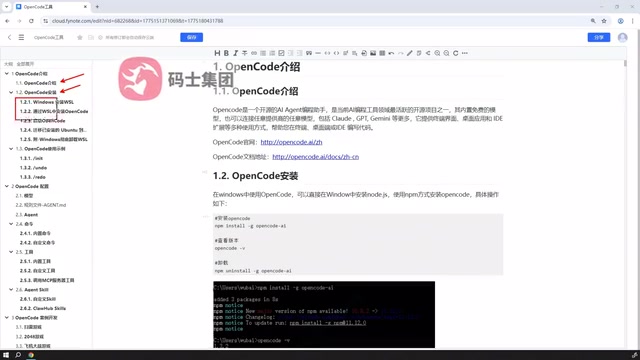
WSL-Based Installation (Officially Recommended)
The second option is aimed at Windows users: install a Linux virtual environment via WSL (Windows Subsystem for Linux), then deploy OpenCode on top of it. This is the method officially recommended by the project.
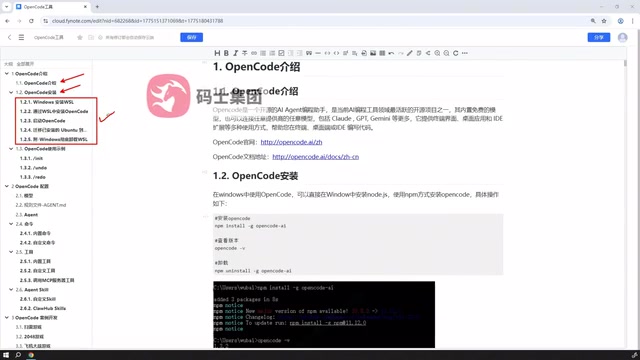
The WSL approach is recommended because many AI coding tools and command-line utilities have better compatibility in Unix-like environments, avoiding the path, permission, and dependency issues common in native Windows setups. While it does require an extra step to set up the virtual environment, the long-term stability makes that upfront investment worthwhile.
What is WSL? WSL (Windows Subsystem for Linux) is an official Microsoft compatibility layer that lets you run Linux binaries natively on Windows without the full hardware emulation overhead of a traditional virtual machine. WSL 2 is the current mainstream version, running on a real Linux kernel with significantly improved filesystem performance and system call compatibility over the original WSL. For developers, WSL bridges the gap between the Windows desktop ecosystem and Linux command-line toolchains — package managers like npm, pip, and apt, as well as shell scripts, all run seamlessly in WSL. Installation is simple: run
wsl --installin PowerShell on Windows 10/11 to automatically deploy the default Ubuntu distribution, and after a restart you'll have a full Linux terminal environment.
Core Configuration: Models, Rules, and Agents
OpenCode's flexibility shines at the configuration level, which is what sets it apart from out-of-the-box tools.
Model Configuration
Users can configure which model to use, meaning you can connect free models to keep costs down or switch to more capable paid models when you need extra power. This decoupled design means OpenCode isn't locked into a single vendor.
Rules Files and Agent Types
Beyond models, OpenCode supports rules file configuration to constrain AI behavior and output standards. It also comes with multiple built-in agent types, each tailored for different task scenarios. Properly configuring rules files can significantly improve how well the AI's output aligns with your project's actual requirements.
Commands, Tools, and MCP Extensions
OpenCode has a fairly complete extensibility story, covering custom commands, custom tools, and external service integration.
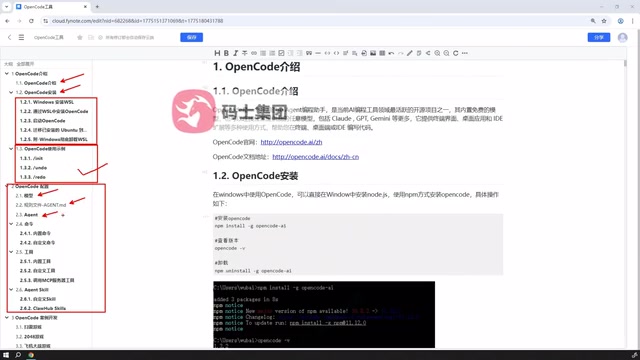
Custom Commands and Tools
Beyond built-in commands, users can define custom commands to encapsulate frequently used operations and reduce repetitive work. The same applies to tools — you can wrap project-specific logic into tools that the AI can call.
MCP Service Integration
OpenCode supports connecting to externally published tools through MCP (Model Context Protocol) services. This means community- or third-party-developed capabilities can be plugged in and used immediately, vastly expanding the tool ecosystem without having to build everything from scratch.
What is MCP? MCP (Model Context Protocol) is an open-source standardized protocol proposed by Anthropic in late 2024, designed to address the fragmented integration between large language models and external tools or data sources. The core idea is similar to a universal USB standard: tool developers expose service endpoints according to the MCP specification, and AI applications discover and invoke those tools through a unified client protocol — no custom adapter code needed for each integration. The MCP ecosystem now covers file system operations, database queries, browser control, API calls, and more, with the number of community-contributed MCP Servers continuing to grow. OpenCode's MCP support means users can directly leverage the entire community's accumulated tooling rather than being limited to a single platform's built-in tool set — one of the key reasons its extensibility surpasses many closed AI coding tools.
Agent SQL Capability
OpenCode also supports Agent SQL functionality, allowing users to define custom SQL agents or directly reference ready-made SQL agents from the web for local use.
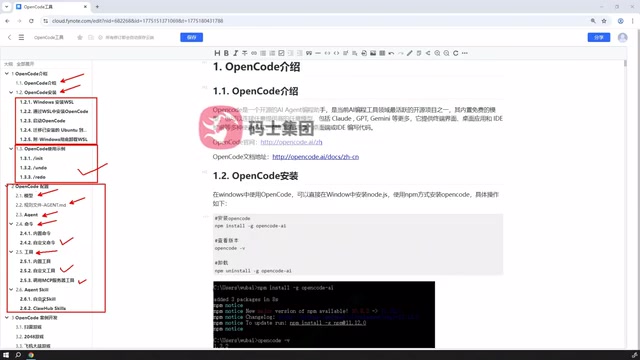
For developers who frequently work with databases, this capability lets the AI operate closer to data workflows — whether it's building queries or processing data, you can leverage existing resources to get up and running quickly without repetitive configuration.
Summary: Who Is It For?
OpenCode's value proposition is quite clear: it's an open-source, free AI coding tool for budget-conscious developers who want a high degree of customization. The learning curve is slightly steeper than purely out-of-the-box commercial products — especially the WSL setup and various configuration steps that require some hands-on effort — but the payoff is greater freedom and lower cost.
If you're frustrated by Claude Code's fees and willing to spend some time on initial setup, OpenCode is worth trying. A good approach is to start with the desktop installation to quickly experience the core features, then migrate to the WSL environment for deeper customization once you've confirmed it meets your needs.
Related articles

Claude Code Hooks in Practice: Auto-Format Code and Block Sensitive Operations
Claude Code Hooks tutorial: use pre/post tool call events to auto-format code, block sensitive files, send desktop notifications, and configure loop patrols so your AI coding assistant manages itself.

Watch-Controlled Drone: Anti-Gravity A1 Follow Me Kit Hands-On
Anti-Gravity A1 Follow Me Kit lets users control a drone via a watch for auto-follow, obstacle avoidance, and lead mode at $800. Based on The Verge's hands-on, we analyze tracking, reframing, and limits in complex environments.

Why Hydra Might Be Immortal: Unraveling the Secrets of Undying Regeneration
Hydra is a tiny freshwater organism, once mistaken for a plant in the 18th century and now a model organism for studying regeneration and aging. This article covers its discovery, remarkable regenerative abilities, and the cellular mechanisms behind its never-aging nature, exploring implications for developmental biology and anti-aging research.