QwenPaw 2.0 Checkpoint Feature Explained: Adding Save Points to Your Agent
QwenPaw 2.0 adds checkpoint save points for safe rollback in long-running Agent tasks.
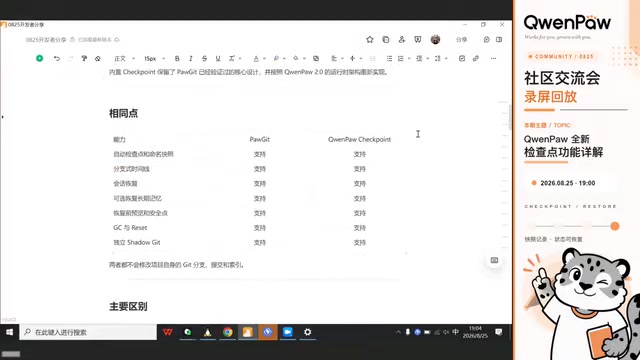
QwenPaw 2.0 introduces a built-in CheckPoint feature that lets developers create save points during long Agent sessions. Evolved from the Pungit plugin, it supports auto checkpoints, named snapshots, and pre-restore safety saves. The system uses isolated Git repos for efficient incremental storage, offers both slash commands and a visual UI, and enables selective file restoration with multi-layered safety mechanisms.
Why Agents Need "Save Points"
Anyone who has worked with long AI Agent sessions has encountered this dilemma: the Agent misunderstands the requirements at some step, then charges full speed ahead in the wrong direction. At that point, you have two choices — either continue the conversation to correct it, but the erroneous context still lingers in the session and pollutes subsequent reasoning; or start a brand new session, but then you have to re-explain all the file context and requirements from scratch.
This "context pollution" problem is particularly pronounced in the autoregressive mechanism of large language models — every time the model generates new content, it references the entire conversation history. Incorrect intermediate results create a kind of "cognitive anchoring" that biases the model toward continuing to reason in the wrong direction. Traditional solutions include context window truncation, selective forgetting, and so on, but these approaches either lose useful information or are overly complex to implement.
The CheckPoint feature newly introduced in QwenPaw 2.0 is designed to provide a more intuitive and controllable solution from the perspective of state snapshots. In a recent QwenPaw community meetup, Yu Yi, the core developer behind the checkpoint feature, gave a systematic presentation. In his words, the idea behind this feature is simple: save the current agent's state first, and if things go off track later, just go back to the previous correct result and continue. You can think of it as a "save point for Agent sessions" — just like loading a save file in a video game.
What Exactly Does a Checkpoint Save?
A checkpoint isn't simply a backup of the entire project. Instead, it precisely manages the "recoverable Agent working state." Specifically, it saves three types of content:
- Current session: the conversation context in QwenPaw
- Long-term memory files: memories accumulated by the Agent
- Workspace files: files produced or modified during the task
Long-term memory files are structured knowledge that the Agent actively accumulates over multiple rounds of interaction. Unlike session context, long-term memory is typically stored as independent files, containing information such as user preferences, project specifications, summaries of completed tasks, and architectural understanding of the codebase. These memories persist across individual sessions, enabling the Agent to maintain a continuous understanding of the project in new sessions.
There's a key design detail here: by default, restoration only handles the current session — long-term memory and workspace files are not automatically restored along with it. They are only synced during restoration if the user explicitly opts in. This "minimal impact" principle avoids unexpected side effects from restoration operations — because memory accumulation is often temporal in nature. Even if the session is rolled back, some knowledge accumulated afterward may still be valid, and blindly rolling it back could actually lose valuable cognition.
Differences and Use Cases for Three Types of Checkpoints
According to Yu Yi, checkpoints come in three types:
- Auto checkpoints: When this feature is enabled, a checkpoint is automatically saved every time the agent completes a response
- Named snapshots: Manually created saves with user-defined names
- Pre-restore safety checkpoints: Before a restore operation is executed, the system automatically saves the "pre-restore state" as a safety net
The third type is particularly praiseworthy in its design — it essentially adds an insurance policy to the "load save" action itself. If you find after restoring that the previous state was actually better, you can always roll back again.
The Relationship Between CheckPoint and the Pungit Plugin
Users familiar with the QwenPaw ecosystem may recall that a session state control plugin called Pungit was previously released in the plugin marketplace. Yu Yi candidly explained the relationship between the two: CheckPoint was not built from scratch, but rather evolved from Pungit's exploration of session version control.
The core ideas are consistent: both support auto checkpoints and named snapshots, both can restore sessions and memory, and both use an independent Git repository to save state without affecting the project's own Git repository. The choice of Git as the underlying storage engine is no accident — Git's core data structure is a content-addressable object store, where each commit is uniquely identified by a SHA-1 hash representing a complete filesystem snapshot. This means checkpoints can perform efficient incremental storage: only files that have changed are re-stored, while unchanged files are reused through hash references. Additionally, Git's branch and tag mechanisms are naturally suited to expressing concepts like "named snapshots" and "timelines." By creating an independent checkpoint directory within the workspace to run a Git repository, the system leverages Git's mature version management capabilities while maintaining complete isolation from any Git version control the project itself may already have.
The real differences are:
- Pungit is a compatibility plugin that requires separate installation, and operations require manually entering various commands
- CheckPoint is a built-in capability of QwenPaw 2.0, operable through a visual frontend interface with no commands to memorize
Additionally, the new version adds selective workspace file restoration — you can first preview which files have changed, then explicitly choose which paths to restore. In Yu Yi's words, this isn't simply copying Pungit in, but rather re-implementing proven designs within the 2.0 architecture and adding new features.
Two Operation Entry Points: Command Line and Visual Interface
Checkpoints offer two entry points, catering to both command-line enthusiasts and GUI fans.
Slash Command Operations
You can operate directly by typing slash commands in the chat page. Two special commands are worth noting:
- Auto command: Actively controls whether auto checkpoints are enabled (auto checkpoints are off by default)
- Restore command: Can now restore not only sessions and memory, but also workspace files
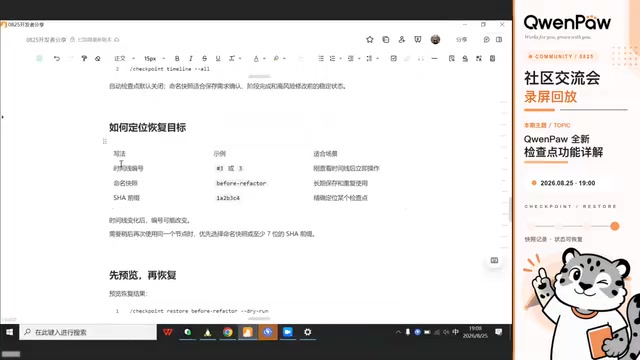
A typical long-running task workflow looks like this: Before starting the task, use snapshot to create a named snapshot (e.g., named before-refactor), then use auto to turn on auto checkpoints. If things go off track during execution, use timeline to view the timeline — each checkpoint can be located by its number, named snapshot name, or hash value. Before formally restoring, use dry run to preview the result, then type confirm to actually execute. If you only enter the target without parameters, the system won't make any direct changes — yet another layer of safety protection.
Visual Interface Operations
For users who don't want to memorize commands, the frontend page provides a complete visual operation experience. Clicking on checkpoints in the left panel shows the total number of checkpoints for the current Agent (14 in the example, including 1 auto checkpoint, 11 named snapshots, and 2 pre-restore safety snapshots). You can filter by snapshot type or session, and with one click enable auto checkpoints or manually create snapshots.
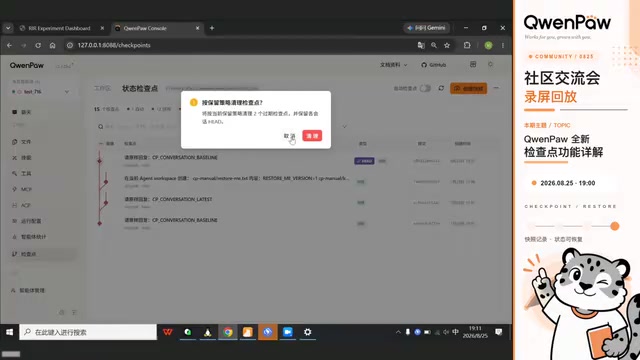
The page also provides three cleanup functions: regular GC cleans up according to preset retention policies (configurable retention count and retention days); thorough GC bypasses policies to clean all auto snapshots and safety snapshots, but user-created named snapshots are always preserved; resetting checkpoint data wipes everything completely. GC (Garbage Collection) here borrows the concept from memory management in programming languages, used to periodically clean up historical checkpoints that are no longer needed, preventing storage space from growing indefinitely.
Three Key Design Advantages of Checkpoints
Yu Yi highlighted three design strengths of checkpoints.
First, the restore process is sufficiently safe. During an actual restore, the system first pauses new queries from entering, waits for the current task to stop, pauses any scheduled tasks that might write to the workspace, then creates a pre-restore safety point, and only then updates session files and memory. The entire process is tightly chained, minimizing the risk of data corruption. This strict state-machine-style restore flow ensures that in concurrent scenarios, there's no risk of ending up in a half-restored state with old and new states mixed together.
Second, complete isolation from the project's Git. Checkpoint data is stored in its own checkpoint directory within the workspace, naturally isolated from the project's native Git — they don't interfere with each other. This is especially important for team collaboration projects — checkpoint creation and restoration leave no trace in the project's Git history and won't affect other team members' commit records.
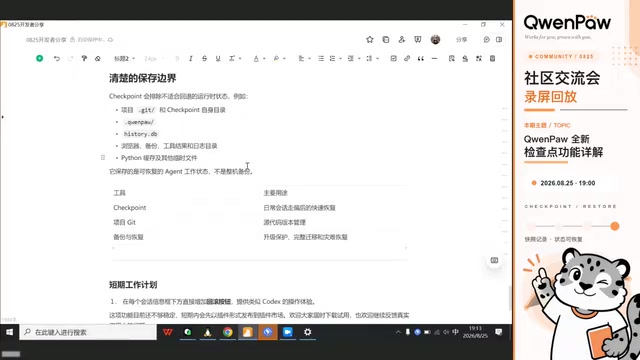
Third, irrelevant files are not tracked. Checkpoints actively exclude files like .git, log caches, runtime directories, and others, managing only the truly recoverable Agent working state rather than a full backup of the entire project.
FAQ: Can You Still Restore After Context Compression?
During the Q&A session, a developer raised a very practical question: After context compression occurs in a session, can you still see the pre-compression content after restoring?
To understand the background of this question, you need to know that Context Compression is a common strategy in AI Agent systems for handling long sessions. Since large language models have context window length limits (e.g., 128K tokens), when conversation history exceeds the window capacity, the system needs to compress earlier conversations. Common compression methods include: summarizing earlier conversations into summaries to replace the originals, discarding distant conversation turns, or using a sliding window to keep only the most recent N turns. While the compressed context retains a semantic summary of key information, the details and precise wording of the original conversations are irreversibly lost.
Yu Yi gave a clear answer: Yes, you can. A checkpoint saves the complete session context "as it was at the moment of saving" — regardless of whether compression occurs afterward, what's read during restoration is exactly the same content that was stored at that time. In other words, as long as the context was complete when saved, it will be complete after restoration; the trajectory that was actively discarded after the compression point simply won't appear. Just refresh the page to see the fully restored session. This characteristic gives checkpoints additional value in long-running tasks as a way to "combat context decay" — developers can proactively create snapshots at key nodes to preserve complete reasoning context, so that even if compression is triggered later due to window limits, these critical states won't be lost.
Known Issues and Future Plans
Yu Yi also flagged a common issue in advance: when clicking "Create Snapshot" on the frontend, the mouse cursor may display a disabled symbol and the button may be unclickable. There are two troubleshooting directions — first, check whether Git is installed locally and can run normally in the terminal; second, confirm whether the current Agent has created a new session (naturally, no snapshot can be generated without a session).
Regarding the future, the team has received considerable feedback requesting a rollback button directly beneath each session message — similar to Codex — to eliminate the hassle of navigating to the frontend page every time. OpenAI's Codex product pioneered this per-message rollback interaction — users can click rollback directly next to an AI reply, and the system will undo that message and all subsequent interactions, restoring the Agent state to the moment before that message was generated. This fine-grained, inline rollback interaction within the conversation flow dramatically lowers the barrier for state management. The QwenPaw team is developing a similar feature, but the implementation challenge lies in ensuring consistent restoration of session state, workspace files, and memory with each rollback — which is far more complex than pure conversation rollback. Therefore, in the short term, it will first be released as a plugin in the plugin marketplace, and the team welcomes everyone to try it out and provide feedback.
Summary
The checkpoint feature in QwenPaw 2.0 essentially provides a "time machine" mechanism for Agent long-running tasks. From the exploration of the Pungit plugin to the implementation as a built-in capability, it maintains the core philosophy while significantly reducing the cost of error recovery through visual operations, selective file restoration, and multi-layered safety nets. For developers who frequently run long and complex tasks, this is undoubtedly a practical feature that can genuinely save time and effort.
Related articles

AI Comic Drama with WorkBuddy from Scratch: A Step-by-Step Skill Pack Installation Guide
Learn how to create AI comic dramas with WorkBuddy from scratch. This guide covers installation, Skill pack import and invocation, plus a script generation demo with manual revision tips to get you through the first step from script to storyboard.

WorkBuddy Agent Runs the Entire GEO Database Mining Pipeline with a Single Prompt
WorkBuddy agent automates GEO database mining: from data search and curation to batch correction, differential analysis, co-expression networks, feature gene screening, and immune infiltration—a single prompt generates a complete bioinformatics report, greatly lowering the barrier to bioinformatics analysis.

PC Memory Wasted? Hacker News Debates Centralized Data Centers
Hacker News users argue that personal computer memory is wasted and should be centralized in data centers, sparking debate on centralized vs. distributed computing resource allocation. This article analyzes the logic behind the claim, the costs of centralization, and new tensions in memory resource allocation in the AI era.