Recreating a Full Creator Toolkit with Claude: Canva, Video Editing, and Notes All Replaced by Self-Built Software

A developer vibe-codes a workstation with Claude Opus, exposing the moat crisis for feature-based SaaS.
A developer used Claude Opus to vibe-code Neural9 Hub, replacing almost all his daily creator software—Canva, Shotcut, Obsidian, Google Sheets—keeping only OBS. The thumbnail module reportedly took two prompts, editing auto-detects silence and retakes, and notes and sponsorship management are AI-driven. His real point: SaaS won't die, but purely feature-based products have no moat once users can describe their needs clearly. Moats come from network effects, compliance, and platform connections.
A developer used Claude Opus to replace Canva, video editing, Obsidian notes, and Google Sheets with software he wrote himself. The entire project was "vibe coding"—he claims he never looked at a single line of code, just fired off a prompt whenever he needed a new feature. The potential impact this has on the SaaS industry may be more noteworthy than the tool itself.
One Person, One Self-Built Creator Workstation
According to a YouTube creator's demo in his video, he named his toolkit Neural9 Hub, and it replaces virtually every piece of creator software he uses day to day. Those called out as replaced include: Canva for thumbnails, Shotcut for video editing, Obsidian for notes, and the Google Sheets he used to manage sponsorship deals and video scheduling. The only thing he didn't replace was OBS.
He emphasized that this software is for his own use only—it's not for sale, nor is it a product launch. The core motivation is simple: if he can implement a piece of software's features himself, there's no reason to keep paying for someone else's generic solution. He even said that if this self-built tool holds up for a month or two, he'll cancel his Obsidian and Canva subscriptions outright.
The entire project was written with Claude Opus, and it's classic vibe coding: he's barely edited the code by hand—when he needs a new feature, he writes a prompt and lets the AI generate it. This is the point he kept stressing—it's not "AI-assisted programming," it's "prompt as feature."
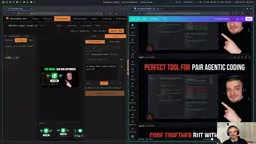
Thumbnail Tool: A "Good Enough Canva" Replicated with Two Prompts
In his Hub, the thumbnail feature lives in its own Thumbnails tab. The interface logic closely mirrors his personal fixed formula: the person on the right, the title on the left, plus a background and a handful of assets. Assets come from three sources—manual upload, an element library, and AI generation.
The AI generation part supports two modes, one of which is "cloud SVG mode." On the spot he demonstrated typing "a snake writing Tetris code on a PC," letting the system generate two concept options, then picking one to place. Generated assets can be iterated on further: he immediately added a prompt asking to shift the style from "too childish" to something more material design and tech-feeling. The tool also supports voice input and reference image upload, so he can use specific logos in thumbnails.
Feed Preview is another external website feature that got replaced. He can drop a finished thumbnail into a simulated feed and search results to preview it, adjusting the title position to judge how it actually looks. According to him, this feature also took just one prompt.
For the entire thumbnail module, he claims he used only two prompts, with a runtime of about twenty to thirty minutes. This tool certainly doesn't have Canva's full feature set, but he says that when he used Canva he was just repeating the same few actions anyway—and Canva actually feels awkward when integrating with AI workflows.
Cloud SVG mode refers to having the large model directly generate SVG (Scalable Vector Graphics) code rather than outputting raster images. SVG is an XML-based vector format made up of paths, shapes, colors, and layers as tags—naturally suited to icons, illustrations, and simple graphics. Compared with pixel images generated by AI drawing models, SVG's advantages are lossless scaling, tiny file sizes, and every element being individually selectable and editable, so you can keep refining style with prompts or break things apart and reassemble them. Its limitations are also obvious: models aren't good at generating complex lighting and photorealistic textures, and the output tends to resemble flat illustration.
Feed Preview means placing a finished thumbnail into a previewer that simulates a real display environment—usually mimicking the YouTube homepage feed or search results page. Creators can see how the thumbnail actually looks after being cropped and scaled on mobile and desktop, and adjust title position, font size, and composition accordingly. This kind of feature was originally provided by third-party websites; it's not hard to implement, but it saves the steps of exporting and switching tools.
Material Design is a design language introduced by Google that emphasizes a metaphor based on paper and ink, clear hierarchy, shadows, and standardized components. When a creator says a generated style is "too childish" and wants something more material design and tech-feeling, it usually means reducing cartoon outlines and saturated color blocks in favor of more restrained colors, geometric shapes, and systematic typography.
Video Editing: AI Automatically Detects Silence, Retakes, and Overlays
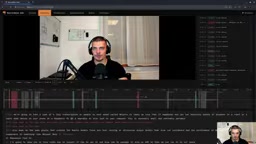
The editing module is the one he considers the biggest time-saver. His old workflow was to use Shotcut to manually stack assets, piece together cuts, add intros and outros and overlay footage—cumbersome at every step. Now the workflow is: upload a video file, the system auto-transcribes it, then AI detects silent segments and retake segments.
The initial timeline uses color to distinguish three types of content: blue is manual editing, red is AI-detected retakes, gray is silence. He can also click on transcribed text to jump to the corresponding position in the video. This first editing pass exports and goes into a second round, where AI automatically adds the intro and overlay footage—the preview clips that appear next to him when he's talking at the start of his videos. The system matches relevant clips that appeared in the video based on the opening transcript and places them automatically, and it also auto-adds the logo and pops up a subscribe button when he mentions "subscribe."
He readily admits the current silence/retake detection isn't perfect and needs improvement, but it's already good enough at the "is it usable" level.
Sponsorship Management, Topic Discovery, and Self-Built Notes
In the sponsorship module, he uses a kanban board to manage email correspondence: stages cover recording, review, publishing, pending payment, and so on. Emails can be categorized as read, spam, or awaiting reply, and it supports AI summarizing long emails, auto-generating replies based on quote requests, and politely declining collaborations. He specifically noted that he had demo mode enabled during the walkthrough—all the company names and quotes inside are AI-generated fake data.
The topic discovery page pulls from Hacker News via the official API, then uses AI to rate each item from 0 to 5 to judge whether it suits his channel. Ones he likes get saved; ones he doesn't get marked as not interested. His exact words were "let Jeff score them"—"Jeff" here is presumably the name he gave his scoring logic.
The notes module is a self-built OneNote-like tool: a hierarchy of notebooks, sections, and tags on the left, an infinite canvas on the right. Double-click to create a new note and drag it freely, with Vim mode keybindings, right-click to create a new heading, image pasting, defining frames (panels), holding Shift to box-select and drag things together, and holding Alt to freehand draw and adjust color and stroke width. Every single capability in the entire notes system, he says, was "bought with one prompt."

Pluggable Models and Remote Access via Tailscale
On the settings page, he configures different models for different features: GPT-7 for fast email Q&A, Opus 5 (his current model) and the faster S6 Luna for design-related tasks, while tasks needing stronger capabilities—video topic selection, title ideation, preview clip placement—go to Opus 5.5, and transcription uses Whisper 1. He also mentioned the option to plug in local models, for example running most scenarios through a local machine in exchange for better privacy and lower cost.
The system has built-in system prompt configuration pages for each feature (he didn't show the contents since they involve quote info), and supports data export/import for migrating to another device. His own usage pattern is running the software on his PC and connecting remotely from his laptop back to his home network via Tailscale. The theme can be switched, for example from a Graphbox-like style to One Dark.

The Real Argument: Feature-Based SaaS Has No Moat
The tool itself is just a demo; what he really wants to convey is this: SaaS won't die, but "purely feature-based" SaaS will struggle to survive long-term.
His chain of reasoning is: if a piece of software's value lies only at the feature level, and users can describe their requirements clearly to a coding agent, then that software will eventually be replicable. He lumps Canva, various spreadsheets, document editors, PDF tools, video editors, and note-taking apps all into this category. He even warns people building SaaS: today users still can't replicate things themselves, but it's only a matter of time—"in a few years, everyone will be doing this."
His counterexamples are things where the moat comes from elsewhere: social platforms like Instagram and X that rely on network effects and platform connections, financial businesses that are hard to replace because of compliance and system integration, and products that depend on users connecting with or sharing information with each other. These aren't things one person can vibe code into existence with a few prompts.
His advice to practitioners comes down to one sentence: don't build products "that anyone could whip up with a single prompt"—instead, offer something that's hard to replace.
Moat is a common metaphor in investing and business analysis, referring to a structural advantage that lets a company fend off competitors and sustain profits over the long term. Common moats include network effects, switching costs, economies of scale, brand, patents, and regulatory barriers. The judgment that "feature-based SaaS has no moat" is essentially saying: if a product's entire value can be clearly described as a feature list, then it falls into the replicable category—it lacks a structural reason that makes users reluctant to leave.
Network effects refers to the phenomenon where the more users a product has, the more valuable it becomes to each user. Social platforms are the classic example: a new platform, even with identical features, can't conjure up an existing web of user relationships, so it's very hard to replicate. Alongside network effects there are also regulatory and compliance barriers—for example, financial businesses need licenses, risk controls, clearing, and system integration, none of which can be bypassed with a piece of code or a few prompts.
Summary
The value of this demo isn't in how complete the tool is, but in how it concretizes "the cost of AI programming" into the scale of a few prompts. For individual creators, it means the barrier to entry for customized tools is dropping dramatically; for those building SaaS, it's more like a stress test—take your product apart and see which parts are just features and which parts are assets no one else can take away.
Additional Background
Pluggable models means treating specific large models as replaceable components called through a unified interface, rather than binding your business logic to a single model provider. The direct benefit is that you can choose the model that best matches cost, speed, and capability for each task; when a model raises prices, gets discontinued, or a better alternative appears, you just modify the configuration instead of rewriting the feature. The task-based division of labor in this article is a classic example—transcription uses a specialized model like Whisper, email Q&A uses a fast lightweight model, and topic judgment and clip matching use more capable models.
Local models means running open-source models on the user's own machine, with data never leaving the local network, so it has advantages in privacy and long-term cost—at the price of needing sufficient VRAM and some deployment and maintenance work.
Tailscale is a zero-configuration networking tool built on WireGuard. It adds different devices to the same virtual private network, letting them access each other as if they were on the same LAN. In this article, the creator runs Neural9 Hub on his PC, then connects remotely from his laptop back to his home network via Tailscale—this way he doesn't have to expose the service to the public internet, and he avoids the hassle of configuring port forwarding and dynamic DNS.
One-line Summary
A developer vibe-codes a workstation with Claude Opus, exposing the moat crisis for feature-based SaaS.
Paragraph Summary
A developer used Claude Opus to vibe-code Neural9 Hub, replacing almost all his daily creator software—including Canva, Shotcut, Obsidian, and Google Sheets—and keeping only OBS. The thumbnail module reportedly took two prompts, video editing auto-detects silence and retakes and matches overlay clips, and notes, sponsorship management, and topic discovery are all AI-driven. His real point: SaaS won't die, but purely feature-based products have no moat, because once users can describe their needs clearly, they can replicate them. Moats come from network effects, financial compliance, and platform connections—not feature lists. For individual creators, this means the barrier to custom tools is collapsing; for SaaS builders, it's a stress test.
Related articles

Free Unlimited Claude Code Solution: Agnes AI + CC Switch Setup Guide
No paid subscription needed — pair the free AI platform Agnes AI with the open-source tool CC Switch to provide a backend for Claude Code, enabling unlimited free calls to text, image, and video models. This guide covers the full setup, test results, and usage boundaries.

A Complete Zero-Cost Guide to Getting Started with Claude Code for Beginners in China
A beginner's guide to Claude Code for users in China: two installation methods (command line and IDE plugin), full configuration steps for replacing the official API with the free domestic LongCat model, and a hands-on demo of building a small tool with natural language, plus tips.

When the NSA Gets Involved: The AI Supply Chain Crisis Behind Open-Source CVEs and API Key Hijacking
Multiple open-source projects disclosed severe CVEs in one day, PHP flaws alarmed the FBI, and Railway and OpenCode were breached with API keys stolen. This article breaks down the vulnerability window, AI-accelerated exploitation, and the AI supply chain crisis behind the API key black market, with a developer defense checklist.