Run AI Coding Models Locally: A Complete Guide to Ollama + VS Code + Cline
Build a free, private, local AI coding environment using Ollama, VS Code, and Cline on a consumer GPU.
This guide walks through building a local AI coding environment using Ollama, VS Code, and the Cline plugin — completely free, with no Token limits and full privacy. Model choice depends on VRAM: Ornith 1.5 for 8–12GB, Qwen3 Coder (~30B) for 24–36GB. The creator cites SWE-bench Pro scores showing Qwen3 Coder at 61.7, surpassing the paid Opus 4.6 MAX at 53.4, with one-shot demos like a 3D Earth and Flappy Bird as proof. Advanced features include MCP tool integration and uncensored model support.
Want to run an AI coding model on your own computer — completely free, with zero restrictions and full privacy? That's no longer a pipe dream. A content creator recently built a complete local AI coding environment on a home gaming PC using Ollama + VS Code + Cline, and claims the core model has already surpassed top closed-source models on the agentic coding benchmark. This article walks through the full setup process and explores what the rise of local models actually means.
The Trio: Ollama, VS Code, and Cline
The entire setup is built on three free tools, and the process is simpler than you'd expect.
The first step is installing Ollama, the core engine for running large language models locally. It handles model downloading, management, and inference. Just grab it from the official website — it's essentially a one-click install.
The second step is installing VS Code (Visual Studio Code), the world's most popular code editor, which serves as your main interface for writing code and interacting with models. It's similar to Cursor, but as a veteran editor, its plugin ecosystem is incredibly mature.
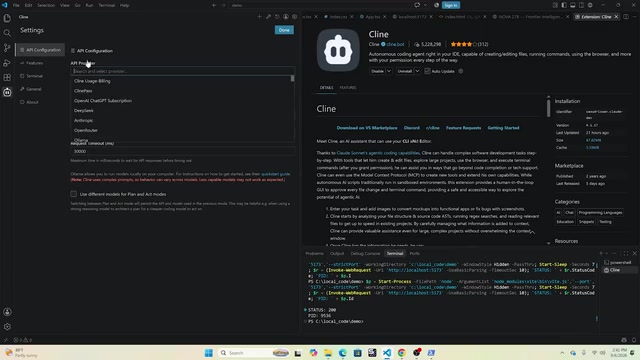
The third step is searching for and installing the Cline extension from VS Code's marketplace. Cline is an AI coding agent plugin. Once installed, go into its settings, set the API Provider to Ollama, and it will automatically detect all the models you've downloaded in Ollama.
One critical parameter during setup is the context window size. The creator used an RTX 5090 GPU and set it to 64K; if your VRAM is limited, you can drop it to 32K. One important note: the context window values on both the Ollama and Cline sides must match, or you'll run into issues.
Cline deserves a closer look. It's not a simple code completion plugin like GitHub Copilot — it's a full-blown agentic coding assistant. It can autonomously read and write files, execute commands in the terminal, launch a browser to preview results, and continuously plan and self-correct across multi-step tasks. Tools like this are commonly called Agentic Coding Assistants, and they compete in the same space as Cursor's Composer mode and Windsurf's Cascade mode. Cline's key advantage is that it's fully open source (MIT license) and supports any API backend, making it seamlessly compatible with local Ollama models — unlike some commercial products that are locked to specific cloud services. The context window determines how much code and conversation history the model can "see" at once: 64K is roughly equivalent to 50,000 Chinese characters or several thousand lines of code. The larger the window, the less likely the model is to lose context on complex projects — but the higher the VRAM cost.
Choosing a Model by VRAM: From 8GB to 36GB
Model selection is the most nuanced part of this setup, and the key factor is your GPU's VRAM capacity. The creator recommends using tools like Can I Run It to find the best open-source models for your hardware.
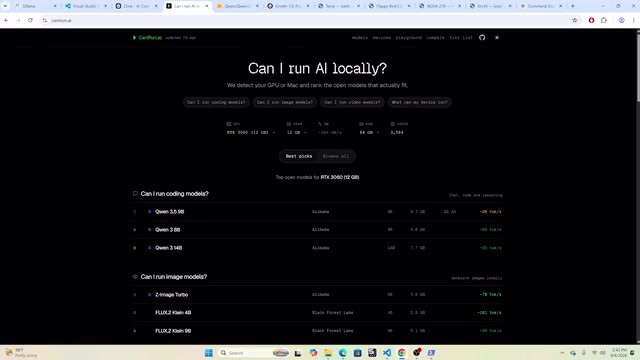
8GB–12GB VRAM: A small model called Ornith 1.5 (around 1.59B parameters) is recommended. Don't underestimate it — it scores around 47 on coding benchmarks, while the similarly-sized QW 3.5 (~0.59B) only scores 21.3. For low-VRAM laptops or entry-level GPUs, this offers the best bang for your buck.
24GB–36GB VRAM: The creator strongly recommends Qwen3 Coder 8B (approximately 30B-class, referred to as QW3.8 27B in the video), which is also the main model used throughout the tutorial demo. Downloading a model is straightforward — just run ollama pull followed by the model name in your terminal (PowerShell on Windows, Terminal on Mac). The model is around 17–20GB and will automatically appear in Ollama's model list once downloaded.

Can a Local Model Really Beat Opus 4.6 MAX?
This is the most provocative — and most attention-grabbing — claim in the whole setup guide. The creator cites benchmark data from the model's Hugging Face page: on SWE-bench Pro (the industry's go-to benchmark for evaluating agentic coding ability), Qwen3 Coder scores 61.7, while Opus 4.6 MAX scores 53.4.
In other words, a top-tier closed-source model that required payment and frequently hit Token limits just six months ago can now run locally for free — and outperforms it on this benchmark. The creator candidly admitted to being deeply frustrated by Opus's Token limits, and running locally eliminates that pain point entirely.
That said, a degree of healthy skepticism is warranted. This "surpassing" is limited to a single benchmark score, and local models typically lag behind frontier models by several months. But the creator's underlying point is worth considering: most everyday coding tasks don't require the absolute latest frontier model, and when the cost is zero, a few benchmark points barely matter.
SWE-bench is an agentic coding benchmark developed by a Princeton University team. It works by giving models real bug-fix tasks from actual GitHub repositories, requiring the model to autonomously locate the issue, modify the code, and pass unit tests — all without human intervention. This makes it far more representative of real-world development ability than toy problems like "write a sorting algorithm." SWE-bench Pro is a harder version with a broader task pool and stricter anti-leakage mechanisms, widely regarded as more difficult to game than the original. It's worth noting that different organizations use different "scaffolding" (the outer agent framework that calls the model) when submitting SWE-bench results, and scores are significantly influenced by framework design — so scores from different sources on the same benchmark aren't always directly comparable.
Live Demo: From a 3D Earth to Flappy Bird
To validate the capabilities, the creator showcased several one-shot generation examples.
One was an interactive 3D Earth: with day/night toggling, glowing halos, aurora effects, city lights, cloud layers, and adjustable rotation speed. The entire project reportedly took about three minutes to build — something that was difficult to achieve even with GPT-5 shortly after its release.
Another was a classic Flappy Bird clone, also generated in roughly three minutes and running smoothly. The creator noted that a paid version of Grok tested three months earlier couldn't produce results this polished.

One easy-to-miss gotcha: when you open a new folder in VS Code, the editor enters "Restricted Mode" for safe browsing. You must click Trust this folder, otherwise the Cline panel may not appear.
Advanced Features: MCP and Uncensored Models
Cline also supports configuring MCP (Model Context Protocol), which lets you connect free or paid MCP services so open-source models can call external tools. The creator demonstrated using MCP alongside the model to generate a single-page landing page using shadcn/ui (a product page for a fictional AI model called Nova 27B) — all running locally with zero Token consumption, producing a genuinely solid design.
Another highlight is support for uncensored model versions. The creator used a Qwen3 Coder uncensored build from the OpenRouter community, also pulled and run via Ollama. These models essentially have near-zero refusals, and since everything runs locally with no data leaving your machine, they combine privacy with unrestricted use.
MCP (Model Context Protocol) is an open standard proposed by Anthropic in late 2024, designed to let AI models call external tools and data sources in a unified way — think of it as giving the model a "plug" that can connect to different "sockets" (MCP Servers) to access file systems, databases, web search, code execution environments, and more. Because the protocol is open, the community has produced a large number of free MCP Servers, and Cline has native support for them. Uncensored models are typically versions fine-tuned from a base model with the RLHF (Reinforcement Learning from Human Feedback) safety alignment step skipped or weakened, allowing them to respond to sensitive or gray-area requests that standard models would refuse. Running such models locally is technically entirely feasible, though users bear full responsibility for the content they generate. Their "data stays local" property significantly reduces privacy concerns.
The Inflection Point for Local Coding Has Arrived
The real value of this setup isn't any single benchmark score — it's what it reveals about a larger trend: consumer-grade hardware can now support near-frontier-level coding capabilities. Free, private, no Token limits, no data sent to big tech companies — this combination of properties is enormously appealing to developers who care about privacy and cost.
Of course, most of the conclusions here come from a single creator's demonstration, and the benchmark comparisons and "beating Opus" claims still warrant careful scrutiny — real-world performance will vary based on hardware and task type. But for developers with a GPU around 24GB of VRAM, spending fifteen minutes setting up a local environment and trying it out is genuinely a no-brainer investment.
Related articles

DeepCell: One-Click AI Generation of Documents, Spreadsheets, and Slides
DeepCell tops Product Hunt with one-click generation of documents, spreadsheets, and slides, using the .deepcell format for linked updates, designed for System 2 tasks like modeling and sales reviews.

Doneas: 15-Minute Daily Accountability Calls That Keep Indie Developers From Procrastinating
Doneas is a daily accountability tool for indie developers: plan tasks on Monday, join a 15-minute call with five builders each day, and log deliveries on a public progress page. This article analyzes its core mechanics, effectiveness, and potential issues around retention and matching.

Fastlane 2.0: Fully Automated AI Ad Campaigns, From Creative to Optimization
Fastlane 2.0 is an AI ad automation tool: enter your website and it learns your brand, generates video and image ads, and runs and optimizes them on Meta, TikTok, Instagram, and YouTube.