Running a 5B-Parameter Image Generation Model on 4GB VRAM: MOS Image Hands-On Test and ComfyUI Tutorial

MOS Image: a 5B open-source text-to-image model running on 4GB VRAM, with high knowledge density, text rendering, and layout control.
MOS Image is an open-source text-to-image model with only 5B parameters; its quantized version runs on 4GB VRAM yet offers impressive knowledge density—celebrities, anime characters, brands, and car models work out of the box, with strong text rendering and non-standard aspect ratios. Based on a Bilibili tutorial by "AI Search," the article covers the full ComfyUI deployment process—downloading the Diffusion model, Qwen 3.5 9B text encoder, and Flux 2.0 VAE, and using INT8/W4A8 quantized versions to reduce VRAM usage—and introduces bounding-box layout control, LoRA style extension, 8-step DMD LoRA acceleration (3–4x, CFG set to 1), and traditional inpainting. The author notes its image quality is below the double-parameter Creature 2, but it has the strongest overall capabilities in its weight class, with a fast-growing fine-tuning ecosystem (e.g., Chromos).
Title
Running a 5B-Parameter Image Generation Model on 4GB VRAM: MOS Image Hands-On Test and ComfyUI Tutorial
Meta Description
MOS Image is an open-source image generation model with only 5B parameters that runs on 4GB VRAM. This article covers its core capabilities, ComfyUI installation steps, layout control, LoRA acceleration, and inpainting techniques, with comparisons to models like Creature 2.
Article Content
The open-source image generation space has a new player—MOS Image. This text-to-image model, with only 5B parameters, has quickly attracted community attention thanks to its extremely low hardware requirements (runs on just 4GB VRAM) and surprising knowledge capacity. According to a demonstration by Bilibili creator "AI Search," it can generate high-quality realistic and anime images, and also supports text rendering, layout control, and inpainting, and can even be fine-tuned with LoRA for richer styles. This article is based on the complete tutorial in that video, combined with community feedback, and outlines MOS Image's core capabilities, installation steps, and advanced techniques.
How 5B Parameters Hold "Massive Knowledge"
MOS Image's most impressive trait is its knowledge density. In the video, the creator showcased numerous out-of-the-box generation examples: from celebrities and anime characters to video game figures, and even various brand names and car models—the model reproduces them accurately without additional LoRA or reference images. This "native knowledge" stems from the breadth of its training data, while the 5B-parameter size allows it to maintain a small footprint while still offering decent generalization.
Text rendering is another highlight. In the demo, MOS Image can generate images containing clear text, charts, infographics, and complex design elements—rare among open-source models of the same parameter scale. The creator said outright: "Its performance in text rendering is absolutely incredible." In addition, the model supports non-standard aspect ratios, generating ultra-wide or ultra-tall images, offering greater freedom in composition.
Of course, MOS Image is not omnipotent. Compared with Creature 2, which has twice the parameters, its image quality is slightly inferior, but the creator considers this expected—"If your GPU can't fit Creature 2, or you want faster generation, MOS Image is definitely the best model in its weight class." Compared with its closest competitor Z Image, MOS is stronger in comprehension and flexibility.
Installing and Configuring in ComfyUI
The simplest and most customizable way to run MOS Image locally is with ComfyUI. The creator recommends the Windows portable version. The process is as follows:
- Update ComfyUI: Go to the Update folder, run
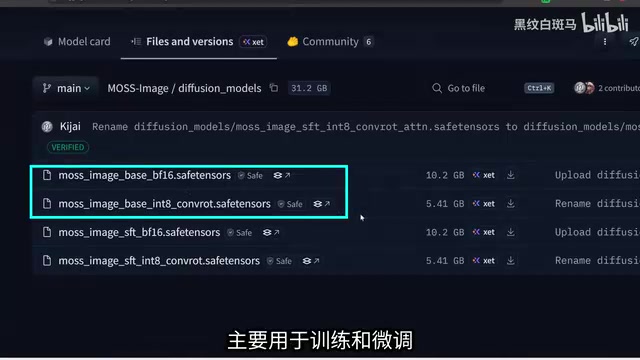
Update ComfyUI.bat, and wait for completion. - Download model files: Search for "MOS" in ComfyUI's template library to see workflows such as text-to-image and layout control. Click the download link in the missing model prompt and manually place the files in the corresponding directories:
- Diffusion model: Place in
Models/Diffusion_Models; choose either the full BF16 version (10GB, higher quality) or the INT8 quantized version (smaller, low-VRAM friendly). - Text encoder: Place in
Models/TextEncoder; versions include BF16, INT8, and W4A8. The creator chose the smallest W4A8 version, with acceptable quality loss. - VAE: Place in
Models/VAE; the smaller 250MB version is recommended.
- Diffusion model: Place in
- Refresh the model list, and in the text-to-image workflow select the MOS Image model, the Qwen 3.5 9B text encoder, and the Flux 2.0 VAE.
After configuration, set the resolution, prompt, and sampling parameters to generate. The creator tested on an RTX 5080 (16GB VRAM), and generating a 1024x1024 image took about 25 seconds.
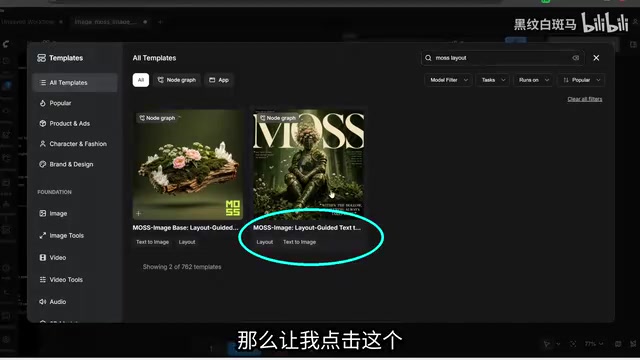
ComfyUI is an open-source Stable Diffusion graphical interface based on node-based workflows. Users drag and connect nodes to combine model loading, text encoding, sampling, decoding, and other steps into a complete pipeline. Compared with form-based interfaces like AUTOMATIC1111, it is more flexible and makes it easier to reproduce and share complex pipelines. Its "Templates" library includes many official and community workflows; when clicked, if models are missing, it prompts download links—this is exactly the mechanism behind "search for MOS to see text-to-image and layout control workflows" mentioned in the article. The Windows portable version includes its own Python environment and dependencies, ready to use after extraction, and can be upgraded via a batch script in the Update folder, with no need to manually configure conda or git—making it friendliest for beginners. And precisely because nodes can be freely added or removed, operations like loading LoRA, inpainting, and DMD acceleration only require inserting or replacing nodes, without changing code.
Division of labor between the text encoder and VAE: In modern diffusion pipelines like MOS Image, the Diffusion model (UNet/DiT) is only responsible for denoising in latent space; the separate text encoder is what actually translates prompts into conditioning vectors. The article uses Qwen 3.5 9B as the text encoder, meaning the model leverages a large language model to understand complex prompts and text rendering instructions—one of the reasons its text generation is strong. Suffixes like W4A8 and INT8 indicate weight quantization bit-width; lower bit-width means smaller VRAM usage with slightly increased precision loss. The VAE is responsible for bidirectional conversion between pixel images and latent space—compressing images during encoding and restoring visual images during decoding—and its quality directly affects the final image's detail and color. The three must match in version, otherwise you'll get noise, color shifts, or outright errors, so the workflow must specify the corresponding model files separately.
Layout Control: Precise Composition with Bounding Boxes
MOS Image supports bounding-box-based layout control, letting users specify the positions of image elements like "drawing a sketch." Select the "layout control" version in the workflow template (note: use the SFT model, not the Base model), and enable Nodes 2.0 in ComfyUI settings to see the bounding box tool on the canvas.
The creator demonstrated a complex scene: on the canvas, they boxed out "a woman in a bikini sitting on a sofa," "red sofa," "coffee table with indoor plants," "her right foot raised," "window with a T-Rex outside," "hand holding a cola can," and "Naruto poster on the wall." After running, the model precisely placed all elements in the specified regions, and even the Chinese text on the cola can was generated correctly. This layout control capability provides a practical tool for scenarios requiring precise composition (such as poster design and illustration storyboarding).
Improving Style and Quality with LoRA
MOS Image supports loading LoRA to extend style or character expression. Using an ink-wash style LoRA as an example, the creator demonstrated how to load it in both text-to-image and layout control workflows: insert a "Load LoRA" node before the model input of the KSampler, select the LoRA file and set the strength (usually 100%), and add the trigger word to the prompt.
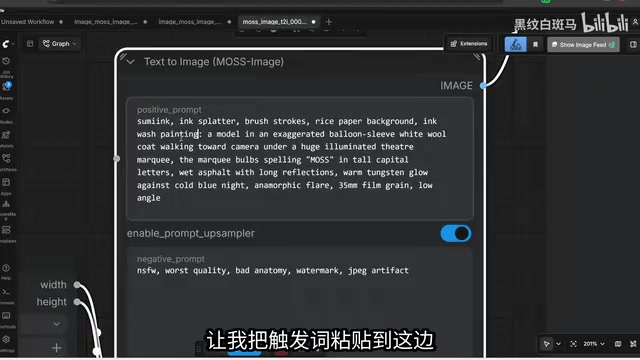
Beyond style LoRAs, the community has already begun fine-tuning complete MOS checkpoints. For example, a new model called Chromos reportedly shows noticeably better quality and consistency than the base MOS Image. Using it is simple: download the Chromos checkpoint file, place it in Models/Diffusion_Models, and select it directly at the UNet model slot.
Speed-Up Trick: 8-Step DMD LoRA
With default settings, MOS Image takes about 25–30 seconds to generate an image. By loading the 8-step DMD LoRA, speed can be increased 3–4x. The creator demonstrated the specific steps: download the DMD LoRA file, place it in Models/Loras, insert a LoRA node before the KSampler, set strength to 1, change sampling steps to 8, and set CFG to 1. Note that when CFG is 1, negative prompts become ineffective; if you need negative prompts, slightly increase CFG (e.g., 1.5).
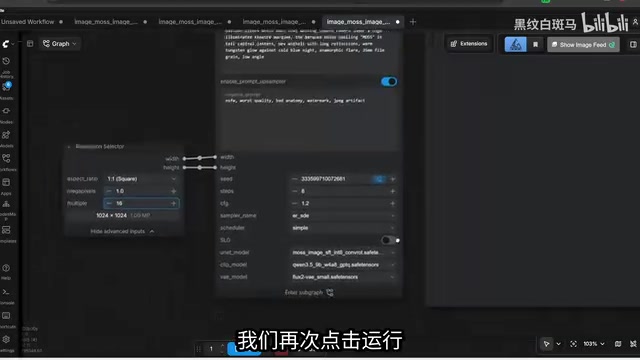
DMD (Distribution Matching Distillation) is an acceleration technique that distills a multi-step diffusion model into a generator with very few steps (usually 4–8): it makes the output distribution of the few-step student model approximate the real data distribution, thereby greatly reducing sampling steps with almost no loss in image quality. Traditional diffusion models typically need 20–30 steps or more to converge, whereas with DMD LoRA loaded, only 8 steps are needed, and per-image time drops proportionally—this is the source of the "3–4x speed-up" mentioned in the article. Since the distillation goal is for the model to directly output the final result at very low step counts, the sampler often needs to work with a lower CFG (Classifier-Free Guidance) value; CFG of 1 is equivalent to turning off classifier-free guidance, and negative prompts no longer participate in computation and become ineffective. Slightly increasing CFG can restore some negative prompt effect, but too high a value introduces oversaturation and artifacts.
Image Editing: Traditional Inpainting
MOS Image itself is a text-to-image model and does not support natural-language semantic editing like One Image 2.1 or Nano Banana, but editing can be achieved through traditional inpainting. The creator demonstrated replacing a notebook in an image with a sleeping cat: load the image in ComfyUI, draw a mask, use the VAE Encode for Inpainting node to encode the image and mask into latent space, connect to the KSampler, and enter the prompt "sleeping cat." Although the result is less flexible than dedicated editing models, it is sufficient for simple replacement needs.
The difference between inpainting and semantic editing: Traditional inpainting involves the user manually drawing a mask to mark the area to be modified; the VAE Encode for Inpainting node encodes the original image and mask into latent space together, and during sampling only the area inside the mask is re-denoised, while pixels outside the mask remain unchanged. Thus it can precisely replace local content, but requires manual region selection, and the model does not "understand" the semantic relationships of the whole image. In contrast, instruction-based editing models like One Image 2.1 and Nano Banana accept natural language such as "replace the notebook with a sleeping cat" and automatically locate and modify, offering greater flexibility, though controllability and local fidelity are sometimes inferior to manual masks. As a pure text-to-image model, MOS Image can only follow the former route, suitable for simple replacements and element additions/removals; for major composition changes or cross-region coordinated edits, dedicated editing models are still needed.
Fine-Tuning and Future Outlook
For users who want to train custom LoRAs, Ostrich AI Toolkit has added support for MOS Image, with detailed instructions and macOS compatibility. The creator believes MOS Image is currently the best image generator in its weight class, and its current performance is only a "lower bound." He predicts that better model weights or fine-tuned versions will appear within days: "It feels like the glory days of the SDXL era repeating."
Overall, with extremely low hardware requirements and excellent knowledge density, MOS Image offers a high-quality open-source image generation option for low-VRAM users. Although its image quality falls short of larger models, its layout control, text rendering, and active fine-tuning ecosystem make it a strong contender among current small-parameter models.
One-line Summary
MOS Image, a 5B-parameter open-source text-to-image model, runs on 4GB VRAM, with high knowledge density and support for text rendering and layout control.
Paragraph Summary
MOS Image is an open-source text-to-image model with only 5B parameters; its quantized version can run on GPUs with 4GB VRAM yet boasts surprising knowledge density: celebrities, anime characters, brands, and car models all work out of the box, with standout text rendering and non-standard aspect ratios. Based on a tutorial by Bilibili creator "AI Search," the article outlines the complete deployment process in ComfyUI—downloading the Diffusion model, Qwen 3.5 9B text encoder, and Flux 2.0 VAE, and choosing INT8/W4A8 quantized versions to reduce VRAM usage; it also introduces bounding-box layout control, LoRA style extension, 8-step DMD LoRA acceleration (3–4x, with CFG set to 1), and traditional inpainting editing methods. The author believes that although its image quality falls short of the double-parameter Creature 2, it has the strongest overall capabilities in its weight class, and the fine-tuning ecosystem (such as Chromos) is rapidly emerging.
Related articles

AI-Powered SRC Vulnerability Hunting: A Hands-On Guide to Building the Hermes Agent Workbench
Based on a hands-on Bilibili video: how to build an AI-powered SRC vulnerability hunting workbench—three-step method, four report elements, Agent mode vs web chat, and tool selection.

CLI-Anything Complete Beginner's Guide: How AI Operates Software — Principles and Practice
A complete beginner's guide to CLI-Anything: how AI Agents operate professional software via the command line, covering the three-layer architecture, CLI Hub installation, DrawIO practice, generator principles, and limits.

Carbon-X: A 14.8B Open-Source Model That Handles DNA and Text Simultaneously
Carbon-X is a 14.8B open-source multimodal model on Hugging Face where DNA and text share a token stream. 6-mer tokenization, 302B token mid-training, deployable on a single 80GB GPU, 66.7% average on five DNA benchmarks, Apache 2.0 license.