Spring AI + MCP in Practice: Building Production-Grade AI Agents with Java

Build production-grade AI Agents in Java that connect to real enterprise data using Spring AI and MCP.
This article systematically covers how to build a production-grade AI Agent in the Java ecosystem using Spring AI and MCP (Model Context Protocol). It clarifies the key distinction between AI Agents and LLMs, explains MCP's role as a standardized intermediary for connecting to databases, REST APIs, and Kafka, breaks down the Controller/Service/Tool layered architecture with ChatClient and ToolContext, and addresses critical deployment security concerns including environment-specific config, secret management, Dockerization, and least-privilege access control. The stack requires Java 21, Maven 3.9, and a valid OpenAI API Key.
Building AI Agents capable of autonomous work within the Java ecosystem is becoming an essential skill for backend and full-stack developers. This article — based on a YouTube technical tutorial — walks through how to use Spring AI + MCP (Model Context Protocol) to build a production-ready AI Agent, covering core concepts, architecture design, key code patterns, and deployment security best practices.
What Exactly Is an AI Agent?
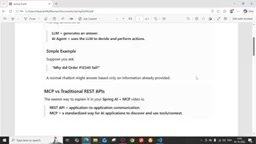
Many people confuse AI Agents with LLMs (Large Language Models), but their responsibilities are fundamentally different. An LLM's job is to generate answers, while an AI Agent uses an LLM to make decisions and execute actions — it understands goals, determines what steps to take, observes results, and keeps working until the objective is complete.
In other words, an Agent is more like a "digital colleague." You hand it a task, and it drives it forward autonomously. A recurring example from the tutorial: when you ask "Why did order 12345 fail?", a regular chatbot can only answer based on the LLM's existing knowledge — and the LLM has no awareness of that order's actual state in your internal system. It will either give an irrelevant answer or pull something unrelated from the internet.
For an Agent to give an accurate answer, it must be able to connect to external systems — databases, logs, business APIs — retrieve real data, and then analyze it. This is exactly where MCP comes into play.
MCP vs. Traditional REST APIs
The tutorial offers a clear contrast: REST APIs solve application-to-application communication, while MCP is a standardized protocol specifically designed to let AI applications discover and use tools and context, which in turn connect to external databases or APIs.
The MCP architecture has several key roles:
- MCP Client: The side that initiates requests
- Tool / Resource / Template: Capability units the Agent can invoke
- MCP Server (intermediary): The central hub, responsible for translating the LLM's decisions into actual calls to external systems
The AI model itself never directly communicates with databases, logs, or APIs — there must always be an intermediary, the MCP Server.
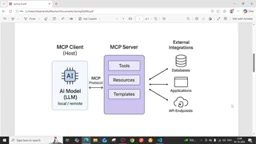
The full flow looks like this: User asks "Why did order 12345 fail?" → LLM determines it can't answer on its own → Hands off to the MCP protocol → MCP Server queries the database, scans logs, calls API endpoints → Aggregates results → Returns a well-reasoned explanation of the failure. The entire process is transparent to the user, but under the hood it's Spring AI and MCP working in concert.
MCP (Model Context Protocol) was proposed and open-sourced by Anthropic in late 2024, with the goal of providing AI applications with a unified "tool invocation" specification — similar to how USB standardizes hardware peripherals. Regardless of whether the underlying system is a database, file system, or third-party API, AI models interact with these capabilities through the same protocol. Before MCP, every AI application had to implement its own integration logic for external systems, with different formats, authentication schemes, and error handling that couldn't be reused. MCP abstracts these capabilities into three standard object types: Tool (executable functions/actions), Resource (readable data sources), and Prompt Template (predefined prompt templates), and defines a JSON-RPC-based communication format between Client and Server. This means the same MCP Server can be reused by different AI applications, and a single AI application can mount multiple MCP Servers to expand its capability boundaries. Spring AI has built-in MCP Client support since version 1.0 — developers simply add the corresponding dependency and configure the endpoint to enable a Spring Boot application to communicate with any spec-compliant MCP Server.
Production-Grade Architecture Design
Moving from a single-machine demo to production requires a more complete architecture. The typical topology described in the tutorial is:
User → Spring Boot AI Agent → Spring AI + LLM → MCP Server → MCP Tool → External Systems
MCP Tools (essentially annotated Java methods) can connect to different targets based on configuration:
- Connect to a database and execute queries
- Call external REST APIs (with security features)
- Interface with a Kafka Server to analyze streaming data and generate reports
Which systems to connect to is entirely determined by your MCP configuration. This "configuration-driven" design allows the Agent's capability boundaries to be flexibly extended.
Key Code Walkthrough
Controller Layer
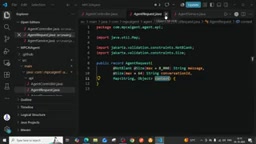
The AgentController in the tutorial uses @RequestMapping to define the AI Agent's entry point with produces = application/json, and accepts an AgentRequest body via @PostMapping("/chat"). The request body carries two key pieces of information: a conversation ID and the service connection details.
Service Layer
AgentService injects ChatClient and Clock (UTC clock). The processing logic roughly follows these steps:
- Extract
conversationIdfrom the request; generate a random UUID if absent - Build a
MapasToolContext, populated with the conversationId and request context - Call
chatClient.prompt(userMessage).toolContext(...)to initiate the request - Return a response containing the conversationId, answer, and creation timestamp
Using a Map to carry context is critical here: the context can include API URLs, user IDs, passwords, headers, and any other information the Tool needs to connect to a specific external API and analyze its data.
Configuration and Tools
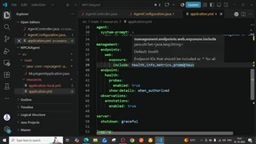
The configuration section registers tools via ToolCallbackProvider, sets the system prompt, and configures request timeouts via McpClientCustomizer — for example, if no response is received within 30 seconds, the MCP Server automatically disconnects.
The tutorial also demonstrates a RuntimeTool example that returns runtime health information such as the current UTC server time, available processor count, and memory in bytes. Following this pattern, you can write dedicated Tools for database queries, API health checks, and other scenarios.
ChatClient is Spring AI's unified abstraction layer over LLM providers (OpenAI, Anthropic, Azure OpenAI, etc.), similar to how Spring Data abstracts away database differences. Developers construct an instance via ChatClient.Builder and chain system prompts, tool callbacks (ToolCallbackProvider), and context (ToolContext) onto the call, ultimately receiving the LLM's response in either streaming or blocking mode. ToolContext is a key-value container shared across the lifecycle of a single request — Tool methods can inject it directly as a method parameter to read runtime dynamic values like URLs and tokens, without hardcoding sensitive information into configuration files. This design allows the same Tool code to serve different users' different backend systems in multi-tenant scenarios — simply by switching context content in the request body — significantly improving code reusability and security.
Deployment and Security Best Practices
Several things must be done right before going to production:
Environment-specific configuration: In application.yml, separate MCP endpoint URLs for local and production environments; use local.yaml for local development and the appropriate profile for production.
Model and API keys: The tutorial uses an OpenAI model (GPT-4.1 mini) with temperature set to 0.2 for stable responses. API Keys must never be written into application.yaml — they should be stored in a secrets management service.
Dockerization: Write a Dockerfile to package the fat jar, with configurable memory percentage; pom.xml should include starter-web, starter-model-openai, starter-mcp-client-webflux, and other dependencies, along with Actuator for health monitoring (exportable to Prometheus).
Principle of least privilege: Restrict the MCP Server to the minimum necessary filesystem, network, and account permissions; review tool behavior before connecting; strictly limit accessible ports and APIs.
This last point is especially important — if you're building a general-purpose Agent, MCP could potentially be manipulated into querying sensitive data belonging to other users. Access controls and permission boundaries must therefore be built into the implementation.
Prompt Injection is one of the most critical security threats to watch out for in production AI Agent deployments. Attackers can embed malicious instructions in user input or external data sources (such as database fields or API responses) to trick the LLM into bypassing its preset system prompt and performing unauthorized actions — such as querying another user's orders or calling internal endpoints that shouldn't be exposed. In an MCP architecture, this risk is amplified: because Tools have real system access, once an LLM is "convinced" to invoke the wrong Tool or pass in incorrect parameters, the consequences can be far more severe than a chatbot giving a wrong answer. Mitigations include: validating parameter legitimacy inside Tools (rather than relying solely on the LLM's judgment), scoping each Tool's accessible resources, recording complete invocation audit logs at the MCP Server level, and introducing Human-in-the-loop confirmation for sensitive operations. This is an extension of the same logic as the "principle of least privilege" mentioned above.
Runtime Requirements
Following the tutorial, the baseline requirements to run this Spring AI + MCP Agent are:
- Java 21
- Maven 3.9
- A valid OpenAI API Key
Once running, invoke it via a REST POST to /ai-agent/chat, passing a message and the tool context you want to use in the request body.
Summary
The core value of combining Spring AI + MCP lies in bridging the LLM's reasoning capabilities with real enterprise data. The LLM handles understanding and decision-making; MCP acts as the standardized intermediary that translates those decisions into actual operations against databases, APIs, and message queues. For developers working at the intersection of Java and AI, mastering the layered Controller/Service/Tool pattern, configuration-driven tool registration, and production-environment secrets and permission management are the critical steps to taking a demo all the way to production.
Related articles

Gaussian Process Bandit Optimization: Exploration Strategies and Inference Regret Guarantees
Cumulative regret guarantees in Bayesian optimization fail to reflect final recommendation quality. This article examines a new study that provides inference regret guarantees for Gaussian process bandit optimization through exploration query strategies and fill distance analysis, validated on hyperparameter optimization and control tasks.

The Most Detailed Codex Guide on Bilibili: From Installation to Real-World Practice
The most detailed Codex guide on Bilibili: from app store installation to daily work mode configuration, with a real coffee shop project demonstrating file organization, data extraction, dashboard creation, and other practical tasks. Learn to use Plan Mode and desktop pets to leverage Codex efficiently.

Appearance Compensation in Volume Rendering: Why RGB Accuracy Cannot Guarantee Density Correctness
Volume rendering research reveals that volumetric data perfectly reproducing external RGB views may still contain density errors: appearance compensation can double central density and keep external rays unchanged even when L2 error exceeds 14.52%. Density recovery depends on appearance capacity, spatial resolution, and measurement design.