Tencent WorkBuddy Hands-On: An Enterprise AI Workbench That Outshines OpenCloud
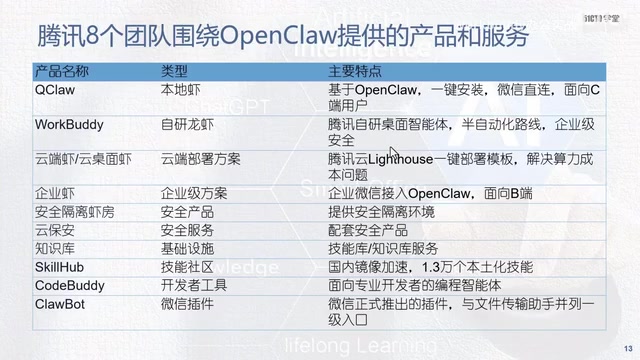
Tencent WorkBuddy: out-of-box, secure, China-integrated office AI agent vs OpenCloud.
WorkBuddy is Tencent Cloud's full-scenario AI Agent desktop workbench, positioned by Pony Ma as the third strategic product after QQ and WeChat. Fully rewritten (not OpenCloud source), enterprise-grade single-user, yet compatible with OpenCloud skills. Its edge: five-minute setup, low hardware needs, security boundaries, stable execution, and direct links to WeChat, Tencent Docs, Feishu, and DingTalk.
Tencent Cloud's WorkBuddy has been positioned by Pony Ma as "the third strategic product after QQ and WeChat," a claim that has sparked considerable discussion in the industry. As a desktop AI agent built for office scenarios, what earns it such high strategic weight? And compared to its sibling OpenCloud, what real pain points does it solve?
What WorkBuddy Really Is: A Product of Tencent's "Horse Racing"
WorkBuddy can be understood as a China-adapted version of Codex: similar interface and interaction logic, but far friendlier to domestic users—no complex configuration, modest hardware requirements, and a free tier. More importantly, it integrates directly with commonly used domestic office software, consolidating work that once required constant switching between apps (organizing materials, generating documents, analyzing spreadsheets) into a single tool.
According to a Bilibili creator, WorkBuddy was designed by Tencent Cloud's CodeBuddy team in early 2026 and launched in March, positioned as a full-scenario AI Agent desktop workbench. Tencent lags behind peers like Alibaba in AI, and after OpenCloud went viral around the Spring Festival, Tencent used its horse-racing mechanism to release a batch of derivative "lobster" products in one go—WorkBuddy being the standout performer.
What's interesting is its product approach: WorkBuddy takes a semi-automated route, positioned for enterprise-grade single-user (企业级单权) scenarios and directly targeting enterprise needs. It is not a wrapper—it doesn't use OpenCloud's source code but is fully rewritten following similar AI agent logic, with systematic design around security boundaries. At the same time, it is fully compatible with OpenCloud's skill ecosystem: anything OpenCloud can do, WorkBuddy can basically do too, plus more out-of-the-box features.
Horse racing (赛马机制) is a well-known internal product incubation strategy at Tencent: multiple teams develop in parallel on the same track and compete, with market and user data ultimately deciding where resources flow. WeChat was born from a horse race among three internal teams simultaneously building mobile messaging products; Tencent has since reused this playbook in short video, cloud gaming, and other areas. In the AI Agent race, OpenCloud went viral in Chinese developer circles around the Spring Festival, and Tencent incubated multiple derivative "lobster" products at once through horse racing—essentially acknowledging its lag in the AI application layer while using internal competition to accelerate the chase. WorkBuddy is the product that emerged from this mechanism, and its strategic weight is directly tied to the race outcome: internal winners are more likely to receive cloud resources, traffic entry points, and organizational support.
Four Core Advantages
Out of the Box: Set Up in Five Minutes
WorkBuddy doesn't require manually installing Node.js (it installs automatically), configuring environment variables, or setting up intranet tunneling—just download the installer, double-click, scan the QR code to log in, and you're ready to go. The whole process takes about four to five minutes.
Hardware requirements are minimal: any device from the past two years that can run Office and write Word documents will do. A dedicated GPU doesn't matter, because WorkBuddy connects entirely to cloud-based LLMs by default—what's installed locally is just a work terminal. By contrast, OpenCloud connects to local LLMs by default, requiring API applications, model downloads, and much higher hardware specs—some people even buy expensive Mac Minis specifically to run it.
High Security: Enterprise-Grade Design
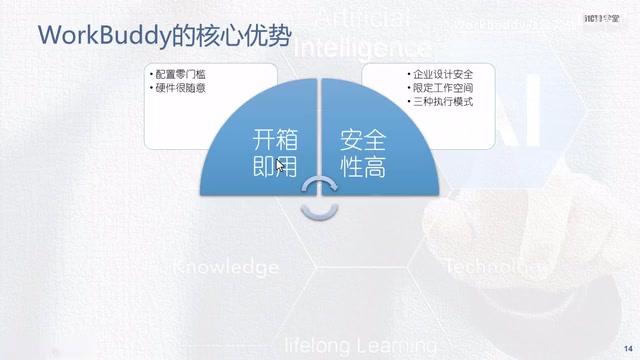
WorkBuddy is designed entirely to enterprise standards, with multiple considerations around risk control. When executing tasks, it confines itself to a workspace, and files outside the working folder are read-only by default. It also offers three execution modes—Craft, Plan, and Ask—corresponding to different risk levels and complexity needs.
These settings don't completely prevent AI from overstepping on files, misconfiguring the environment, or touching things it shouldn't, but at least the boundaries are drawn—and that basic level of precaution is already quite solid in product design.
Workspace confinement is a common security measure in enterprise-grade agent design: the agent is restricted to reading and writing within a specific directory or sandbox, with the file system outside the workspace read-only or invisible by default. This approach draws on OS sandboxing, container isolation, and the principle of least privilege—the idea that any program should only receive the minimum permissions necessary to complete its task. For desktop agents, risks mainly come from three sources: mistakenly modifying or deleting important user files, executing unconfirmed system commands, and sending sensitive data to external services. Workspace confinement primarily addresses the first; tiered execution modes address the second. It's worth emphasizing that this kind of design is "secure by default" rather than "absolutely secure"—users should still avoid running high-risk tasks in directories containing core data.
High Completeness: Reliably Enters Your Workflow
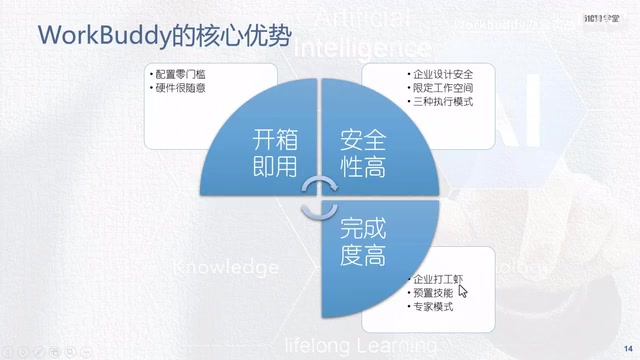
This is what the creator considers the most core advantage. Comparing the experience: OpenCloud frequently stalls midway through larger, more complex tasks with no feedback, requiring constant "continue the work" or "keep executing" prompts to push it forward in chunks—one time it took seven or eight prompts to finish the task, and that was assuming nothing went wrong.
WorkBuddy basically doesn't have this problem. After using it for a while, you realize it's not a demo sample but a product that reliably enters your workflow: complete usage paths, clear logic, settings that are friendly to ordinary office workers, and excellent stability.
Strong Ecosystem Support: Direct Connections to Domestic Office Tools
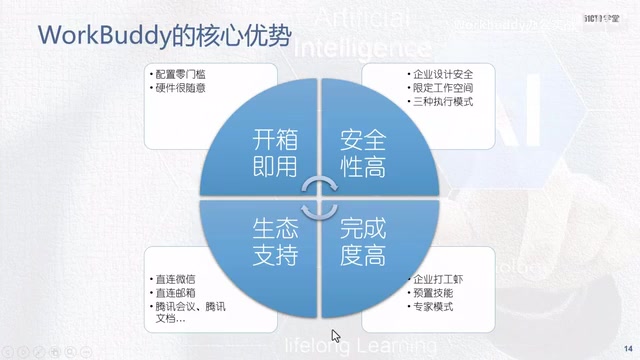
Tencent's own products are naturally fully supported: WeChat, QQ Mail, Tencent Meeting, and Tencent Docs all connect directly. It also supports WeChat Mini Program Yuanbao, WeChat Assistant, WeChat Customer Service accounts, QQ Yuanbao bot, Feishu, DingTalk, as well as third-party tools like Kingsoft Docs and Tencent Surveys.
OpenCloud also emphasizes direct connections, but it mainly connects to foreign messaging apps like Twitter and X—which doesn't fit well for domestic users. WorkBuddy is clearly more practical in Chinese office scenarios.
AI Agent differs fundamentally from ordinary chat-based AI in that it doesn't just answer questions—it autonomously decomposes tasks, invokes tools, reads and writes files, and executes multi-step operations. A typical agent workflow includes: receiving a goal, planning steps, invoking local or cloud tools (file system, browser, office software APIs), observing results, and iterating until the task is complete. This also explains the architectural divergence between WorkBuddy and OpenCloud: both are desktop agents, but WorkBuddy delegates inference to cloud LLMs by default with the local machine serving only as a work terminal, while OpenCloud connects to local models by default. The cloud approach lowers hardware barriers and data-residency risk; the local approach has advantages in privacy and offline capability. The three modes mentioned—Craft, Plan, and Ask—are essentially dials for agent autonomy: Craft leans toward automatic execution, Plan produces a plan before executing, and Ask stays more at the Q&A and confirmation level.
Skills and Expert Modes: An Out-of-the-Box Capability Library
WorkBuddy offers a large number of prebuilt skills and expert modes. In the skill library, you can search directly for the capability you need—say, Word document or PPT skills—and what you find is generally vetted, prebuilt, safe skills that work immediately upon installation.
Compare GitHub: searching PPTX turns up countless projects with the same name, and users have no way to judge which is good or which is risky—it's exhausting. WorkBuddy's skill library eliminates that screening cost.
Expert mode, meanwhile, provides prebuilt expert roles across domains—data analysis report writers, UI designers, and so on. Just summon one when needed and state your requirements, which is very friendly to non-technical users.
Skill ecosystems are key to AI Agent platformization: the agent itself provides only a general reasoning and execution framework, while specific capabilities (reading and writing Word, generating PPTs, querying databases, operating browsers, etc.) are extended through pluggable skill packages. Open ecosystems (like open-source skill repositories on GitHub) have the advantage of scale and fast iteration, but carry risks of duplicate project names, uneven quality, and malicious code; curated, reviewed skill libraries trade some richness for discoverability and security. By remaining compatible with OpenCloud's skill ecosystem while building its own prebuilt safe skill library, WorkBuddy is effectively striking a compromise between "open" and "controllable." Expert modes are another layer of abstraction: packaging skills, prompts, and workflow orchestration into role presets for specific jobs, so non-technical users can get professional output without understanding the underlying skills.
Interface Design: Beginner-Friendly vs. Geek-Oriented
WorkBuddy's settings are self-explanatory—beginners can jump right in. OpenCloud's options, by contrast, lean geeky: English interface, terminology like Personal Assistant and Code Agent that ordinary users don't understand, and messaging configuration that leaves them unsure how to fill in. For domestic beginners, WorkBuddy's advantage is very clear.
Who Should Use WorkBuddy
WorkBuddy is positioned as a desktop application for office scenarios, with full functionality and enterprise-grade security. It suits office professionals and managers, delivering a smooth and comfortable experience. If you want to pick one of Tencent's "lobster" products to try, WorkBuddy is the priority choice.
One-line Summary
Tencent Cloud WorkBuddy, with its out-of-the-box setup, enterprise-grade security, and direct domestic ecosystem connections, is the office AI agent to beat OpenCloud.
Paragraph Summary
WorkBuddy is a full-scenario AI Agent desktop workbench designed by Tencent Cloud's CodeBuddy team in early 2026 and launched in March, positioned by Pony Ma as the third strategic product after QQ and WeChat. It takes a semi-automated route aimed at enterprise-grade single users, is fully rewritten rather than using OpenCloud's source code, and remains compatible with OpenCloud's skill ecosystem. Compared to OpenCloud, WorkBuddy's core advantages are four-to-five-minute out-of-box setup, minimal hardware requirements, enterprise-grade security boundary design, stable non-interrupting task execution, and direct connections to domestic office tools like WeChat, Tencent Docs, Feishu, and DingTalk. Prebuilt skill libraries and expert modes further lower the barrier for non-technical users. The article concludes it suits office professionals and managers and is the priority choice to try among Tencent's "lobster" product matrix.
Related articles

Developer Naming Woes: The Technical Names That Drive Us Crazy
Why is technical naming so maddening? From Nginx and Vite to Qt and Sudo, a YouTube creator rants about the chaos of developer naming and pronunciation, revealing the tug-of-war between creators' intentions and community habits, and the cultural roots behind spelling traps like PyPI and GNOME.

Figma Workplace Scandal: Employee Sues CEO for Forcing Confrontation with Harasser
Figma and its CEO are sued by a current employee alleging sexual harassment and discrimination, and forcing the victim to confront her harasser. This article outlines the background, potential impact, and industry reflection.

Jensen Huang and Nvidia: Elite Privilege Behind the Revolving Door of Business and Politics
An opinion piece uses Jensen Huang's reappointment as Nvidia CEO to examine business-government ties and elite impunity, questioning free-market ideals and AI industry governance.