The Era of Multi-Agent AI Collaboration: How Kylon Lets Teams Work Alongside AI

Kylon combines Slack-style channels with AI agents to fix duplicated effort and data sync pain in team AI workflows.
The article covers tech creator Nate Herk's exploration of multi-user collaborative AI workflows and how the new tool Kylon solves the inability to share a personal AI operating system with a team. Kylon uses a Slack-style channel interface where human members and their own agents collaborate in one workspace, with direct agent-to-agent communication and sub-threads for complex tasks. Its billing is per-workspace and supports bring-your-own Claude Code/Codex subscriptions; agents come in Fast, Professional, and top tiers (the top reportedly calls Claude Opus). Nate demoed Instagram content automation and ClickUp tracking, advising gradual rollout from quick wins. The editor sees Kylon filling a team-collaboration gap, though long-term results need validation.
The era of solo AI play is fading. We've gotten used to building a highly personalized AI operating system on our own machines—plugging in Claude Code, Codex, and various MCP tools so agents can handle our emails, write code, and create content—and an obvious question surfaces: this system belongs to me alone, and no one else on the team can truly participate.
Tech creator Nate Herk shared his exploration of multi-user collaborative AI workflows on Bilibili, and gave a detailed demo of a new tool called Kylon that attempts to solve this problem. According to his introduction, Kylon combines a Slack-style channel interface with AI agent management, letting human members and their respective AI agents collaborate in the same workspace.
From a Personal AI Operating System to the Pain Points of Team Collaboration
Nate described how he used to work: wiring skills, memory, and connected accounts into a personal AI operating system, then linking it to tools like Slack, ClickUp, Gmail, and Notion to form an ecosystem built around one person. One person speaking into a microphone, backed by "20 arms and 30 computer desktops."
The problem is that when everyone on the team builds their own system this way, duplicated effort becomes inevitable. Nate pointed out that everyone is repeatedly rebuilding their own integrations and skills, leading to overlapping work. Data synchronization is even more troublesome—someone has to keep Google Drive updated, various automation flows need to ensure data consistency, and the AiOS setups each person builds lack any sharing mechanism.
He offered a view on gradual transformation: rather than forcing a 20-person team to switch to AI all at once, bring one person or one business unit on board at a time. Kylon's design happens to support exactly this pace.
MCP (Model Context Protocol) is an open protocol proposed by Anthropic in late 2024, aimed at standardizing how AI models connect to external tools and data sources. Before MCP, every AI application needed to write separate integration code for tools like Gmail, Notion, and GitHub, resulting in duplicated effort and a fragmented ecosystem. MCP defines a general client-server architecture: tool providers implement MCP servers, and AI applications as clients can automatically discover and invoke these tools. This lets agents access resources like file systems, databases, and API services in a unified way, greatly reducing integration costs. The "various MCP tools" Nate mentions in the article refer to exactly these external capabilities connected via the protocol, which give a personal AI operating system real execution power—reading and writing emails, managing projects, and operating code repositories.
Kylon's Core Design: Channels, Agents, and Sub-threads
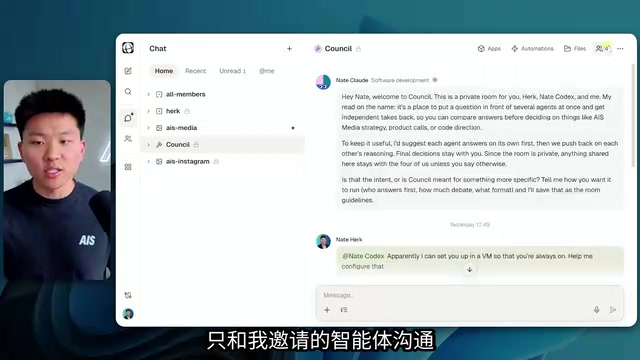
Kylon's interface resembles Slack—channels listed on the left, chat content on the right. The difference is that channels contain both human members and agents. Nate showed a channel called AIS Media, where he, Cody, and Aiden were simultaneously talking to their respective agents, jointly building applications, automation flows, and a knowledge base.
Each channel can be configured independently with apps, automation flows, and file management. Agents can also proactively communicate with each other—Nate's Claude Code subscription and the Herk agent talk directly within the channel, advancing tasks without his involvement.
When a user issues a complex instruction (such as "make a kanban board"), the system creates a sub-thread to carry the actual execution. Nate demonstrated the full carousel creation workflow: the agent generates the carousel, asks for approval, publishes it live, then the user closes the sub-thread and the interface stays clean.

Bring Your Own Subscription and Tiered Agents
Kylon has two key design choices around billing. First, it bills per workspace rather than per seat, and the team plan shows a breakdown of credits consumed by each member. Second, it supports "bring your own subscription"—users can connect their own Claude Code or Codex subscription to Kylon, so agent runs consume the user's own subscription quota rather than Kylon credits.
Agents can be tiered by task type. Nate showed three modes: Fast mode is the cheapest, suited to administrative chores; Professional mode sits in the middle, used for logical reasoning; the highest mode is for complex systems engineering. According to what he cited from the Kylon team, the highest mode calls Claude Opus on the backend, which explains why it's suited to design and engineering tasks.
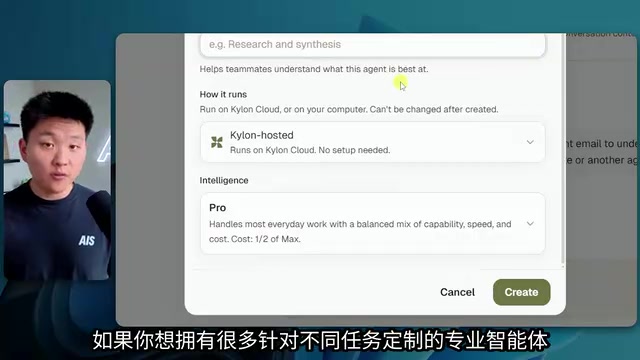
Users can set each agent's persona, thinking style, and tone, and can also view its current quota consumption. Nate mentioned that Aiden has not shared his Claude or Codex subscription access with him—this privacy control is deliberate, as sharing is optional.
Claude Opus is the flagship version of Anthropic's Claude model family, positioned for highly complex reasoning, system design, and long-chain engineering tasks. Compared with lightweight models, Opus performs better at code generation, multi-step logical planning, and following details, but its per-call cost is also significantly higher. Kylon points its highest-tier agent backend at Opus, meaning this tier suits design and engineering scenarios that require deep thinking rather than everyday administrative chores. This tiering strategy is essentially a trade-off between cost and capability: Fast mode likely calls a smaller model to keep costs down, Professional mode sits in the middle, and the highest mode uses Opus to guarantee output quality. Users can flexibly choose based on task type, avoiding the use of high-cost models for low-complexity work.
Real-World Use Cases: From Instagram Automation to Project Tracking
In the AIS Instagram channel, Nate demonstrated a complete content automation flow. His Claude Code subscription automatically researches news developments, brainstorms content, creates carousels, and publishes them to Instagram every 6 hours. The final carousels match the brand style, and some embed video.
Another case is a team tracking board. Nate connected ClickUp to Kylon, and the Herk agent follows up at the end of each day on whether team members completed their committed goals. This solves a real pain point: people complete tasks in ClickUp but forget to check them off as done, causing data distortion and inaccurate information for others. Nate emphasized that Kylon is not meant to replace ClickUp or Google Drive, but to make these existing tools run more orderly through automation.
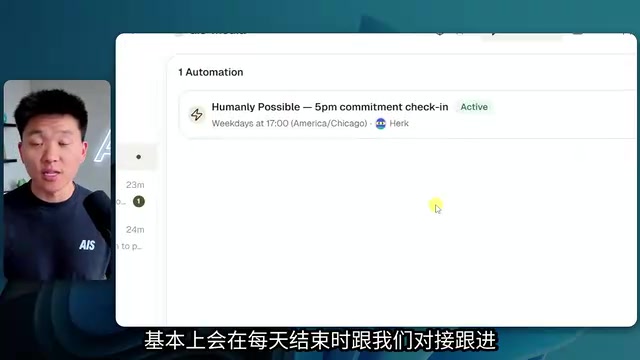
ClickUp is a popular project management and productivity platform that supports task lists, kanban boards, Gantt charts, goal tracking, and other views; teams often use it to assign work, set deadlines, and monitor progress. In Nate's case, ClickUp serves as the system of record for the team's committed goals, and the Herk agent automatically follows up at the end of each day on whether members completed their assigned tasks. The problem is that ClickUp's completion status depends on manual check-offs; when members actually finish a task but forget to mark it complete, the data becomes distorted, leading managers and other members to see incorrect information. Kylon's automation does not replace ClickUp—rather, through agents proactively verifying and reminding, it compensates for missed manual operations and makes the data in existing tools more reliable.
Implementation Advice: Start with Quick Wins
Nate offered a concrete path to get started. He suggests first generating a Markdown brief about your personal business and work in your own Claude Code or Codex, then importing it into a new Kylon agent so it quickly understands your context. Then connect services like Gmail, Google Calendar, GitHub, and Notion, or enter API keys manually.
For rolling it out to a team, his advice is to find "quick wins" rather than piling on a bunch of apps and automations. Get one specific workflow running first—say, weekly report tracking for a business line or content production—and only add new channels and invite more people once the process is smooth.
Nate also admitted that these capabilities weren't entirely impossible before. He had tried building a similar conversational agent in ClickUp; it worked technically, but required custom mapping, round-robin logic, GitHub deployment, and version management—high technical barriers and not intuitive. Kylon's value lies in encapsulating that complexity so small teams can get up to speed quickly.
Editorial View
Kylon is trying to address a demand gap that is taking shape: as personal AI toolchains mature, the team-level collaboration layer becomes the next bottleneck. Its channel-based design and bring-your-own-subscription model make sense in principle, but actual results depend on stability in multi-user scenarios, the granularity of permission management, and whether the information flow remains controllable as the number of agents grows. Nate's demo provides a valuable reference sample, but the tool's long-term performance still needs more team practice to verify.
One-line Summary
Kylon combines Slack-style channels with AI agents to solve the pain points of duplicated effort and data synchronization in team collaborative AI workflows.
Paragraph Summary
The article introduces tech creator Nate Herk's exploration of multi-user collaborative AI workflows and how the new tool Kylon solves the problem that a personal AI operating system cannot be shared with a team. Kylon uses a Slack-style channel interface, letting human members and their respective agents collaborate in the same workspace, supporting direct agent-to-agent communication and sub-threads for executing complex tasks. Its two key billing designs are per-workspace billing and support for bringing your own Claude Code/Codex subscription; agents are tiered by task into Fast, Professional, and highest modes, with the highest reportedly calling Claude Opus. Nate demonstrated Instagram content automation and ClickUp project tracking cases, and advised teams to roll out gradually starting from quick wins. The editor believes Kylon addresses a demand gap at the team collaboration layer, but long-term results remain to be verified.
Related articles

Cursor AI Programming in Practice: Build a Student Management System from Scratch in 30 Minutes
A Bilibili creator demonstrates Cursor AI programming: generating a student management system in 30 minutes with natural language. Details on Agent mode, Claude selection, prompt techniques, and thresholds.

Top 20 AI Coding Tools Ranking: From Rock-Solid to Lackluster, a Scored Matrix
Bilibili creator releases top 20 AI coding tools ranking, tiered T0–T4 from rock-solid to lackluster, with Claude Code and Codex tied at T0. This article details the scoring dimensions (capability, reliability, robustness, durability, cost, domestic availability) and tool performances to help developers choose the right AI coding assistant.

Vibe Coding Systematic Tutorial: Master AI-Assisted Programming from Zero
A three-month Vibe Coding tutorial from a Bilibili creator covering Codex, ClaudeCode, and Cursor, from core logic to commercial project practice for beginners.