The Essence of AI Agents: Model, Tools, and Loop

An AI Agent consists of model, tools, and loop; the key to design is defining permission boundaries and stop conditions.
The article breaks down the composition of an AI Agent using a minimalist explainer video: the model makes decisions, tools provide external capabilities, and the loop drives continuous "act-check-re-decide" operation. Among the three, the loop is the essential difference between an Agent and an ordinary chatbot, shifting it from single answers to goal-driven, autonomous strategy adjustment. But greater autonomy means greater risk, so the article emphasizes that the core design principle is to define permission boundaries and stop conditions—clarifying what the Agent can do and when it should stop and return decisions to humans, consistent with the human-in-the-loop engineering approach. Finally, the article turns the three-element framework into a checklist developers can directly compare against, helping distinguish a true Agent from a simple chat interface.
The term AI Agent may sound like a pile of buzzwords, but beneath the surface, its core typically consists of just three parts. Recently, an explainer video from YouTube broke down the composition of an Agent in a minimalist way and offered a key design principle: don't just say "handle everything"—be clear about what it can do and when it should stop and ask you.
Three Parts, One Loop
The video points out that an Agent typically consists of the following three elements:
- Model: Responsible for deciding what to do next. This is the Agent's brain, usually a large language model.
- Tools: External capabilities the model can call, such as web search, running code, calling APIs, etc.
- Loop: Execute an action, check the result, decide again, until the task is complete.
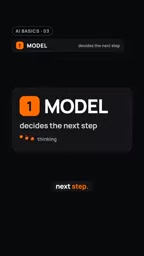
This definition is powerful because it pulls the Agent from mysticism back into engineering reality. Without tools, the model can only spin within text; without a loop, the model can only give a one-shot answer. The presence of the loop allows the Agent to adjust its strategy based on intermediate results.
The Loop Is the Soul of the Agent
The video emphasizes: "An Agent doesn't stop after giving one answer. It keeps running until the task is complete."
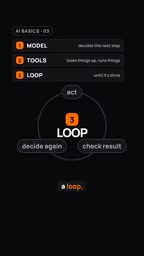
This reveals the essential difference between an Agent and an ordinary chatbot. A chatbot is a single-turn or multi-turn conversation, while an Agent is goal-driven. You give it a goal, and it plans its own path, executes, observes, and re-plans. This "act-check-re-decide" loop is the source of the Agent's autonomy.

But this also brings new problems: if the loop has no clear termination condition, the Agent may fall into an infinite loop or perform operations beyond expectations.
The ReAct (Reasoning + Acting) pattern is a classic reference for understanding the Agent loop. It was proposed by Shunyu Yao et al. in 2022. The core idea is to let the large language model alternately produce "Reasoning" and "Acting" at each step: first reason about the current state and the next intent, then call a tool to execute an action, then observe the returned result, and enter the next round of reasoning. This alternating "thought-action-observation" structure is the concrete implementation of the "act-check-re-decide" loop mentioned in the article. The value of ReAct lies in making the model's reasoning process explicit, which not only improves task success rates but also allows every step of the loop to be logged and manually reviewed, providing a handle for setting stop conditions and debugging Agent behavior.
The Key to Designing an Agent: Boundaries and Stop Conditions
The advice given in the video is very pragmatic: "Don't just say 'handle everything'; be clear about what it can do and when it should stop and ask you."

This means that when designing an Agent, you need to define two things:
- Permission boundaries: Which tools can the Agent call? Which data can it access? Which operations can it perform?
- Stop conditions: Under what circumstances should the Agent stop and return decision-making power to humans? For example, when encountering uncertainty, involving sensitive operations, or when the number of loop iterations exceeds a threshold.
This view is consistent with the current "human-in-the-loop" approach in AI engineering practice. The more autonomous the Agent, the more it needs clear guardrails.
Human-in-the-loop is a design paradigm that embeds human judgment into automated processes. In the Agent context, it does not mean that every step requires manual confirmation, but rather that human intervention "gates" are set at key nodes: for example, when performing irreversible operations (deleting data, sending emails, making payments), when confidence is below a threshold, or when the number of loop steps approaches the upper limit, pause and request human approval. Common engineering implementations include approval queues, permission checks before tool calls, and interruptible execution state machines. Alongside this is "observability" design—recording the model input, tool call parameters, and returned results at each step, so that humans can quickly understand the context when intervening, rather than facing a black box.
Implications for Developers
For developers building Agent applications, this three-element framework provides a clear checklist:
- Does your model have sufficient reasoning capability to decide the next step?
- What tools have you equipped the Agent with? Are these tools safe and controllable?
- Does your loop have clear termination conditions and error handling mechanisms?
- Have you defined the division of labor between the Agent and humans?
The video concludes with one sentence: "Model, tools, loop." Simple, but enough to distinguish a true Agent from a simple chat interface.
In an era where AI applications are emerging endlessly, returning to this foundational framework may help you avoid much of the confusion brought by hype.
Function Calling is the basic mechanism by which current mainstream large models make "tools" a reality. Developers describe each tool's purpose, parameter types, and constraints in structured JSON. During reasoning, the model outputs a call request that conforms to that structure, which an external runtime executes and returns the result to the model. This mechanism turns "which tools the model can call" from a vague convention in the prompt into a verifiable interface contract: non-compliant parameters can be rejected, unregistered tools cannot be called, and permission boundaries thus gain a technical foothold. Understanding the schema design and error-return conventions of Function Calling is the prerequisite for making the "tools" element of the three truly safe and controllable.
One-line Summary
An AI Agent consists of three elements—model, tools, and loop—and the key to design is defining permission boundaries and stop conditions.
Paragraph Summary
The article uses a minimalist explainer video to break down the composition of an AI Agent: the model makes decisions, tools provide external capabilities, and the loop drives continuous "act-check-re-decide" operation. Among the three, the loop is the essential difference between an Agent and an ordinary chatbot, shifting the Agent from a single answer to goal-driven, autonomous strategy adjustment. But greater autonomy means greater risk, so the article emphasizes that the core design principle is to define permission boundaries and stop conditions—clarifying what the Agent can do and when it should stop and return decisions to humans, consistent with the human-in-the-loop engineering approach. Finally, the article turns the three-element framework into a checklist developers can directly compare against, helping distinguish a true Agent from a simple chat interface.
Related articles

Cursor AI Programming in Practice: Build a Student Management System from Scratch in 30 Minutes
A Bilibili creator demonstrates Cursor AI programming: generating a student management system in 30 minutes with natural language. Details on Agent mode, Claude selection, prompt techniques, and thresholds.

Top 20 AI Coding Tools Ranking: From Rock-Solid to Lackluster, a Scored Matrix
Bilibili creator releases top 20 AI coding tools ranking, tiered T0–T4 from rock-solid to lackluster, with Claude Code and Codex tied at T0. This article details the scoring dimensions (capability, reliability, robustness, durability, cost, domestic availability) and tool performances to help developers choose the right AI coding assistant.

Vibe Coding Systematic Tutorial: Master AI-Assisted Programming from Zero
A three-month Vibe Coding tutorial from a Bilibili creator covering Codex, ClaudeCode, and Cursor, from core logic to commercial project practice for beginners.