Using AI Agents to Automatically Find the Best Meeting Time for Your Team
Define scoring rules, extend the AI assistant with Codex, and generate meeting slot rankings and heat maps in seconds.
The article walks through using an AI Agent for meeting coordination: divide a week into 30-minute slots, score each by attendee status (free=1, tentative=0.5, busy=0), rank them; add an availability matrix tool via Codex that outputs top slots, absentees, and a single-file HTML heat map (requires restart and verification); ask in natural language for candidates; invitations are drafted only, and the author manually verifies a slot's score. It previews connecting to real Outlook with IT collaboration, emphasizing a universal rules-tools-verification skeleton.
Title
Using AI Agents to Automatically Find the Best Meeting Time for Your Team
Meta Description
Follow the second installment of the Outlook Assistant tutorial to learn how to use an AI Agent to automatically find the best 30-minute meeting slot for a six-person team: define free/tentative/busy scoring rules, use Codex to add an availability matrix tool, generate a full-week heat map, rank the top three slots and draft invitations, with manual verification and security boundary notes.
Article Content
Scheduling a 30-minute meeting for six colleagues can turn into a three-day email chain of "does Tuesday work?" — a familiar scenario for many team coordinators. The second installment of the "Outlook Assistant" series on the YouTube channel Edge shows another possibility: let an AI Agent build an availability matrix in seconds, score and rank slots by rules, generate a heat map, and draft invitations. The entire process is built on a clear set of scoring rules and Codex tool extensions, and its core ideas are valuable to anyone looking to use AI to transform schedule coordination.
Scoring Rules First: Turning "Who's Available" into a Computable Score
Before letting AI write a single line of code, the video's author did something easily overlooked: define the scoring rules. The approach is to divide a week into 30-minute time slots and, for each slot, tally attendee status — free counts as 1 point, tentative as 0.5 points, busy or out of office as 0 points. The slot's score is the sum of all attendees' points as a percentage of the maximum (number of people × 1), then slots are sorted from highest to lowest score.
The key to this design is treating "tentative as half a person." In reality, much of the inefficiency in meeting coordination stems precisely from tentative status being neither something you can directly exclude nor something suitable to treat as fully available. Converting it to 0.5 points gives "maybe attending" time slots a reasonable intermediate weight in the ranking, rather than mixing them with fully free or fully occupied slots. Rules are defined by humans, scoring is executed by machines — this is the prerequisite for automating all subsequent steps.
In calendar systems, attendee time status typically falls into several standard types: Free means fully available for that period; Tentative means an invitation has been accepted but may change; Busy means a confirmed commitment exists; Out of Office means on leave or traveling. These statuses can be retrieved in bulk via the Exchange/Outlook API (such as Microsoft Graph's scheduleInformation), forming the data foundation for building an availability matrix. Understanding the semantic differences between these statuses is important: busy and out of office are usually non-negotiable, while tentative status leaves room for negotiation, so assigning it an intermediate weight is a reasonable engineering trade-off.
Adding a New Tool with Codex: Availability Matrix and Heat Map
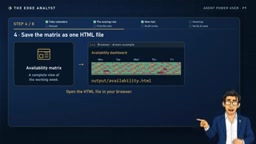
Once the rules were set, the author added a new tool to the assistant via Codex. The request had two parts: first, build the availability matrix, apply the scoring rules above, and return the top three slots plus the list of people who can't attend; second, in the same request, save the matrix as a heat map, output as a single HTML file that can be opened directly in a browser, similar in form to the dashboard from the previous installment in the series.
After adding the tool, you need to close Codex and restart it so it loads the new tool, then do a check via SlashMCP to confirm the tool is in place. This "restart—verify" step may seem trivial, but it reflects a practical constraint: an Agent's capability extensions aren't hot-loaded, and new tools require explicit confirmation to take effect. For readers planning to follow along, this is an easy place to stumble.
Codex here refers to an AI assistant framework that supports tool extensions (similar to the agent form of OpenAI Codex), allowing developers to register new callable tools (function/tool) via natural language descriptions or code snippets. SlashMCP is a checking mechanism for interacting with an MCP (Model Context Protocol) server via slash commands, used to confirm whether a tool has been correctly loaded and exposed. MCP is an open protocol proposed by Anthropic, aimed at standardizing how AI models connect to external tools and data sources, enabling Agents to dynamically discover and invoke new capabilities. The core value of such tool extension mechanisms is that domain-specific functionality can be added on demand without modifying the assistant's core logic.
Asking in Natural Language: Top Three Slots and a Full Heat Map
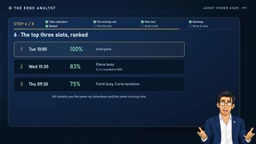
With the tool ready, the author asked directly in natural language: "Find the best 30-minute time slot next week." The assistant faced the calendars of six colleagues — Anna, Ben, Carla, David, Alaina, and Farid — and returned three candidates: Tuesday 10:00 with everyone free, scoring 100%; Wednesday 15:30 with five of six available; and Thursday 9:30 scoring 75%. It also output the names of those unable to attend, making follow-up communication easier.
You may not have noticed that the heat map visualizes the entire week at once, so "which time slot is best overall" no longer depends on comparing calendars one by one. This combination of "ranked results + global view" is more practical than simply giving a single recommended time — when the highest-scoring slot isn't feasible, the coordinator can quickly understand what the trade-off of the next-best option is.
A heat map is a two-dimensional visualization that uses color intensity to represent values, in this scenario with time slots of the day on the horizontal axis and days of the week on the vertical axis, where darker colors indicate higher availability scores for that slot. Compared to reading a table row by row, a heat map lets coordinators quickly identify "golden hours" and "danger zones" in a single screen. The benefit of outputting the visualization as a single HTML file is zero dependencies, offline opening, easy sharing and archiving, and avoiding the complexity of deploying a dashboard service.
Drafting Invitations and Manual Verification: AI Conclusions Still Need Human Review
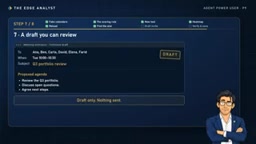
After selecting the best slot, the assistant drafted a meeting invitation with a short agenda about a Q3 portfolio review. It should be noted that the demo server in the video doesn't include a send tool by design, so the output stays at the draft stage and no email is actually sent. This design both fits the demo's security boundaries and highlights a real-world principle: letting the Agent draft while a human confirms sending is a more reliable division of labor.
The author then did something worth learning from — manual verification. He picked the third slot from the heat map (Thursday 9:30, 75%) and checked it person by person against the calendar file: one free, one tentative, one busy, exactly corresponding to the 75% score. Before using AI output for real decisions, sampling one case for manual review is a low-cost, effective way to catch errors in rule implementation.
From Fictional Data to Real Calendars: Boundaries and Next Steps
This installment's demo used entirely fictional data throughout, and ended by setting a save point called "meeting finder view one" for future iteration. The author previewed that the next installment, the series finale, will discuss how to connect this assistant to real Outlook in the right way, in collaboration with the IT team.
The inspiration of this approach lies in its structure rather than the specific tools: first define quantifiable scoring rules, then encapsulate the rules as tools the Agent can call, trigger with natural language, use visualization to aid decision-making, and finally retain manual verification and human confirmation of sending. Team size, slot granularity, and tentative weighting can all be adjusted to team habits, while the "rules—tools—verification" skeleton is universal.
Reference: YouTube channel Edge, "Outlook Assistant Part 2" video.
Connecting the demo assistant to a real Outlook calendar involves several production environment concerns: OAuth 2.0 authorization and permission scopes (such as Calendars.ReadWrite), enterprise tenant admin consent policies, data privacy and compliance review, and the Mail.Send permission required to send email. IT teams typically need to assess security risks and may require validation in an isolated test tenant first. In addition, real calendar data is noisier than fictional data (such as recurring meetings, all-day events, time zone differences), and the scoring rules may need preprocessing steps like deduplication and time zone normalization.
One-line Summary
Define scoring rules first, then extend the AI assistant with Codex to generate meeting slot rankings and heat maps in seconds.
Paragraph Summary
The article describes a complete workflow for using an AI Agent to assist with meeting coordination: first divide a week into 30-minute slots and score each slot by attendee status (free = 1, tentative = 0.5, busy = 0) and rank them; then add an availability matrix tool to the assistant via Codex, outputting the top three slots, the absent list, and a single-file HTML heat map, with a restart and verification required after adding; then ask in natural language to get candidate slots (e.g., Tuesday 10:00 with 100% attendance); invitations are only drafted since the demo server has no send tool; the author also manually verified one slot's score to validate the rule implementation. Finally, it previews the next installment on connecting to real Outlook in collaboration with the IT team, emphasizing the universal "rules—tools—verification" skeleton.
Related articles

2026 Top 7 Free AI Coding Tools: Hands-On Ranking and a Free-Stack Combo Strategy
Hands-on ranking of seven free AI coding tools in 2026, covering Cursor, GitHub Copilot, Windsurf, Google Antigravity, and local Ollama, plus a free-tool combo strategy that never runs out of quota.

ChatGPT vs. AI Agents: Choosing Between Conversation and Agentic Workflows
ChatGPT vs. AI Agent explained: the real difference between basic conversation and agentic workflows, the observe-choose-act-check loop, and when to use each.

OpenBot: A Local-First Desktop Workspace for AI Teammates
OpenBot is a local-first desktop workspace by nightly-labs that runs Codex, Claude, and Grok as persistent AI teammates with dedicated workspaces, task queues, file sharing, browser control, and agent-to-agent collaboration. Written in TypeScript.