WorkBuddy Beginner's Guide: A Full Breakdown of Desktop AI Agents and MCP Configuration

The desktop AI agent WorkBuddy shifts users from asking AI questions to managing AI to execute office tasks.
The article centers on the desktop AI agent WorkBuddy, pointing out that traditional web AI is only a Q&A tool that cannot operate local files, so users still have to manually copy results—prompts themselves aren't valuable, execution is. WorkBuddy works out of the box and can automatically handle batch file categorization and renaming, document and Excel processing, and simple website generation, and integrates with Feishu, DingTalk, WeCom, and Tencent Docs. The author uses the analogy "CodeX is a special forces soldier, WorkBuddy is a college student," recommending ordinary office workers first use WorkBuddy to get work done and advance to CodeX only with a programming background; on cost, WorkBuddy is friendlier thanks to daily check-in credits. The article also clarifies three major misconceptions and emphasizes that the learning focus is a mindset shift: from question-asker to AI manager.
Why Do You Need a Desktop AI Agent?
Many people have been using AI for a long time and have learned a pile of prompts, yet their salaries haven't gone up. According to a Bilibili creator's observations in a course, the root cause is this: prompts are essentially just suggestions, and suggestions aren't worth anything—execution is what's valuable. Traditional web-based AI is just a Q&A tool with no permission to operate local files. It looks like you're using AI, but in reality you're still working for AI—copying results and manually operating the mouse and keyboard, as tedious as ever.
WorkBuddyAd is positioned precisely to solve this problem: it's a desktop AI agent. You simply issue a task in natural language, and it automatically dispatches, researches, executes, and delivers—directly operating your local computer to complete real office tasks.
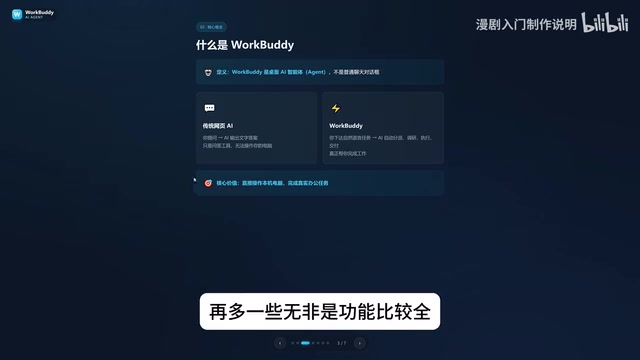
WorkBuddy's Core Capabilities and Typical Scenarios
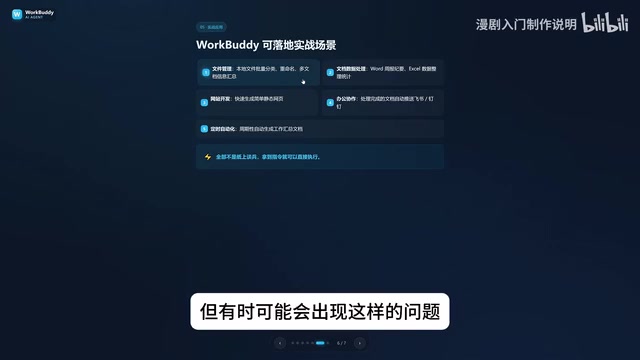
WorkBuddy works right out of the box—no environment setup, no command line required. In the video, the creator listed several practical scenarios:
- File management: batch categorization, batch renaming, and multi-document information aggregation. For example, when course folders end up out of order (01, 03, 04) due to merging, manually renaming each one is a huge hassle—WorkBuddy can do the renaming automatically.
- Document and data processing: weekly reports, Excel spreadsheet handling.
- Website development: generating simple website pages.
- Collaborative office work: deep integration with Feishu, DingTalk, WeCom, and Tencent Docs—sending Feishu messages and periodically generating work reports.
These aren't just theoretical—as long as you give reasonable instructions, WorkBuddy can execute them directly.
AI Agent The key difference from an ordinary chatbot lies in "autonomy" and "execution capability." Traditional large models can only generate text based on a conversation and cannot perceive or change the local environment; an agent adds a layer of "tool calling" capability on top of the model—it can read the file system, run scripts, operate applications, and decide the next action based on execution results, forming a "plan—execute—feedback" loop. This is typically implemented via the Function Calling mechanism: the model outputs a structured calling intent, and the host program actually executes it. WorkBuddy belongs to this category, which is why it can complete tasks requiring multiple consecutive steps, such as batch renaming and cross-document aggregation.
WorkBuddy vs CodeX: How to Choose?
The creator used a vivid analogy: CodeX is a special forces soldier, WorkBuddy is a college student. CodeX is more capable, but it needs a commander to draw up a detailed battle plan—specific files, directories, execution parameters—requiring professional skills and extensive experience; WorkBuddy is an obedient college student who is more than capable of handling simple tasks (sending files, organizing archives).
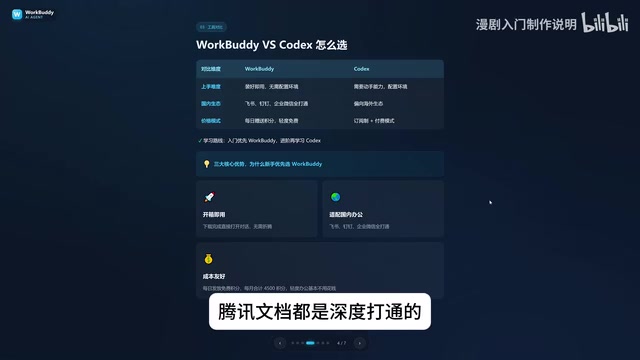
Recommendation: ordinary office workers should prioritize WorkBuddy to get work done, and only learn CodeX when they have a programming background or need to handle complex tasks—this keeps the learning cost lowest. On cost: WorkBuddy gives free credits for daily check-ins, plus a few thousand extra credits during promotional periods, accumulating at least three thousand credits a month; CodeX is subscription-based, so you pay real money even during the learning phase.
The difference between credit-based and subscription-based pricing is worth elaborating on. Pay-per-use AI products typically bill by "token," the smallest unit the model processes text in; the number of tokens consumed by a task depends on the length of input and output and the number of tool calls. The credit system essentially converts token consumption into more intuitive points and subsidizes them through check-ins and promotions, lowering the psychological barrier for users; the subscription system means prepaying a fixed fee in exchange for a quota, suitable for high-frequency, professional use cases. For beginners, the credit system has a lower cost of trial and error—you can first verify whether the tool fits your workflow before deciding whether to invest in a paid product.
Three Major Misconceptions—How Many Have You Fallen For?
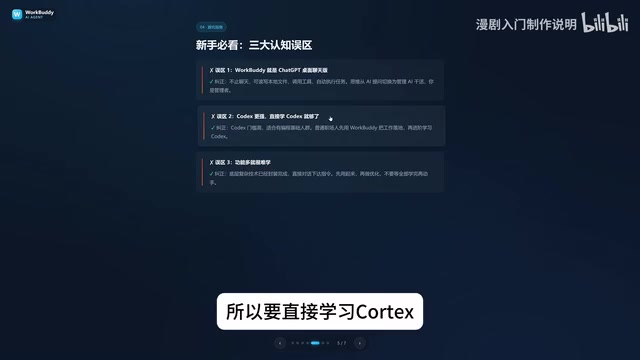
Misconception 1: WorkBuddy is just a desktop chat version of ChatGPT. Not accurate. It's not limited to chatting—it can read local files and call tools to execute tasks automatically. You need to shift your mindset from "asking AI questions" to "managing AI to get work done"—you're the manager, WorkBuddy is the employee, and your computer is the company.
Misconception 2: CodeX is more powerful, so you should learn CodeX directly. CodeX has a higher barrier to entry and suits people with a programming background. For most work, learning only WorkBuddy is completely sufficient—advance only when it's no longer enough.
Misconception 3: With so many features, it must be hard to learn. WorkBuddy's interface is very similar to Tongyi Qianwen, Doubao, and GPT. The focus of learning isn't the interface features but shifting your questioning mindset: from asking questions to issuing commands, letting WorkBuddy operate your computer for you. You can absolutely learn while watching videos and operating along.
MCP Configuration: From Installation to the Expert Center
The original course title mentions "from download and installation to the Expert Center + MCP configuration," and comes with practice materials, prompt templates, installation packages, a list of commonly used experts, and an MCP configuration guide. MCP (Model Context Protocol) is a standard protocol for connecting AI with external tools. Once MCP is configured, WorkBuddy can call more external services, expanding its execution boundaries. The creator stated that the related materials are available for free and no fees are charged.
It should be noted that the original video mainly focuses on WorkBuddy's positioning and introductory concepts; the specific steps for MCP configuration and detailed operations of the Expert Center are not covered in the available materials. It's recommended to study with the accompanying configuration guide and follow-up courses.
MCP uses a client–server architecture: WorkBuddy acts as the client (Host) and connects to various "MCP servers" through a unified protocol specification. Each server exposes a set of tools or data sources, such as file retrieval, database queries, calendar read/write, and web scraping. The value of this design lies in decoupling—tool providers don't need to develop separate adapters for each AI application, and AI applications don't need to build in all capabilities—they just connect on demand. Compared with earlier plugin systems, MCP is an open standard, and the same set of servers can be reused by different clients. For security, users usually need to explicitly authorize the scope of resources each server can access, and when configuring, prioritize servers from trusted sources.
From AI Question-Asker to AI Manager
The core of this course isn't a list of features but a shift in mindset: from simply asking questions to issuing commands that let AI operate your computer. WorkBuddy's advantages are that it works out of the box, is deeply adapted to domestic office software, and daily credits lower the cost of use. If you're still torn between learning WorkBuddy or CodeX, first ask yourself: do you need execution and getting things done, or complex programming? Once the answer is clear, the path becomes clear too.
Related articles

Altman Declares: The Cybersecurity Crisis Is Unsolvable and There Are Too Many Vulnerabilities to Patch
OpenAI CEO Sam Altman publicly admits he can't fix all security vulnerabilities and that the cybersecurity crisis will keep worsening. This article analyzes the industry reality behind this statement: exploding software complexity, the double-edged sword of AI, and the need to shift security paradigms from "zero vulnerabilities" to resilient defense.

Product Hunt Launches Visual Launch Editor, Saying Goodbye to Tedious Form Filling
Product Hunt launches a Visual Launch Editor with in-place editing for name, tagline, gallery, and maker info, auto-saved drafts, and a checklist to guide creators.

Zelensky Speaks: How We Held Kyiv Against 200,000 Russian Troops
Zelensky recalls the early Russia-Ukraine war: 200,000 Russian troops drove on Kyiv while Ukraine's main forces were in the east. He explains how mobilization grew the army from 200,000 to 800,000 and how Kyiv and Chernihiv oblasts were recaptured.