WorkBuddy Complete Beginner's Guide: A Full Breakdown of the Interface and Features, from Getting Started to Hands-On Practice
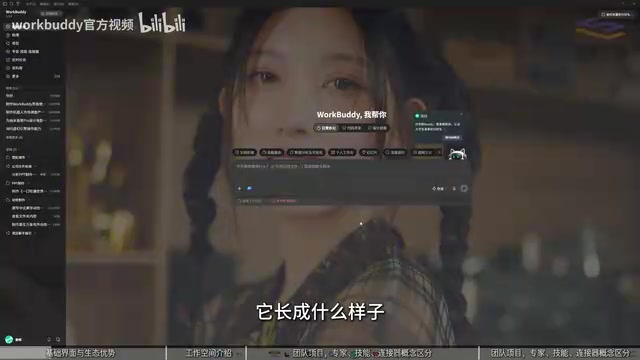
A breakdown of Tencent WorkBuddy AI office workbench's basic interface and core concepts, helping beginners build an overall understanding.
Based on the foundational section of a 60-minute Bilibili tutorial, this article systematically breaks down the interface layout and usage logic of Tencent's AI office workbench WorkBuddy. It first clarifies its positioning: not just a chat tool, but a task execution platform for office workers, finance professionals, and developers, with multimodal understanding and WeChat ecosystem advantages. It then introduces core modules including workspace and permission control, assistant (remote access), and projects (team collaboration), and highlights the distinction between three easily confused concepts: experts (optimizing AI judgment), skills (enabling execution), and MCP connectors (expanding data scope), using the metaphor of "brain, hands and feet, territory" to aid understanding. Finally, it explains scheduled tasks and the knowledge base, summarizing three core task categories—everyday office work, code development, and design creativity—providing a clear path for beginners to move from "looking at features" to "actually using them."
WorkBuddy is an AI office workbench launched by Tencent. It doesn't just chat—it understands natural language instructions, plans tasks autonomously, and within authorized scope can process local files, generate documents and spreadsheets, create PPTs, and even assist with app development. A Bilibili creator used a 60-minute ultra-complete tutorial to address a common pain point: many tutorials only cover features without explaining the underlying principles, leaving beginners unsure where to start even after watching.
This article is based on the foundational section of that tutorial, breaking down WorkBuddyAd's interface layout and the usage logic of each section to help you quickly build an overall understanding of this tool.
1. WorkBuddy's Positioning: More Than Just a Chat Tool
The creator emphasized from the outset that WorkBuddy's core value lies in "turning ideas into actual results." It targets three groups: everyday office workers (handling documents, Excel, PPT, data analysis), finance industry professionals (document processing), and developers (websites, mini-programs, Agent development).
As a Tencent product, WorkBuddy has natural advantages in the WeChat ecosystem and mini-program development, and integrates more smoothly with services like Tencent Cloud. It also features multimodal understanding capabilities, supporting image, video, and voice interaction, so it can play a role in design and creative scenarios (such as poster generation and visual motion effects).
The interface design itself reveals the target users—different sections correspond to different work scenarios. The creator demonstrated the process of having WorkBuddy design a PPT around a theme: with just a single sentence instruction, the tool automatically generates a draft, saving enormous amounts of repetitive work.
2. Breaking Down the Core Interface Modules
1. Workspace and Permission Control
The workspace specifies where files are stored. After you select a directory, all files WorkBuddy generates during that session are saved to that directory for easy management later.
"Allow full access" is a key toggle. Only when enabled does WorkBuddy have permission to operate on your computer's local files; when disabled, its access scope is restricted. The creator cautioned that this option should be set carefully based on task requirements.
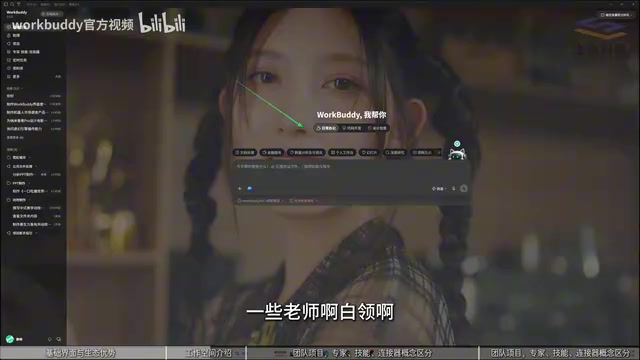
2. Assistant: Remote Connection to WorkBuddy
The Assistant module supports conversing with WorkBuddy through channels like WeChat, QQ, DingTalk, Feishu, and WeCom. Essentially, this is a remote access method similar to Open Claude. For example, if you send a message on WeChat asking it to send over a file from your computer, it will execute the request. The creator called it a "true assistant," enabling remote control.
3. Projects: Team Task Collaboration
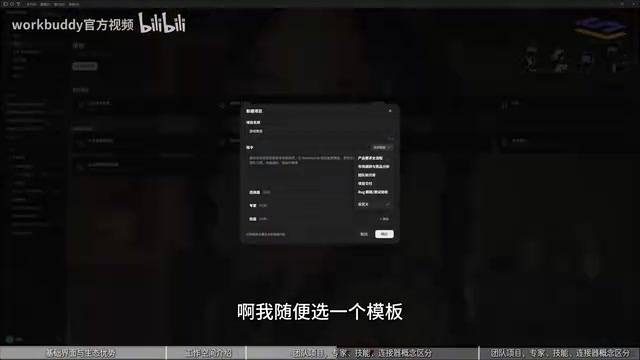
The Projects module is designed for team tasks. You can create projects, select templates, and assign tasks and deadlines to different members. The creator explained that this is essentially a collaboration workflow where superiors define tasks and subordinates execute the assignments.
MCP (Model Context Protocol) is a standardized protocol proposed and open-sourced by Anthropic in late 2024, designed to let AI models connect to external data sources and tools in a unified way. It uses a client-server architecture: AI applications act as clients, while external services (such as cloud documents, databases, APIs) act as servers, exposing resources and operations through standardized interfaces. Unlike traditional one-off custom integrations, MCP allows any compatible AI to access connected services in a "plug-and-play" manner, greatly reducing expansion costs. WorkBuddy's "connectors" mentioned in this article are precisely concrete implementations of the MCP protocol—application providers expose MCP servers, and WorkBuddy can securely read or operate on this cloud data, while the application provider controls the scope of what is exposed. This is also why the creator compared MCP to "expanding territory": it doesn't change the AI's own reasoning capabilities, but rather expands the boundaries of information and operations it can reach.
3. Experts, Skills, and Connectors: Three Easily Confused Concepts
The creator focused on distinguishing these three concepts, which together form WorkBuddy's extension ecosystem.
Experts (role agents) : Built-in prompts that turn the AI into a "mini-expert" in a specific domain. Through role and identity settings, they enable the AI to output more accurate professional information. The creator likened this to "optimizing the AI's brain," whose main function is to offer suggestions and improve judgment quality.
Skills : A fixed, reusable method of operation. The creator likened this to "giving the AI hands and feet," enabling it to actually do work. Skills typically target software or operations on the local computer, such as handling PDFs, Markdown, front-end design, and more.
Connectors (MCP) : A bridge connecting cloud applications or external services. They don't necessarily correspond to local software—data may reside in the cloud (such as cloud documents). MCP's role is to expand the AI's operational scope, allowing it to access and operate data sources it otherwise couldn't reach.
The creator used the concept of an "ecosystem" to explain why so many extensions are needed: application providers open up MCP to ensure AI can connect to them, while controlling the scope of data exposed. Experts optimize the brain, Skills optimize the hands and feet, and MCP expands territory—each plays its own role.

4. Scheduled Tasks and Knowledge Base
Scheduled tasks allow you to preset instructions and trigger times, such as "help me open a certain software on my computer in ten minutes." For complex tasks, you can choose a more powerful AI model; for simple tasks, there's no need to overthink it. Before execution, the system will confirm computer permissions again.
Knowledge base functions as an external knowledge add-on. If you have proprietary materials or public knowledge (such as biomedical data), you can put them into the knowledge base so the AI prioritizes reading them each time it executes a task, rather than broadly searching the web. The creator emphasized that this is similar to the logic of AI web search, except the data is proprietary content you've already organized.
5. Summary: Three Core Task Categories
WorkBuddy's core capabilities can be summarized into three task categories: everyday office work (documents, spreadsheets, PPT), code development (websites, mini-programs, Agents), and design creativity (posters, images and video). The creator believes that understanding the purpose of each interface section is the first step for beginners to move from "looking at features" to "actually using them."
The subsequent advanced and hands-on sections will dive deeper into file batch processing, automated tasks, program debugging, Skills extensions, and scenarios like building websites, mini-games, and mini-programs from scratch. For those who want to get started with Agents or improve office efficiency, this tutorial provides a clear path from understanding to hands-on practice.
Background Supplement
Agent The key difference between an Agent and an ordinary chatbot lies in "autonomy." Chatbots typically only respond to single-turn instructions, whereas an Agent can understand a goal, autonomously break it down into multi-step tasks, plan the execution order, call tools (such as reading and writing files, searching, running code), and adjust strategy based on intermediate results. WorkBuddy's "autonomous task planning" capability is precisely a manifestation of Agent architecture: when a user says "make a PPT about X," the Agent will independently complete a series of actions including information gathering, outline design, content generation, and layout output. Agents are typically driven by large language models, combined with memory, tool-calling, and planning modules. Understanding Agents helps clarify why WorkBuddy needs extensions like "Experts," "Skills," and "MCP"—they respectively enhance the Agent's judgment, execution capability, and perception range, evolving it from "able to chat" to "able to do."
RAG (Retrieval-Augmented Generation) is a technique that lets large models retrieve from external knowledge bases before generating answers. The basic process is: convert the user's question or task into a query, retrieve the most relevant document fragments from a pre-built vector database, then feed these fragments as context to the model to generate a well-grounded answer. RAG's core value lies in solving the model's problems of "not knowing the latest or private information" and "making things up," while avoiding the high cost of retraining the model. WorkBuddy's "Knowledge Base" feature described in this article is essentially a productized RAG: after users upload proprietary materials, the AI prioritizes retrieving this content when executing tasks, rather than relying solely on the model's internal knowledge or web search. The creator's emphasis that "the data is proprietary content you've already organized" corresponds precisely to the role of the "external knowledge base" in RAG, which is also one of the most common implementation approaches for enterprise-level AI applications.
Related articles

Kimi K3.1 Pro Hands-On: Can an Open-Source Model Challenge Opus 5.5?
Kimi K3.1 Pro tested against Opus 5.5 and DeepSeek V4.1 Flash: strong benchmarks, but MOBA game dev exposes weaknesses. Speed near Opus, cost near DeepSeek—the open-source value pick.

The Boundaries of Multi-Agent Handoff: What to Give, What to Hide?
In multi-agent workflows, how much context should a handoff include? This article breaks down a Reddit developer's firsthand experience: whether an atomic spec plus the target file is enough for the Coder, why the Reviewer must have the spec, and how to request a bounded excerpt of a named dependency when the slice is too narrow—distilling an actionable handoff judgment rule.
Nanbeige4.3-33B Open-Sourced: Outperforms Qwen3.8-27B and Paves the Way for Small-Model Distillation
Nanbeige4.3-33B open-source model released, reportedly outperforming Qwen3.8-27B on multiple benchmarks per its Hugging Face model card, and set to serve as the distillation base for small models like Nanbeige4.3-3B. This article analyzes its performance and selection value for developers.