WorkBuddy Complete Beginner's Guide: From Installation to AI Agent in Practice

WorkBuddy is a China-friendly AI Agent that directly controls your computer and executes tasks like a digital employee.
This guide covers WorkBuddy, an AI Agent tool built for users in China. Unlike traditional Q&A AI, WorkBuddy can directly control your computer and complete full tasks within authorized scope — acting more like a digital employee. The article explains three work modes, the Skills/Experts/Connectors system, multimodal generation from images to video, scheduled automation, and a layered memory system. The core methodology throughout: describe your needs clearly in natural language and keep iterating on results.
What Is WorkBuddy, Exactly?
If you're only going to seriously learn one AI tool this year, WorkBuddyAd is worth putting at the top of your list. As framed by the Bilibili creator who made this tutorial, it's best understood as a China-friendly alternative to Codex — the interface and operational logic are largely similar, but the barrier to entry is much lower for users in China: no complex configuration, minimal hardware requirements, and a free credit allowance to get started.
The more important distinction is that it's not a traditional "Q&A chatbot." Conventional large language models are great at answering questions, analyzing content, and offering suggestions — but actually doing something still requires human hands. WorkBuddy belongs to the AI Agent category, meaning it can directly control your computer and invoke tools within the scope you authorize, driving tasks all the way to a finished result.
A concrete example: given a document with messy formatting and inconsistent punctuation, a traditional AI would tell you how to fix it. WorkBuddy would find the file on your desktop and automatically clean up the formatting itself — you just wait. This is the point the creator keeps coming back to: it's more like a "digital employee" than a chat window.
The fundamental difference between an AI Agent and a traditional large language model lies in execution capability. Traditional LLMs (like early ChatGPT) are essentially language prediction systems — you input a question and get text back, while all real-world actions remain with the human. AI Agents go further by adding "tool-calling" and "environment awareness" — they can read and write local files, call external APIs, control the mouse and keyboard, and even make autonomous decisions across multiple steps, retrying until a task is complete. This paradigm is often called "Agentic AI," representing a shift from "AI assisting humans" to "AI acting as an autonomous agent." OpenAI's Codex (now integrated into ChatGPT and a standalone product line) was one of the earlier commercial examples of this direction, focusing on code generation and computer operation tasks — but it requires stable international internet access and a degree of developer background knowledge, creating a significant barrier for most users in China.
Why Start with a Tool Like WorkBuddy?
The creator offers several practical reasons that are genuinely useful for beginners.
Low barrier to entry: Search for the product name in your browser, download it, and deploy it locally. There are dedicated versions for both Mac and Windows, and the process is straightforward.
Compatible with domestic work environments: Through "connectors," you can authorize the AI to access commonly used software like WeCom and email. Once authorized, it can help reply to messages and compile documents based on chat history — letting AI participate in a full work pipeline.
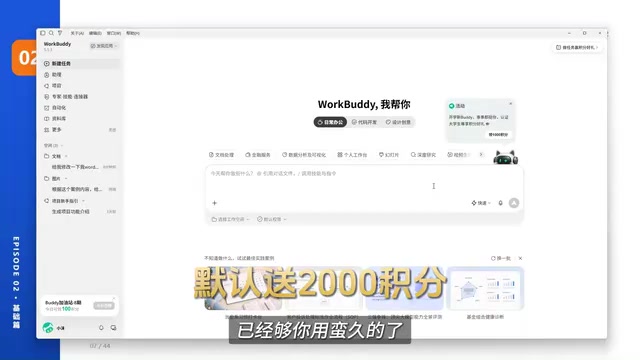
Controlled costs: You get 2,000 credits on registration, plus a daily top-up allowance, which is more than enough for light use. By contrast, many overseas products require paid subscriptions before you can unlock their real value.
One-click skills and experts: There's a built-in Chinese-language Skill marketplace where common capabilities can be installed directly, plus "Experts" playing different professional roles that can be invoked with a single click.
Compared to tools like Codex, which offer more flexibility but require understanding of code environments and workflow APIs, a locally deployable, China-compatible, cost-controlled AI Agent is simply a more realistic starting point for most beginners.
Three Work Modes: Choosing the Right One Saves Credits
WorkBuddy offers three work modes. The creator uses a "different types of employees" analogy that makes them easy to grasp:
Default Mode (Execution Mode)
Best for simple, well-defined tasks where the AI can get straight to work — like organizing a folder. The built-in "enhanced prompt" feature automatically refines your instructions, which is beginner-friendly. This mode covers most everyday tasks.
Plan Mode
Designed for complex tasks. It will ask you clarifying questions and lay out a step-by-step plan before doing anything, waiting for your approval. For example, if you ask it to "build a gaming website," it'll first ask about your requirements and theme, then present a complete plan.
Ask Mode
Closest to a traditional AI, but with the ability to read local files. You can ask things like "how many assets are in this folder?" and it will read the directory and give you an answer. It only responds — it doesn't take action — so it consumes the fewest credits.
The creator makes a point worth remembering: for simple questions, Ask mode is sufficient. Using Default mode is overkill and burns more credits; using Plan mode makes even less sense. Choosing the right mode is itself a cost-saving skill.
Multimodal Capabilities: From Images to Video in One Flow
WorkBuddy can generate documents, images, presentations, and videos. The tutorial walks through a complete example: producing a children's picture book short video on the theme of The Little Match Girl.
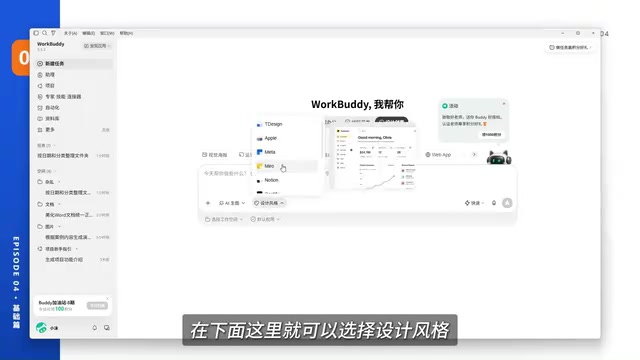
The workflow goes roughly like this: start in the "Design & Creative" section, choose a picture book style and set a 16:9 ratio, let the AI refine your prompts and generate a set of illustrations; select and revise any elements you're unhappy with (like unwanted text); then drag those images or @ them into a new project and ask it to generate a short video with transitions, subtitles, and narration. The AI renders a 25-second animated picture book, subtitles added automatically, and you can keep refining through conversation if needed.
The creator repeatedly emphasizes a core methodology here: the more detailed your prompt, the better the result. Whether you're generating a document, image, or video, the key is learning to describe what you need in natural language, then iterating on the output.
Core Features: Experts, Skills, and Connectors
This is the most important section of the entire tutorial. These three components form the capabilities that set WorkBuddy apart from ordinary AI tools.
Skills: Teaching the AI to "Do a Specific Thing"
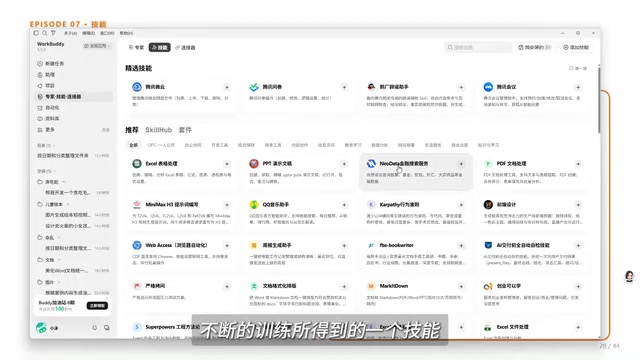
A Skill is a concrete, trained capability — like sending an email or creating and editing a PowerPoint presentation. Install them from the Skill marketplace with one click, then invoke them via the slash key or the plus menu. The tutorial demonstrates converting a Snake game HTML file into a project showcase presentation — the AI actually reads the game file and automatically generates a complete deck covering project background, core mechanics, and technical highlights.
Experts: "An AI Role That Knows a Domain"
Experts combine capabilities with domain experience — for example, a "senior full-stack developer with ten years of experience." A single Expert may have multiple Skills built in. Just summon one and send your request.
Expert Teams: Multi-Role Collaborative Teams
The creator demonstrates the power of Expert Teams using a "Snake Caterpillar Game" project: a software development team with a product manager to define requirements, an architect to break down the work, an engineer to write code, and a QA to verify quality. The entire process consumed just 45 credits and produced a playable game.
Connectors: Bridging Domestic Office Software
Connectors let the AI read, process, and send emails, or organize invoices and forward them to specific contacts. The creator spells out the real value: what used to mean a full day of switching between different apps can now be done by opening WorkBuddy and issuing a single instruction.
The layered design of Skills, Experts, and Connectors maps onto the mainstream "modular capability" approach in AI systems engineering. A Skill is essentially an encapsulated function or workflow — given an instruction, it executes a fixed sequence of steps. An Expert is a role instance with a preconfigured system prompt and a bundled set of Skills, similar to layering a "professional background filter" over the model to make its reasoning and output more consistent in a given domain. A Connector is fundamentally OAuth authorization plus API wrapping, letting the AI access third-party services on behalf of the user. This same layered architecture exists in mainstream AI Agent frameworks like LangChain and AutoGen — WorkBuddy simply productizes it into a low-code interface, lowering the barrier for everyday users. Understanding this underlying logic helps you diagnose which layer is at fault when a task fails, so you can adjust your instructions or authorization settings more precisely.
Advanced Features: Automation and Memory
Automation lets WorkBuddy execute recurring tasks automatically at scheduled times. For content creators, for example, you could set it to "check trending topics on short video platforms daily and filter ones with creative potential" — it runs on schedule and outputs results automatically. The creator stresses that the success of any automation depends entirely on the prompt: you must clearly describe both the task objective and the expected output format.
The memory system comes in two flavors that are easy to confuse but fundamentally different:
- Conversation memory: This is "experience-based" — the system automatically summarizes your preferences each night, so the more you use it, the better it understands you. However, if your style keeps changing, it may misremember things, making it somewhat unstable.
- Personalized global instructions: These are "hard rules" — for example, "lead with the conclusion, then break it into bullet points, bold key items, and don't fabricate information." These are enforced strictly at all times. You can also choose a reply style, from "efficient and pragmatic" to "sarcastic and snarky."
Model Selection and Remote Control
The tutorial wraps up with a few practical details. Speed-wise, there are three tiers — Fast, Balanced, and Ultimate. Use Fast for simple tasks, Balanced when you're unsure, and Ultimate for complex ones. Higher reasoning intensity and enabling Max mode preserves more context but burns more credits; the default setting is fine for most use cases.
When connecting your phone for remote control, it's a good idea to enable "allow running while locked" first, so tasks don't get interrupted when your computer's screen turns off. You can also turn successful conversations into reusable Skills, preserving the rules you've already set up.
Final Thoughts
The real value of this tutorial isn't in the step-by-step feature walkthroughs — it's in the mindset it conveys for using an AI Agent: treat WorkBuddy as a "digital employee" you can authorize and collaborate with, not a chat window collecting dust in your bookmarks. From setup to Expert Team collaboration, from multimodal generation to automated tasks, everything comes back to one thing — learning to express your needs clearly in natural language, and continuously iterating on the results. For beginners who don't write code and have never touched AI before, this is genuinely an accessible entry point.
Related articles

Qwen 4 First Test Leaks: Performance Rivals Opus 5.5, DeepSeek V4 Series Surfaces
Early Qwen 4 test outputs leak, with front-end generation said to rival Opus 5.5; DeepSeek V4 Mini, Flash, and Pro names appear in a code repo; Ant Group's Ling-3.1-flash surfaces too. Here's the latest on model tiering and on-device lightweight models.

OpenCode Makes DeepSeek V4.1 Flash Free, AI Daily Roundup
AI daily roundup: OpenCode makes DeepSeek V4.1 Flash free, StepFun Step5 Preview and Ling 3.1 Flash open-sourced, Grok Voice 3.0 tops speech leaderboard, Matrix Game 4.0 open-sourced, and the EU opens its first AI Act enforcement probe into OpenAI and Anthropic.

DeepSeek V4.1 Flash 1017 Released: Reasoning and Coding Upgrades, Search and Fetch API Now Available
DeepSeek releases V4.1 Flash 1017 with major gains in reasoning, coding, and agentic tasks, plus web search and fetch APIs at 5 yuan per 1,000 requests. Tencent Hunyuan open-sources High Memory 2.0, Perplexity open-sources multimodal decision models, and MOFCOM seeks comments on AI export catalog.