Buddy Review: The "Agentic Cloud" That Lets AI Agents Deliver Code Autonomously

Buddy shifts from CI/CD to an Agentic Cloud, letting AI agents handle build, test, and deploy via MCP.
Buddy has transformed from a traditional CI/CD tool founded in 2016 into what it calls an "Agentic Cloud," unifying compute, storage, and delivery on one platform. Its core is containerized pipelines defined visually or in YAML, with multi-architecture support, incremental build caching, one-click rollback, branch preview environments, visual testing, and sandbox cloud machines. This year's remote MCP server lets AI agents view pipelines, logs, and servers, while tool filtering cuts an agent's visible tools from 118 to 28, limiting the blast radius of mistakes. In the official demo, an agent found and fixed a local time zone bug without pushing code, diagnosing it in 78 seconds and rerunning successfully in 40 seconds, with humans retaining approval rights. Pricing comes in Free, Pro, and Hyper tiers, but the GB-minute billing model and mixed euro/dollar pricing deserve attention.
AI coding agents can write code in seconds, but someone still has to build it, test it, deploy it, and figure out at 2 a.m. why it crashed. Buddy wants to let agents handle that part too—it now calls itself an "Agentic Cloud," bringing compute, storage, and delivery together into a single platform.
Buddy is not a new product. It has been a CI/CD tool for web teams since 2016. Its website now describes it as a DevOps and platform engineering suite. In plain terms: you connect your code, and Buddy builds, tests, and ships it. What has changed this year is the pace—visual testing launched in August, AI access via MCP in September, and Buddy Drop on October 1. Three Product Hunt launches in under 6 weeks, all pointing in the same direction: letting agents run delivery work.
What Buddy Does Under the Hood
At the core of Buddy is the pipeline. You can design pipelines in a visual editor or in YAML, and each step runs in a container, with support for Intel, ARM, Linux, Windows, or Mac. Builds are cached and change-aware, so small edits don't trigger a full rebuild.
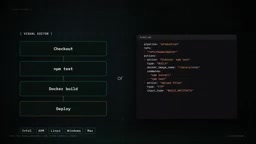
On the deployment side, Buddy can push to major clouds, ordinary VPSs, bare metal, or CDNs. If a release goes wrong, there is one-click rollback, and you can also require manual approval before production. The environments feature gives every branch and every pull request its own live URL, making it easy for reviewers to click through.
Visual testing compares screenshots against saved baselines across different browsers and screen sizes, using Playwright, Selenium, or Cypress under the hood. Tunnels can map services running on your laptop to a public address with login protection, without changing network configuration. The domains feature manages DNS and SSL certificates for you.
Sandboxes are on-demand cloud machines preloaded with Node, Docker, GitHub, and more. You can choose the specs, from 1 CPU + 2GB RAM up to 12 CPU + 24GB RAM.
MCP Access: Letting Agents Operate Your Infrastructure
The new highlight is that Buddy runs a remote MCP server. MCP is the standard way for AI agents to use external tools. Once connected, your agent can view pipelines, run history, logs, and servers.
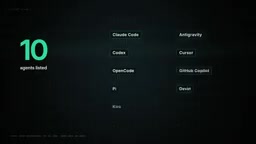
Buddy lists 10 compatible agents, including Claude Code, Codex, Cursor, GitHub Copilot, Devin, and GrokBuild. There is also a command-line tool called BDY, and we installed version 1.25.20 from NPM; the output shown below is real. A single BDY-MCP command starts a local MCP server, and the help text even prints the exact configuration lines to add to Claude Code.
You can limit which tools an agent can see—pipelines, source code, sandboxes, domains, and so on, for a total of 12 categories. This matters. In Buddy's own testing, filtering down to pipelines and source code cut the tool list from 118 to 28. Fewer tools means a more focused agent and a smaller blast radius when it makes a mistake.
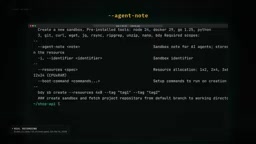
The CLI itself is also designed for agents. One command can print all 231 commands. There is also a filter called BDY-MCP that reads all commands as JSON without requiring login. Sandboxes even have a field called AgentNote, meant to hold instructions an AI agent should read before touching that machine.
About MCP
MCP (Model Context Protocol) was introduced by Anthropic at the end of 2024 to define a standard interface between AI models and external systems. Before that, every tool integration (database, file system, API) required custom adapter code for each model. MCP abstracts that layer into a unified protocol: tool providers implement an MCP Server that exposes a number of "tools" (callable functions) and "resources" (readable data); agents connect as MCP Clients and discover and invoke these capabilities according to the protocol. Because it is a standard protocol, the same MCP Server can be reused by different clients such as Claude, Cursor, and Copilot. Remote MCP means the server runs in the vendor's cloud rather than locally, and agents connect over HTTP, so remote infrastructure can be operated without installing anything on the developer's machine—this is precisely the technical precondition that lets Buddy have agents directly manage pipelines and servers.
A Real Case: Locating and Fixing a Time Zone Bug in 78 Seconds
Buddy published a walkthrough. A small Node service called JSShopAPI had a pipeline, Build and Deploy, that failed at the test step. Without pushing any code, the agent called three tools: list all runs, open the failed run, and read the 98-line test log.
The bug was a classic one: the code used the machine's local time zone to get the current hour, so a developer in Warsaw got one time while a cloud runner on UTC got another, and as a result the Happy Hour discount never took effect. The agent rewrote the code so it always used the store's time zone, then ran all 6 tests in three different time zones, and showed the diff. Only after human confirmation did it commit, push, and rerun the pipeline. The third run passed.
Buddy says the diagnosis and fix took about 78 seconds, and the rerun took another 40 seconds or so. One detail: humans always retain control over change approval—Buddy recommends this too.
Why Time Zone Bugs Are So Classic
"Using the machine's local time" is one of the most common anti-patterns in distributed systems. When code calls a local time zone API to get the current time, the result depends on which machine the process is running on: a developer's laptop set to Warsaw time, a cloud container defaulting to UTC, and the two differ by 1–2 hours. After cross-machine and cross-region deployment, any business logic that depends on local time such as "the current hour" or "today" can silently fail—and often it does not throw an error, it just produces the wrong result, for example a discount campaign that never meets its trigger condition. The right approach is to store time uniformly as UTC and convert only for user-facing display according to an explicit business time zone; even if the business rule itself depends on a local time zone, such as store opening hours, the code should explicitly specify that time zone rather than reading the runtime environment's default value. This kind of bug is time-consuming to troubleshoot precisely because it requires comparing context across logs and environments.
Pricing and a Few "Gotchas"
Three plans, all starting with a 14-day trial and no credit card required. Free: 1 user, one pipeline at a time, 300 GB minutes, 1 GB cache. Pro: €29/month, 2 users, 3000 GB minutes, 10 GB cache. Hyper: €99/month, 5 users, two concurrent runs, 6000 GB minutes, plus SSO and advanced permissions. Additional users, parallel runs, and quotas are sold separately as add-ons.
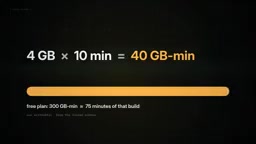
Before signing up, here are a few honest warnings. First, how GB minutes are calculated: a build with 4GB RAM running for 10 minutes consumes 40 GB minutes, so the free 300 GB minutes is only enough for about 75 minutes of that kind of build.
Second, plan prices are listed in euros, but add-ons are listed in dollars, so figure out what you will actually pay.
Third, an agent with deployment permissions is very powerful. Buddy itself recommends giving agents read-only, expiring tokens and treating build logs as untrusted input.
Fourth, this is a large platform. If you are only running tests on GitHub, you may not need all of its features. We also could not run a live pipeline ourselves—Buddy's servers were unreachable from our test machine—so the agent demo here comes from Buddy itself.
Who Is Buddy For?
Small teams and agencies that want builds, previews, tests, and hosting on one platform without stitching together five services. And developers who are already using agents to write code and now want agents to ship and clean up within guardrails. The bet is simple: the next user of your cloud dashboard may not be human at all.
Would you let an AI agent deploy to production?
Background Notes
GB Minutes and How CI Billing Works
GB minutes are a common unit of measurement on CI/CD platforms: the duration of a build run multiplied by the memory allocated to that build. A container with 4GB RAM running for 10 minutes consumes 40 GB minutes, while a 2GB container running for the same time consumes only 20. This billing method means high-memory builds, such as large frontend bundles or memory-intensive test suites, burn through quota much faster than low-memory tasks, so how long the free quota lasts depends on the actual memory configuration of your pipeline, not just the number of minutes. Before buying, estimate the memory × duration of a typical build and multiply by the number of runs per day to judge which tier is actually right.
One-line Summary
Buddy has shifted from CI/CD to an Agentic Cloud, letting AI agents take over build, test, and deployment through MCP.
Paragraph Summary
Buddy has evolved from a traditional CI/CD tool founded in 2016 into what it calls an "Agentic Cloud," bringing compute, storage, and delivery onto one platform. Its core capabilities are containerized pipelines defined visually or in YAML, with multi-architecture support, incremental build caching, one-click rollback, branch preview environments, visual testing, and sandbox cloud machines. This year's new remote MCP server lets AI agents view pipelines, logs, and servers, and tool filtering cuts the tools visible to an agent from 118 to 28, reducing the blast radius of mistakes. In the official demo, an agent located and fixed a local time zone bug without pushing code, diagnosing it in 78 seconds and rerunning successfully in 40 seconds, while humans retained approval rights. Pricing comes in Free, Pro, and Hyper tiers, but the GB-minute billing method and the mix of euros and dollars are worth noting.
Related articles

AI Reverse-Engineers Monitor Firmware in 15 Minutes — Has the Hacking Barrier Been Flattened?
A security researcher used AI to reverse-engineer Dell monitor firmware in 15 minutes—entropy analysis, key extraction, MD5 verification—revealing encryption design flaws.

Mistral Voxtral 3: Real-Time Voice at 4 Cents per Minute, Challenging OpenAI
Mistral Voxtral 3 cuts real-time voice agent costs to 4 cents per minute, bundling three speech recognition models, a speech generation model, and a real-time voice toolkit, supporting 50+ languages and self-hosting. This article analyzes its pricing structure, sub-second response performance, and its strategic divergence from OpenAI and Gemini on data privacy versus out-of-the-box convenience.

WebMCP: Every Website as Its Own MCP Server, So AI Agents No Longer Rely on Screenshots
WebMCP lets websites expose tools via the document.modelcontext API, becoming directly callable MCP servers. This article explains its architecture, the Claude Code remote-debugging demo, Chrome's current support stage, and its impact on the agent ecosystem.