Building a Production-Grade AI Agent from Scratch: A Practical Guide to RAG and MCP

Break down the full workflow of a production-grade AI Agent: four-layer architecture, MCP connectivity, RAG hands-on practice, and cost evaluation
Based on the Edureka tutorial on Bilibili, this article systematically breaks down the complete build path from a demo-level to a production-grade AI Agent. It first uses the seven-module AI evolution map to show that Agents are built on all preceding technologies, with the core difference being reasoning, task execution, and tool calling. It then presents the production-grade four-layer architecture: user interface layer, agent layer (supervisor/planner/executor/memory agents), memory and knowledge base layer, and processing orchestration and LLM interface layer. The MCP protocol standardizes the connection between Agents and external tools through the Host-Client-Server chain. The hands-on section uses ChromaDB + sentence-transformers to build RAG, FastMCP to connect a weather service, and the Anthropic API to call Claude for local deployment and verification. Finally, it discusses the evaluation framework for token cost, context windows, and multi-model cross-validation.
Building a Production-Grade AI Agent from Scratch: A Practical Guide to RAG and MCP
Most developers still understand AI Agents as nothing more than "calling an API plus a prompt," but actually putting an Agent into production requires solving far more than that: How do you design a multi-agent collaboration architecture? How do you use RAG to make the model answer from private knowledge? How do you connect external tools through the MCP protocol? How do you evaluate the cost and performance tradeoffs of model selection? This article, based on the complete hands-on content of the Edureka tutorial on Bilibili, breaks down the full workflow of a production-grade AI Agent from architecture design to local deployment.
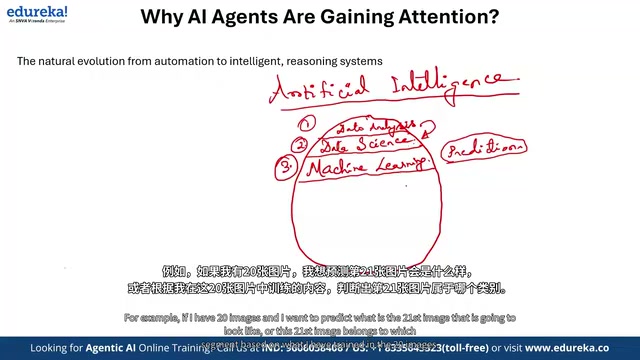
The AI Evolution Map: Why Agent Is the Seventh Module
Edureka breaks the development of AI into seven progressive modules: data analytics, data science, machine learning, deep learning, NLP/computer vision, generative AI, and Agentic AI. The value of this layered framework lies in revealing a key fact—Agents did not appear out of nowhere; they are built on the backbone of all preceding modules.
Traditional automation relies on predefined rules and has limited flexibility; generative AI solved the problems of content generation and conversational interaction; and Agentic AI builds on that by adding reasoning, task execution, and tool-calling capabilities. The lecture uses a vivid analogy to illustrate the difference: if a student trained only on a generative AI course is asked to solve a calculus problem, he cannot answer, because his flexibility is limited by the scope of his training. An Agent is different—it can use cross-validation across multiple models to avoid the hallucination risk of a single model. When one model computes 10×5=48, the Agent can call another model to verify.
This design philosophy of "not blindly trusting a single model's output" is the core of what distinguishes an Agent from an ordinary chatbot.
RAG (Retrieval-Augmented Generation) is the key technique for solving the large model's problems of "outdated knowledge" and "missing private knowledge." Its core idea is: before the model generates an answer, retrieve document fragments relevant to the user's question from an external knowledge base, inject these fragments into the prompt as context, and then have the model generate an answer based on these factual grounds. The complete RAG pipeline consists of two stages: indexing (document chunking, embedding, storing in a vector database) and retrieval-generation (question embedding, similarity search, context assembly, LLM generation). Compared with fine-tuning, RAG does not require retraining the model; updating knowledge only requires updating the vector database, making it better suited for dynamic management of enterprise private knowledge. In this article's hands-on project, the combination of ChromaDB + all-MiniLM-L6-v2 is a typical RAG implementation.
The Four-Layer Architecture of a Production-Grade AI Agent
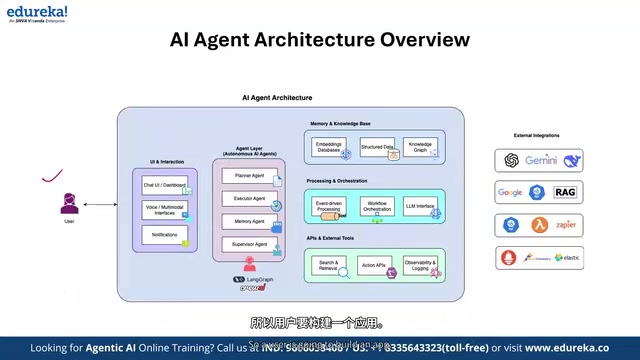
The standard AI architecture given in the tutorial covers 70%–80% of general scenarios and is divided into four core layers:
User Interface and Interaction Layer
Whether aimed at internal users or customers, the UI layer is the entry point of the solution. It carries domain identity (finance, retail, e-commerce, manufacturing), multimodal input (voice, image, text), and task notification mechanisms. A pure backend Agent without a UI is hard to sell and adopt—a point often overlooked by technical teams in actual delivery.
Agent Layer: Division of Labor Among Four Roles
This is the processing core of the entire architecture, containing four types of agents:
- Supervisor Agent: Plays the role of "manager," aggregating the status of each Agent and determining whether the task is complete, whether there are blockers, and whether handoff is needed.
- Planner Agent: Decides whether tasks should be executed sequentially or in parallel. When a task exceeds a single context window, it decides how many batches to split it into—if using GPT-series models (about 200K context), it may need 4 batches; if using Anthropic's Claude series (up to 400K context), 2 batches suffice.
- Executor Agent: Similar to a Jira ticketing system, it picks up and executes the specific tasks assigned to it.
- Memory Agent: Manages short-term and long-term memory and decides which information needs to be persisted.
Frameworks such as LangGraph and CrewAI provide the underlying capabilities for building these agents.
Memory and Knowledge Base Layer
Take a Harvard admissions exam bot as an example: 1,500 PDFs (past exam papers, standard answers, grading records) need to be embedded, chunked, and stored to build a retrievable knowledge base. This is the data foundation of the RAG system.
Processing Orchestration and LLM Interface Layer
Event-driven processing (such as HR onboarding triggering a payroll process) and workflow orchestration (sequential/parallel) are completed at this layer. The LLM interface layer provides the flexibility to switch among multiple models—mainstream vendors on the market offer 60–70 models, and Hugging Face has more than 200 options.
The MCP Protocol: The Standard Interface for Agents to Connect to the Outside World
The Model Context Protocol (MCP) is the connectivity layer that the tutorial focuses on. Its core value is standardizing the way Agents interact with external tools.
The MCP call chain is: MCP Host (IDEs or platforms such as VS Code, Cursor, Claude Code, etc.) → MCP Client → MCP Server. The tutorial demonstrates three typical Server scenarios: reading documents from Google Drive and importing them into the development environment, connecting to databases such as PostgreSQL/MySQL/MongoDB for read-write analysis, and connecting to weather services or platforms such as GitHub/Slack through Web APIs.
The brilliance of this design is that each data source or tool can be invoked as an independent MCP Server, and the Agent does not need to write custom code for every integration point.
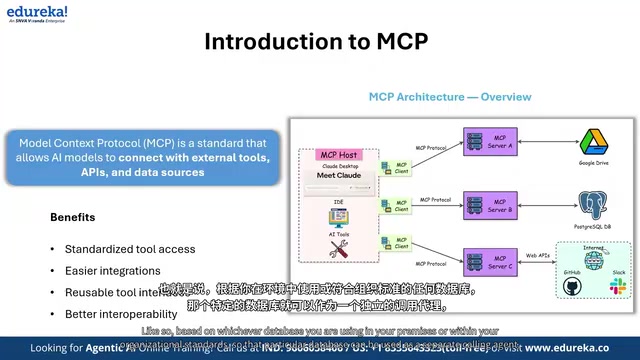
MCP (Model Context Protocol) is an open protocol proposed by Anthropic at the end of 2024, aimed at unifying the way large model applications connect to external data sources and tools. Before MCP appeared, every time an Agent integrated a new tool it required writing customized adapter code, creating an integration explosion of "N models × M tools." MCP adopts a client-server architecture: the Host (such as an IDE or Agent runtime) has a built-in MCP Client and communicates with MCP Servers through a standardized JSON-RPC protocol; each Server encapsulates one type of resource (file system, database, API) and exposes three types of capabilities: Tools, Resources, and Prompts. This decoupled design allows Agents to plug and play with any tool that conforms to the MCP standard, greatly reducing integration costs, and is also regarded as the infrastructure for interoperability in the Agent ecosystem.
Hands-On: Building a Local Agent with RAG + MCP
The tutorial's hands-on project combines RAG and MCP to build an Agent that can answer from private knowledge and query real-time weather. The tech stack is as follows:
- Vector database: ChromaDB (open source and free), used to store embedded multi-dimensional semantic data
- Embedding model: all-MiniLM-L6-v2, a small language model from sentence-transformers, specifically for semantic search
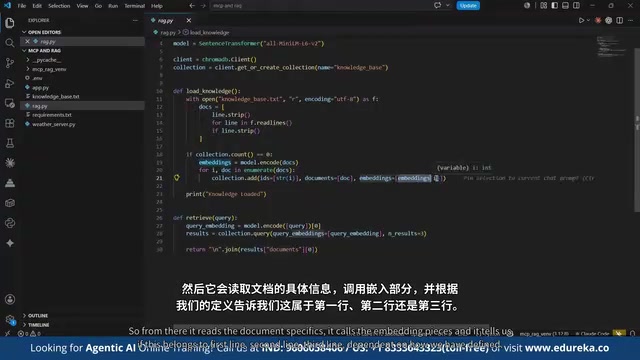
- RAG pipeline: read knowledge_base.txt → split line by line (line_strip) → embed → store in a ChromaDB collection → return the top 3 most similar results during retrieval
- MCP weather service: built on FastMCP, calling an open-source weather API, supporting three cities: Bangalore, London, and Mumbai
- Large model: calling Claude through the Anthropic API
Several engineering details in the code are worth noting: using a .env file to manage API keys to avoid key leakage leading to high bills; coordinating RAG retrieval and MCP tool calls through asynchronous calls (asyncio) in app.py; and the system prompt explicitly defining the format of the Agent's retrieval context and tool output.
Deployment and Verification
The tutorial demonstrates the complete local deployment workflow: create a virtual environment → install dependencies (anthropic, chromadb, sentence-transformers, etc.) → activate the environment → run app.py. After the Agent starts, it loads vector embeddings and enters an interactive loop; type exit to quit.
The verification stage surfaced a problem common in real development: on the first run, the model name had expired, and it was necessary to switch from Claude Opus 4 to Opus 3.5 for the call to work properly. After the fix, the Agent correctly answered "which is the best large language model" (based on the preset answer gpt-4o-mini in the knowledge base) and also correctly handled the MCP call for "current weather in London," returning a temperature of about 20 degrees Celsius with a note that it was rainy.
Interestingly, when asked about the "weather in Switzerland," the Agent did not return an MCP-format response but instead gave a generic LLM-template reply—because the weather server was configured for only three cities, and Switzerland was not in scope. This detail precisely validates the boundary conditions of intent recognition and tool calling.
ChromaDB is an open-source embedded vector database designed specifically for semantic retrieval scenarios in LLM applications. It organizes data in "collections," each storing document fragments along with their corresponding embedding vectors and metadata, and supports approximate nearest-neighbor retrieval based on cosine similarity or Euclidean distance. ChromaDB's biggest advantage is its lightweight nature—it can be embedded directly into the application process as a Python library without the need for a separately deployed server, while also supporting persistence to local disk. In this article, line_strip is used to split documents line by line because the knowledge base is in Q&A pair format, with each line being a complete semantic unit, so fixed-length overlapping chunking is unnecessary; and returning the Top-3 results during retrieval is a common balance point between recall and prompt length/cost.
sentence-transformers' all-MiniLM-L6-v2 is a lightweight embedding model with only about 22M parameters, trained through knowledge distillation from a larger teacher model, which improves inference speed severalfold while maintaining semantic retrieval quality, outputting 384-dimensional vectors. It is suitable for running locally on CPU and is a common default choice for prototypes and small-to-medium-scale RAG systems; when the knowledge base scale or semantic accuracy requirements increase, it can be replaced with larger embedding models such as BGE or E5.
Cost Optimization and Model Evaluation
The evaluation dimensions mentioned in the tutorial deserve separate attention: token count, input token cost, output token cost, and total capacity cost. When Gemini or Claude is too expensive, alternative models need to be evaluated. The tradeoff logic here is directly related to the Planner Agent's batching strategy—models with larger context windows have higher unit prices but may reduce the number of calls, so total cost needs to be calculated comprehensively.
Evaluation also includes measuring answer quality: whether the model's way of thinking is correct and whether the output meets the expected goal. This is exactly where one hidden advantage of multi-agent architectures lies—cross-validation can detect hallucinations at low cost.
Context Window refers to the maximum total number of tokens (input + output) that a model can process in a single call, and it is the core constraint on an Agent's task batching. When the total number of tokens in the documents to be processed exceeds the window, the Planner Agent splits them into multiple batches for separate processing, and the input tokens of each batch are repeatedly counted in the cost. Therefore, total cost is not simply equal to "unit price × document volume," but is strongly related to window size: the larger the window, the fewer the batches, but the unit price per token is usually higher; the smaller the window, the lower the unit price but the more batches and the greater the repeated overhead. In actual model selection, it is necessary to establish an estimation model of "total cost = number of batches × tokens per batch × unit price" and evaluate comprehensively together with response latency and answer quality, rather than merely comparing the list price per million tokens.
Final Thoughts
The complete output of this solution can be pushed to AWS, GCP, SAP, or any Cloud Foundry application, and local development requires no cloud permissions. For developers who want to move from a demo-level Agent to a production-grade one, the four-layer architecture, standardized MCP connectivity, and cost evaluation framework provided by the tutorial constitute a reusable starting point. The real challenge is not getting the Agent to run, but making it stable, observable, and scalable—that is exactly the weight behind the word "production-grade."
Related articles

Free Unlimited Claude Code Solution: Agnes AI + CC Switch Setup Guide
No paid subscription needed — pair the free AI platform Agnes AI with the open-source tool CC Switch to provide a backend for Claude Code, enabling unlimited free calls to text, image, and video models. This guide covers the full setup, test results, and usage boundaries.

A Complete Zero-Cost Guide to Getting Started with Claude Code for Beginners in China
A beginner's guide to Claude Code for users in China: two installation methods (command line and IDE plugin), full configuration steps for replacing the official API with the free domestic LongCat model, and a hands-on demo of building a small tool with natural language, plus tips.

When the NSA Gets Involved: The AI Supply Chain Crisis Behind Open-Source CVEs and API Key Hijacking
Multiple open-source projects disclosed severe CVEs in one day, PHP flaws alarmed the FBI, and Railway and OpenCode were breached with API keys stolen. This article breaks down the vulnerability window, AI-accelerated exploitation, and the AI supply chain crisis behind the API key black market, with a developer defense checklist.