Claude Code v2.1.284 Update: Sonnet 5.5 Arrives and Auto Mode Becomes the Default

Claude Code v2.1.284 ships Sonnet 5.5 with 1M context, Auto mode as default, and broad stability and security fixes.
Anthropic's Claude Code v2.1.284 brings Claude Sonnet 5.5 as the new default model with a 1M token context window priced at $2/$10 per million tokens and $0.20 cache reads. Auto mode now starts by default in interactive and VS Code sessions. The /usage command surfaces real dollar spending figures, plugin self-authorization is locked down for non-official sources, and prompt injection defenses are added to memory loading. VS Code gains message timestamps and an Ultracode toggle, while session recovery, error handling, and MCP connectivity all receive significant fixes.
Anthropic has shipped Claude Code v2.1.284, a significant update to its command-line AI coding tool. This release introduces Claude Sonnet 5.5 as the new default model, alongside extensive fixes and improvements to permission modes, usage management, MCP connectivity, and VS Code integration. For developers who rely on Claude Code daily, this is a dense, detail-rich release worth reading carefully.
The Headline Change: Claude Sonnet 5.5 Is Now the Default
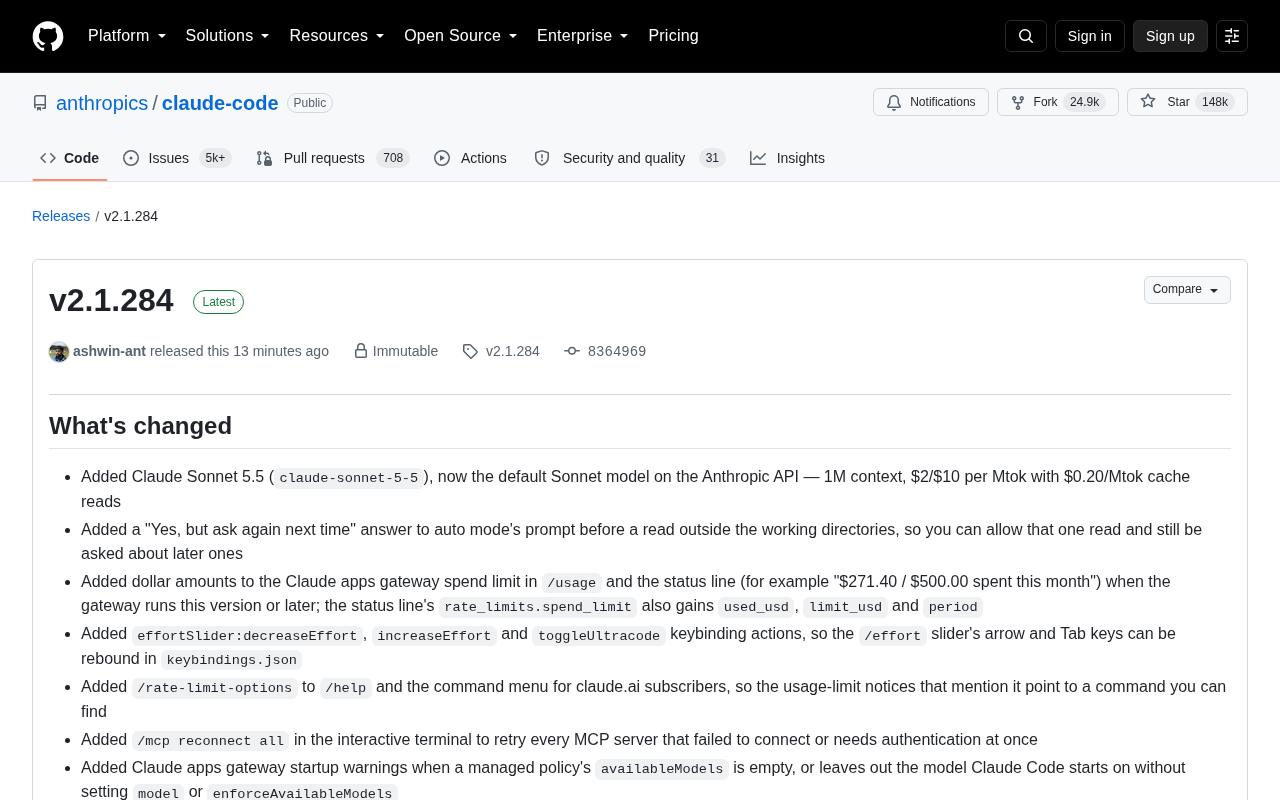
The most notable addition in this release is Claude Sonnet 5.5 (model ID claude-sonnet-5-5), which is now the default Sonnet model on the Anthropic API.
According to the release notes, the model ships with the following key specs:
- 1 million (1M) token context window
- Priced at $2 / $10 per million tokens (input/output)
- Cache reads at just $0.20 per million tokens
A million-token context means developers can feed much larger codebases and longer conversation histories into a single session. The low cache read price significantly cuts the cost of repeatedly referencing the same context across long sessions. For heavy users, this is a meaningful upgrade in both capability and economics.
Permission Modes: Auto Mode Is Now the Default Starting Point
This update makes a directional change to the interaction experience: interactive terminal and VS Code sessions now start in auto mode by default when no permission mode is configured, across all plans and providers. The permissions.defaultMode setting can still override this behavior.
Paired with this change, auto mode now includes a new option in its prompt before reading outside the working directory — "Yes, but ask again next time". This lets users temporarily allow a one-off out-of-directory read while still being prompted for future requests, striking a finer balance between convenience and security.
Usage and Cost Transparency
Anthropic has put real work into usage visibility. When the Claude apps gateway runs this version or later, the /usage command and status bar now display specific dollar amounts — for example, "$271.40 / $500.00 spent this month". The status bar's rate_limits.spend_limit field also gains used_usd, limit_usd, and period fields for programmatic access.
There are also a number of improvements around rate limit handling:
- A new
/rate-limit-optionscommand for claude.ai subscribers gives users a discoverable command to match options mentioned in rate limit prompts. - Fixed repeated polling of the plan-usage endpoint after hitting usage limits —
/usage,/extra-usage, and the IDE usage view now back off instead of hammering the API. - Users already on the highest Max plan are no longer incorrectly nudged to
/upgrade; the prompt now points to/usage-creditsinstead.
Stability Fixes: Error Handling and Session Recovery
This release includes a large number of stability fixes, many of which address real developer pain points:
- Fixed broken response streams that previously threw raw errors like "JSON Parse error" or "undefined is not an object", or wrote "undefined" into responses — these are now retried or reported as interrupted responses.
- Fixed cases where "Prompt is too long" appeared even after compression — Claude Code will now compress again, retaining less recent conversation history.
- Fixed MCP tool calls in resumed sessions failing because the server was still connecting — calls now wait up to 10 seconds.
- Fixed Agent SDK sessions crashing when a user message contained a malformed image — bad images are now replaced with an explanatory comment.
On the MCP front, a new /mcp reconnect all command lets users retry all failed or authentication-required MCP servers in one go.
Context Compression is a key mechanism for managing long conversations with large language models. When conversation history exceeds the model's context window, the system summarizes or compresses earlier content to make room for new messages. Claude Code's compression strategy preserves recent exchanges while condensing older history — but edge cases can cause failures: the compressed result may still be too long, or multimodal content like images may be malformed in ways that break reconstruction. The fixes in this release — a second compression pass and fault-tolerant image replacement — give Claude Code much stronger self-healing capabilities when handling long or format-complex session histories, which is especially important for large development tasks that span multiple days.
MCP and Plugin Ecosystem: Tightened Security
Developers should take note of tightened plugin permissions. Under the managed allowManagedPermissionRulesOnly policy, plugins sourced from the marketplace, claude.ai, or npm can no longer pre-authorize tools for themselves via allowed-tools — only plugins from official Anthropic sources or sources vouched for by managed settings retain this pre-authorization capability.
Additionally:
claude mcp addnow rejects and provides guidance when managed settings restrict MCP servers to plugins, rather than silently saving a server that will never load.- During automatic memory loading, hidden characters and tags in
MEMORY.mdand recalled memories that mimic Claude Code's own internal markers are now neutralized before being sent to the model — a defense against prompt injection attacks.
MCP (Model Context Protocol) is an open protocol from Anthropic that allows AI models to connect to external tools, databases, and services through a standardized interface. Developers can write MCP servers to expose capabilities like file system access, API calls, and code execution, while Claude Code dynamically loads these servers as a client. This openness enables powerful extensibility, but also introduces security risks: a malicious MCP server or tampered plugin could theoretically plant hidden instructions in the prompt and trick the model into performing unintended actions — a class of attacks known as "prompt injection". The neutralization of hidden characters mimicking internal markers in MEMORY.md and recalled memories is a targeted defense at the memory-loading layer, while restricting self-authorization for non-official plugins reduces the supply chain attack surface at the permission level.
Dense Refinements to VS Code Integration
This update includes a large number of VS Code extension fixes and enhancements, reflecting Anthropic's ongoing investment in the IDE experience:
- Optional message timestamps (off by default), with a date row displayed across day boundaries.
- A new plugin load error indicator, and an Ultracode toggle below the Effort slider.
- Fixed the issue where typing
/modeland pressing Enter would print usage text to chat instead of opening the model selector. - Fixed Claude Code tabs becoming unresponsive after Restart Extensions, and conversations can now be reopened after a restart.
- Fixed "Prompt is too long" errors when attaching large text files after compression.
Ultracode has also been spun out as a standalone toggle within /effort (Tab key or /effort ultracode [on|off]). It no longer forces the xhigh effort level and can remain enabled at any effort level.
What This Update Means
Taken together, v2.1.284 is an update that balances capability with polish. Sonnet 5.5 and the million-token context represent meaningful progress at the model layer. Auto mode as default and cost visibility improve the day-to-day experience. The extensive fixes to MCP, plugin permissions, and error handling signal that Claude Code is steadily maturing into a production-grade tool. For heavy users, upgrading should bring noticeably more reliable session recovery, friendlier error messages, and clearer cost visibility.
Related articles

Free Unlimited Claude Code Solution: Agnes AI + CC Switch Setup Guide
No paid subscription needed — pair the free AI platform Agnes AI with the open-source tool CC Switch to provide a backend for Claude Code, enabling unlimited free calls to text, image, and video models. This guide covers the full setup, test results, and usage boundaries.

A Complete Zero-Cost Guide to Getting Started with Claude Code for Beginners in China
A beginner's guide to Claude Code for users in China: two installation methods (command line and IDE plugin), full configuration steps for replacing the official API with the free domestic LongCat model, and a hands-on demo of building a small tool with natural language, plus tips.

When the NSA Gets Involved: The AI Supply Chain Crisis Behind Open-Source CVEs and API Key Hijacking
Multiple open-source projects disclosed severe CVEs in one day, PHP flaws alarmed the FBI, and Railway and OpenCode were breached with API keys stolen. This article breaks down the vulnerability window, AI-accelerated exploitation, and the AI supply chain crisis behind the API key black market, with a developer defense checklist.