Dify + MCP in Practice: Building a Multi-Scene Life Assistant Agent with ModelScope MCP Marketplace

Build a multi-scene life assistant Agent using ModelScope MCP, Dify Chatflow, and local Qwen3.
This guide walks through building a practical life assistant Agent that covers eating, learning, news, and travel using ModelScope's MCP Marketplace and the Dify low-code platform. It covers MCP protocol basics, tool validation in the playground, and step-by-step Chatflow workflow setup with four Agent nodes powered by locally deployed Qwen3.
Building a Practical Life Assistant Agent from Scratch
As large model applications become more widespread, enabling AI agents to genuinely call external tools and access real-time data has become a central concern for developers. Based on a hands-on tutorial from a Bilibili creator, this article walks you through using the ModelScope MCP Marketplace and Dify platform to build a fully functional life assistant Agent from scratch — one that covers eating, learning, reading news, and traveling.
The entire solution revolves around two core components: MCP as the tool protocol standard, and Dify as the low-code orchestration platform. Together, they make it possible to build a genuinely useful agent at minimal development cost.
What Is MCP and Why Does It Matter for AI Agents
MCP stands for Model Context Protocol, officially open-sourced by Anthropic in November 2024. It is an open standard protocol designed to simplify interactions between large models and external tools or data sources.
Its core value lies in providing a unified interface framework: through MCP, disparate services and tools can be integrated into a standardized interface layer, enabling AI models to intelligently call these resources for complex tasks — without writing custom adapter code for each individual tool.
MCP's technical design draws inspiration from LSP (Language Server Protocol) — just as VSCode communicates with code completion services for various languages through the unified LSP protocol, MCP allows AI models to communicate with any external tool through a standardized protocol. At the transport layer, it supports both stdio (standard input/output) and SSE (Server-Sent Events), with SSE being especially suited for cloud deployment scenarios where the server can actively push data streams. Each MCP Server exposes three types of capabilities: Tools (callable functions), Resources (readable data sources), and Prompts (preset prompt templates). AI models interact with them using the standardized JSON-RPC 2.0 message format.
The Explosive Growth of the MCP Ecosystem
The pace of MCP Server development has been remarkable. The MCP.so marketplace now hosts over 13,000 MCP Servers, and major internet companies like Baidu and Alibaba Cloud have launched their own MCP marketplaces. The recently launched ModelScope MCP Marketplace already offers over 3,000 MCP Servers, covering verticals including maps, search, programming, and content.
This thriving ecosystem means developers building AI agents can pick and combine ready-made capability modules like building blocks, dramatically reducing integration costs.
Solution Design: Four Life Scenarios, Four MCP Tool Categories
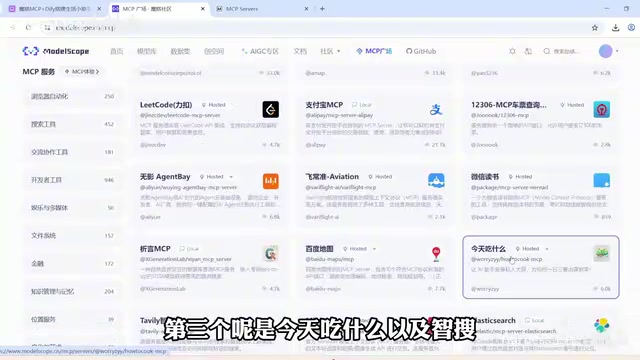
The solution maps four everyday scenarios to corresponding MCP Servers:
- Eating: Integrates the "What to Eat Today" recipe recommendation service (How to Cook)
- Learning: Integrates the LeetCode coding practice service
- News: Integrates a news service with search capabilities
- Travel: Integrates Amap (高德地图) for routing and geographic information
A "ZhiSou" search engine service is also configured as a supplemental capability.
Steps to Create and Configure MCP Servers
Using Amap as an example, the configuration involves a few steps: first, register an account on the Amap Open Platform and create a Web application to obtain an API Key; then return to ModelScope, enter the Key on the corresponding MCP Server's configuration page, and save.
After saving, the platform generates an SSE URL — this is the key endpoint for calling the service in Dify, so be sure to record it. Similarly, services like ZhiSou that require authorization need their keys obtained in advance; free services like LeetCode and How to Cook can be created directly to get their request URLs.
Validating Tool Availability in the MCP Playground
Before formally connecting to Dify, it is strongly recommended to test each Server's availability in the ModelScope MCP Playground one by one, to avoid discovering tool failures only after reaching the Dify stage.
How to do it: enter the playground, click Configure, choose JSON mode to add entries, and paste in the SSE URLs generated earlier. There is one critical detail here: click the "wrench" icon at the bottom of the playground to disable the platform's built-in tools such as Amap, Time, and Fetch, to prevent conflicts with your custom MCP Servers.
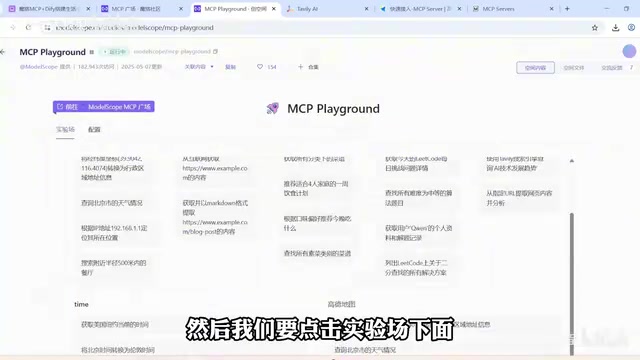
Validation results: searching for "breakfast recipes for early risers" successfully invoked How to Cook; querying "bus route from Changsha Railway Station to Meixi Lake Bubugao" returned correct results from Amap. All four MCP Servers passed validation.
The Core Step: Building the Chatflow Workflow in Dify
With tools validated, it's time for the core of the solution — building the Chatflow workflow in Dify.
Dify is an open-source LLM application development platform (90k+ GitHub Stars) that supports self-hosted deployment and features a visual workflow orchestration engine at its core. Chatflow is a workflow type in Dify specifically designed for conversational scenarios. Unlike a standard Workflow that executes once, Chatflow maintains multi-turn conversation context — making it ideal for this kind of life assistant that requires continuous interaction.
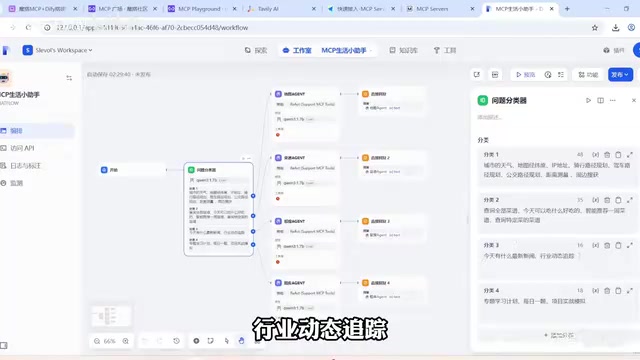
The overall structure is clean and consists of the following main nodes:
1. Start Node and Question Classifier
The start node uses default settings. Next comes the Question Classifier node, for which this solution uses a locally deployed Qwen3 model.
The underlying principle of the question classifier is a zero-shot text classification task that leverages the large model's instruction-following capability to route user inputs to different branches — eliminating the high cost of training traditional intent recognition models on large labeled datasets. The classifier's input variable is the user's request from the start node.
Based on the capability boundaries of the four MCP Servers, user intents are divided into four categories:
- Category 1: Geography-related — city weather, map navigation, latitude/longitude queries
- Category 2: Diet-related — recipe recommendations, meal plans
- Category 3: News and information — current events, industry trend tracking
- Category 4: Learning-related — topic study, learning plans, daily algorithm challenges
2. Key Configuration Points for the Four Agent Nodes
After classification, execution flows into four Agent nodes. The configuration logic is consistent across all four, with the following key points:
- Install the plugin: Search for and install the Agent plugin that supports MCP tool calling from the Marketplace.
- Agent strategy: Choose ReAct rather than Function Calling.
ReAct (Reasoning and Acting) is an Agent reasoning paradigm proposed by Google Research in 2022 that alternates between chain-of-thought reasoning and action execution. The core loop is: Thought (reasoning) → Action (tool call) → Observation (result review) → Thought again, repeating until the task is complete. By comparison, Function Calling relies on the model producing accurate structured parameters in a single pass, which makes it less fault-tolerant in complex multi-tool scenarios. Testing confirmed that Function Calling had instability issues, while ReAct's explicit reasoning process made it more reliable for the multi-tool calling scenarios in this solution.
- Model: Use Qwen3 across all nodes. Qwen3 is Alibaba Cloud's next-generation open-source large model series released in 2025, supporting hybrid reasoning modes. When quantized to 4-bit precision via tools like Ollama, a 14B-parameter version runs smoothly on consumer-grade GPUs. Dify connects to locally deployed Qwen3 via an OpenAI-compatible interface — no per-token fees, data stays local.
- Tool configuration: Check the "Get Timestamp" tool, since all node tasks are time-sensitive.
- MCP service configuration: Enter the SSE URL generated by ModelScope and add an instruction such as "Please use amap-maps to fulfill the user's query based on their input."
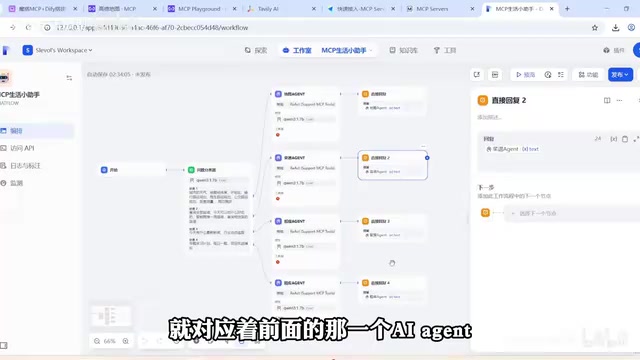
3. Direct Reply Nodes
Add one "Direct Reply" node at the end of each branch to return the corresponding Agent's result to the user. At this point, the four-agent Chatflow workflow is complete.
Live Demo Results
After building the workflow, use the preview button in the upper right to test:
- Input: "Recommend a meal plan and shopping list for this week" → The workflow hits the recipe Agent branch, calls How to Cook, and returns detailed recipes — great results.
- Input: "Give me an algorithm problem and answer in Chinese" → The workflow hits the learning branch, calls LeetCode, and returns the "Peak Element in Array" problem with a Chinese explanation. One subtle point: LeetCode returns English content by default, so the instruction must explicitly require "answer in Chinese."
News queries and travel route recommendations similarly run stably through their respective branches.
Summary: A Clear Path to Building Practical AI Agents with Low-Code
The value of this solution lies in providing a reproducible, low-code path to building multi-scene AI Agents: MCP handles standardized tool integration, Dify handles visual workflow orchestration, and local Qwen3 handles reasoning and decision-making. With these three working together, even ordinary developers can build a life assistant covering multiple scenarios in a short time.
From an engineering perspective, the following lessons are worth highlighting:
- Validate tool availability in the playground first, before connecting to Dify — this makes debugging far more efficient.
- Disable platform built-in tools to prevent conflicts with custom MCP Servers.
- Prefer the ReAct strategy — it proved more stable than Function Calling in testing, especially for complex multi-step, multi-tool tasks where ReAct's step-by-step reasoning offers stronger fault tolerance.
For readers looking to get started with AI application development or prepare for related interviews, this type of project both deepens your understanding of real-world MCP protocol usage and helps you master the core ideas behind Dify Chatflow workflow orchestration — making it a highly worthwhile hands-on starter project.
Key Takeaways
Related articles

Bilibili's Hit Dify Tutorial: A Practical Guide to Building 20+ AI Apps from Scratch
A distilled guide to Bilibili's top-rated Dify tutorial: Windows + Docker deployment, MySQL connection, five app types, model integration strategy, and publishing.

Agent Skills Beginner's Guide: From Concepts to Multi-Agent Collaboration in Practice
A comprehensive guide to Agent Skills: core concepts, components, the importance of Description, standardization, beginner learning paths, and multi-agent collaboration.

One Neuron Detects Both Cats and Cars? We Reproduced It and Found a New Explanation
The cat-car neuron reinterpreted: researcher Cammarata argues it distinguishes pointy from round, not cats from cars. We reproduced the experiment and found the new explanation holds on most inputs—but cars are the exception. The interpretability debate continues on language models.