LangChain in Practice: A Complete Path to Building a Production-Ready Agent from Scratch

A six-layer engineering path and pitfall-avoidance guide for building a production-ready Agent from scratch with LangChain.
Based on Bilibili creator "Ziyi"'s hands-on video, this article systematically covers building a production-ready Agent from scratch with LangChain. It starts by distinguishing Model from Agent and explaining LangChain vs. LangGraph selection, then covers system prompts and streaming output, tools and internet search, short-term and long-term memory, RAG knowledge base integration, and finally exposing the Agent as a Web API with FastAPI. The core insight: Agent productization requires six layers working together—model integration, prompt engineering, tool system, memory system, knowledge base, and service exposure—and InMemorySaver in multi-worker deployments is a critical pitfall requiring persistence design.
Many developers picture an Agent as simply "calling an API and letting the model answer questions," but taking an Agent from scratch to production-ready means crossing several hurdles: tool calling, memory management, knowledge base integration, and service exposure. In this hands-on video, Bilibili creator "Ziyi" walks through the entire path with LangChain, from model initialization all the way to exposing interfaces via FastAPI. The code volume isn't large, but every step lands on a key engineering milestone.
This article is based on that video's content and provides a systematic overview combined with the capability boundaries of the official LangChain framework.
1. First, Distinguish Model from Agent: The Brain vs. the Complete Person
The video opens with a straightforward analogy: the Model is the Agent's brain, while the Agent is a complete person. The model itself only handles reasoning, and the Agent layers on tools, MCP, specification constraints, and other "organs" and "codes of conduct." This distinction matters because it determines what capability each subsequent step is adding.
LangChain's position in this ecosystem is "a framework for directly building Agents," alongside LangGraph—the latter leans toward organizing multi-step logic through workflow orchestration. Which to choose depends on your scenario's complexity: for a single Agent with a few tools, LangChain's create_agent is sufficient; for multi-node state machines, conditional branches, and loops, LangGraph is more suitable.
For model sourcing, the video demonstrates using Tencent Cloud TokenHub's free quota, with DeepSeekAd V4 Flash selected and integrated via the OpenAI-compatible protocol. This means the request endpoint and key are both managed through .env environment variables, with the Provider set to OpenAI. The benefit of this approach is that switching models costs almost nothing—to switch to another service offering an OpenAI-compatible interface, you only change the environment variables.
Project initialization uses UV to manage the virtual environment, with dependencies including LangChain, OpenAI SDK, LangGraph, Tavily, and more. The creator particularly emphasizes one principle: the code for each chapter is an independently runnable minimal example, not the final integrated version, so that readers clearly understand "what capability this step is adding."
Division of Labor Between LangChain and LangGraph
LangChain and LangGraph both belong to the LangChain ecosystem but serve different purposes. LangChain originally centered on chain-based calls (Chain) and provides high-level wrappers like create_agent, suitable for quickly building "single Agent + several tools" scenarios where developers only declare the model, prompt, and tool list, and the framework automatically handles the calling loop. LangGraph models the Agent as a state graph (StateGraph): nodes are computation steps, edges are conditional transitions, supporting loops, branches, parallelism, and human intervention—suitable for tasks requiring precise control of multi-step flows, multi-Agent collaboration, or long-running tasks. The two are not mutually exclusive—LangGraph can call LangChain components, and create_agent's underlying implementation is often based on LangGraph. When choosing, grasp one criterion: can the logic be expressed as "a single call + tool loop"? If yes, LangChain; otherwise, LangGraph.
2. System Prompts and Streaming Output: Giving the Model an Identity and Feedback
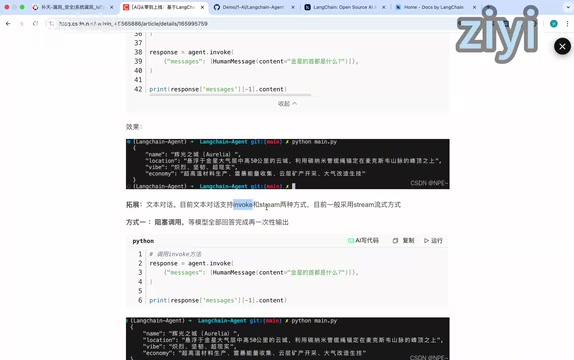
The first step from a bare model to an Agent is the system prompt. In LangChain, you pass in identity, instructions, and output examples via the system_prompt configuration, then use create_agent to bind the model and prompt together, and finally trigger with invoke. In the video demo, a question is asked to the model and the output is organized according to the preset example format—this is the role of few-shot at the prompt level.
There are two calling methods: invoke and stream. The former is blocking, waiting for the model to finish generating everything before returning; the latter is streaming, where the frontend receives each character as the model emits it. The video explicitly states that mainstream scenarios should use stream, because the experience difference in conversational products is very pronounced. This point reappears later in the FastAPI section—the interface layer must also provide streaming endpoints.
3. Tools and Internet Access: Giving the Agent the Power to Act
The model only has historical training data. To make it calculate, check the weather, or operate platforms, you need Tools. Tools can be local functions or wrappers around external APIs. Once defined, pass them in via the tools parameter list of create_agent.
Internet search is one of the most commonly requested Agent capabilities. The video chooses Tavily as the Web Search tool: register, activate, get an API Key, write it to environment variables, then import TavilySearch through the LangChain-Tavily integration package, configure the maximum number of returned results, and pass it to the Agent as a Tool. The underlying logic is: when the model determines it needs internet access, it calls this tool, the tool returns search results, and the model generates an answer based on those results.
There's an easily overlooked engineering detail here: the tool's description directly determines whether the model calls it at the right time. If the description is vague, the model may fail to call it when it should, or call it when it shouldn't.
4. Short-Term and Long-Term Memory: Letting the Agent Remember People and Things
An Agent without memory treats every conversation as a stranger. The video divides memory into two types: short-term memory is the context of the current task or session, and long-term memory is experience and knowledge across tasks and sessions.
Short-term memory in LangChain is implemented through two things: the checkpointer handles archiving, and the thread_id identifies the archive slot. Before calling, historical messages are spliced into the context, and the model gains "memory." The in-memory version uses InMemorySaver, but the video does a very practical demo—after re-running the program, the previous conversation memory is gone because memory disappears with the process. To persist, switch to SQLite, fix the thread_id, and at runtime load history from short_memory.db and splice it into the context.
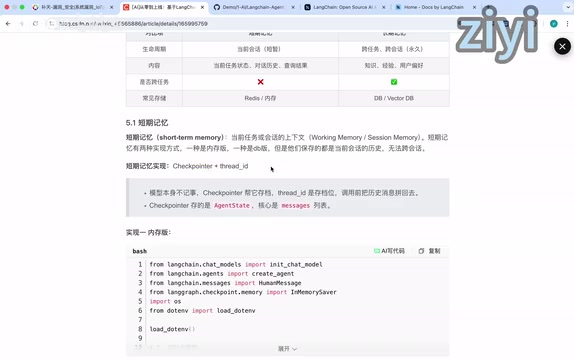
Long-term memory is implemented through a store. The video creates a store with SQLite and connects it. In the demo, different thread_ids are used (equivalent to different sessions), and the Agent still remembers what was said before—this is the value of cross-session memory.
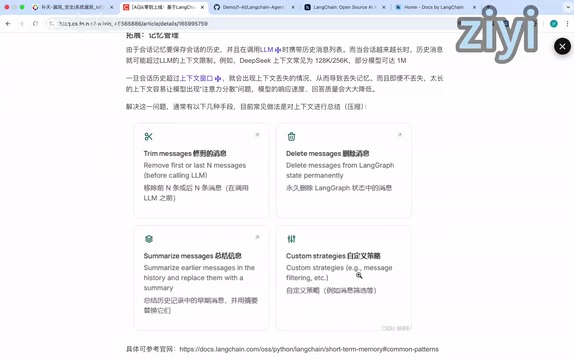
The context window is a hard constraint on memory management. Once history exceeds the window, memory is lost. The video lists four coping strategies: trim messages (remove the first few or last few), delete historical messages, summarize/compress, and custom strategies. In real projects, summarize/compress is most commonly used, and the video adopts this one.
The Difference Between Checkpointer and Store
Checkpointer and Store are two independent abstractions in LangGraph's memory system. Checkpointer targets "session state": it uses thread_id as the key and saves a complete state snapshot of the graph after each step (including message history and intermediate variables), supporting interruption recovery and time-travel debugging. It answers "where is this session up to?" Store targets "cross-session long-term data": it is a key-value storage interface that organizes data by namespace and key, is not bound to a particular thread, and allows the Agent to actively write and retrieve user preferences, factual knowledge, and more. The two can be used together: Checkpointer ensures continuity within a single conversation, while Store lets different conversations share a user profile. In production, Checkpointer can be swapped for persistent implementations like PostgresSaver or RedisSaver, and Store has corresponding database backends.
5. RAG and Knowledge Bases: Letting the Agent Understand Your Business
Tools and memory solve "can do things" and "can remember," but the model still only understands general knowledge, not your business. For example, company annual leave policies and attendance rules must rely on a knowledge base.
The technical path is RAG: before the model generates an answer, it first retrieves the most relevant content from an external knowledge base as context for the model. The video also mentions Agentic RAG—not forcing retrieval on every question, but letting the model decide whether the current question needs to query the knowledge base. This is closer to real business scenarios.
The key to implementing RAG in an Agent is packaging retrieval capability as a Tool. Specific steps: install dependencies like text splitter, prepare documents (the video passes strings directly, while real projects usually load docs or PDFs), chunk the documents and configure splitting parameters, vectorize with a local embedding model and store, configure the number of document chunks returned per retrieval (the video sets 3), and finally use create_retriever_tool to wrap the retriever as a tool passed to the Agent.
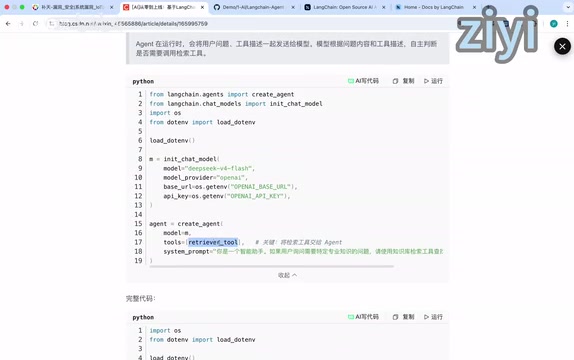
The demo effect: directly asking "What is our company's annual leave policy?" the Agent calls the RAG tool to read knowledge base content before answering.
Embedding and Vector Retrieval
RAG retrieval quality depends heavily on the embedding model and vector storage. The embedding model maps text to high-dimensional vectors, where semantically similar text is closer in vector space. Local embedding models (such as BGE and Sentence-Transformers series) don't require external API calls, making them suitable for data-sensitive or offline scenarios, but you need to manage model loading and inference resources yourself; cloud embedding services like OpenAI save on operations and are billed by token. Vectorized document chunks are stored in a vector database (such as FAISS, Chroma, Milvus). During retrieval, the user question is also vectorized, and the top-k chunks are returned by cosine similarity. The "return 3 chunks each time" setting in the video is the top-k parameter; too small may miss information, too large introduces noise and crowds the context window, so it needs tuning based on document granularity and question types.
6. FastAPI Service Exposure: From Terminal to Users
All the capabilities above run in the terminal. An Agent only you can use has no product value. The final step is to expose the Agent as a Web API using FastAPI, so browsers, apps, and third-party systems can access it via HTTP requests.
The video's server code is very concise: add middleware to allow frontend cross-origin, define request body specifications, set the endpoint URL, use await with invoke for regular endpoints, and return character-by-character for streaming endpoints (corresponding to SSE). For testing, you can call directly via Swagger, or write a simple index.html—open it in the browser, enter content in the input box, click send, and the gray box displays the model output.
The overall architecture is: the backend wraps Agent capabilities with LangChain, the frontend targets 2C users, and they communicate via HTTP and SSE.
A Pitfall That Must Be Solved Before Going Live
At the end, the creator points out a key issue for real business: InMemorySaver is unusable in multi-worker deployments. Each process's memory is independent—if a user's first request hits worker1 and the second hits worker2, memory breaks. Production environments must persist—return to the SQLite or other database solutions from Section 4. This reminder seems casual but is the failure point for many demos turning into production.
7. Engineering Insights from This Path
Looking back at the entire chain, the abstractions LangChain provides actually correspond to six layers of Agent productization: model integration (zero-cost model switching), prompt engineering (identity and format constraints), tool system (action power), memory system (continuity and personalization), knowledge base (business depth), and service exposure (accessibility). Each layer alone isn't complex, but only together do they make a production-ready Agent.
For developers getting ready to start, several suggestions are worth considering: first, split minimal runnable examples by chapter—don't write integration code right away; second, think through the deployment form for memory and persistence in advance—single-machine memory and multi-worker are two different designs; third, parameters like tool descriptions and retrieval chunk counts should be tuned to the actual task, not copied from defaults; fourth, connect streaming output from day one—retrofitting it later costs more.
One-line Summary
A six-layer engineering path and pitfall-avoidance guide for building a production-ready Agent from scratch with LangChain.
Paragraph Summary
Based on Bilibili creator "Ziyi"'s hands-on video, this article systematically covers the complete path of building a production-ready Agent from scratch with LangChain. It first distinguishes Model from Agent and explains the selection criteria between LangChain and LangGraph; then covers system prompts and streaming output, tools and internet search, short-term and long-term memory, and RAG knowledge base integration, finally exposing the Agent as a Web API with FastAPI. The core conclusion: Agent productization requires the synergy of six layers—model integration, prompt engineering, tool system, memory system, knowledge base, and service exposure; among them, InMemorySaver in multi-worker deployments causes memory breaks, a key pitfall when moving from demo to production that requires persistence design in advance.
Related articles

Bilibili's Hit Dify Tutorial: A Practical Guide to Building 20+ AI Apps from Scratch
A distilled guide to Bilibili's top-rated Dify tutorial: Windows + Docker deployment, MySQL connection, five app types, model integration strategy, and publishing.

Agent Skills Beginner's Guide: From Concepts to Multi-Agent Collaboration in Practice
A comprehensive guide to Agent Skills: core concepts, components, the importance of Description, standardization, beginner learning paths, and multi-agent collaboration.

One Neuron Detects Both Cats and Cars? We Reproduced It and Found a New Explanation
The cat-car neuron reinterpreted: researcher Cammarata argues it distinguishes pointy from round, not cats from cars. We reproduced the experiment and found the new explanation holds on most inputs—but cars are the exception. The interpretability debate continues on language models.