LangGraph 1.0 Hands-On Tutorial: Building Persistent AI Agents from Scratch

LangGraph 1.0 six-lesson guide to building persistent, production-grade AI agents from scratch.
LangGraph is a low-level agent orchestration framework from the LangChain team that complements the high-level LangChain library by trading convenience for fine-grained control over execution logic. Its five core features include durable execution via checkpointing, full memory management combining short- and long-term memory, Human in the Loop breakpoints for human oversight, production-validated reliability, and deep observability through LangSmith. The accompanying six-lesson course covers the complete path from framework philosophy and state management to streaming, tool integration, multi-agent architectures, and production deployment.
Why Learn LangGraph
Most traditional AI applications are stateless and disposable — you ask a question, it answers, and that's the end of it. But AI applications that actually work in production need memory, reasoning, and the ability to autonomously execute complex tasks. This is what's known as a "Durable Agent" — and it's the core problem LangGraph is designed to solve.
This tutorial series is based on the latest LangGraph 1.0.x release and consists of six lessons, each under 20 minutes, taking you from core concepts all the way to production deployment. The key ideas surrounding agents — memory, reasoning, autonomy, complex tasks, and persistence — form the central design philosophy of the entire LangGraph framework.
LangGraph vs. LangChain: Understanding the Difference
To understand LangGraph, you need to understand its relationship with LangChain. LangChain is a well-encapsulated, high-level framework that makes it easy to call LLMs, use tools, and build simple agents. The better the abstraction, the more convenient it is to use — and that's precisely what makes it a "high-level" framework.
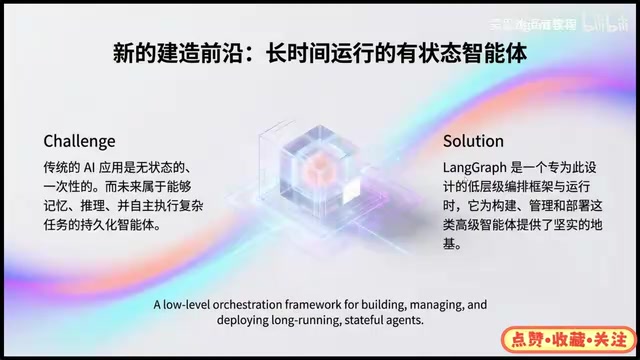
LangGraph takes the opposite approach — it's positioned as a low-level orchestration framework and runtime. "Low-level" means it lets you build agents from the ground up. The tradeoff is increased complexity, but the benefits are significant: you gain far greater freedom to define every node and every transition path in your agent, rather than being constrained by high-level abstractions. For complex scenarios that require fine-grained control over execution logic, this kind of low-level capability is often a hard requirement.
Five Core Features of LangGraph
Durable Execution
Durability is one of LangGraph's most important features. It doesn't just maintain state — it preserves the execution context. This means that if an agent encounters a failure mid-execution, it can seamlessly resume at any point, ensuring the entire process is never lost. For long-running, multi-step tasks, this is absolutely critical.
Under the hood, durable execution relies on a checkpointing mechanism. After each node completes, LangGraph serializes the current full state and writes it to persistent storage (such as a database or file system). If the program crashes or the network drops, it can reload from the most recent checkpoint on the next run — no need to restart the entire process from scratch. For complex agent tasks that may run for minutes or even hours, this translates to enormous cost savings. This stands in stark contrast to traditional stateless API calls, where a mid-run failure discards all intermediate results and forces a complete retry. The checkpointing mechanism also lays the groundwork for "time travel" functionality: because every step's state is saved, you can rewind to any historical node and re-execute from there.
Full Memory Management
LangGraph integrates both short-term and long-term memory, giving agents genuine context awareness. Memory management is the key dividing line between a "toy demo" and a "production-grade application" — an agent without memory can only ever handle one-off conversations.
Human in the Loop
When an agent needs human intervention at an intermediate node during execution, the Human in the Loop mechanism comes into play. It allows humans to confirm and review actions within the workflow — especially important for high-risk decisions and compliance review scenarios.
In engineering terms, Human in the Loop (HITL) works by inserting breakpoints into the agent's execution graph. When execution reaches a breakpoint, LangGraph pauses and persists the current state, waiting for external input or an approval signal (typically from a human) before continuing. This is fundamentally different from a standard request-response model — the agent can pause and wait for hours or even days without consuming any compute resources. Typical use cases include: AI-generated contracts that require legal review before being sent, automated ops scripts that need engineer confirmation before executing high-risk operations, and flagged content in moderation workflows that gets escalated for human review. The HITL mechanism enables flexible combinations of autonomous AI execution and human oversight, making it a critical safety valve for building trustworthy production systems.
Production-Grade Reliability
LangGraph is already used in real products by many well-known companies, with numerous products relying on LangGraph under the hood. This production-validated reliability is what sets it apart from experimental frameworks.
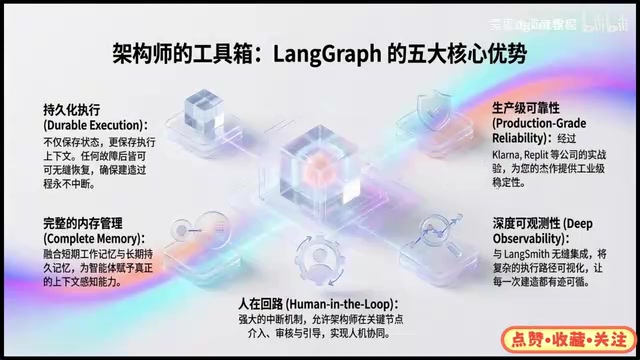
Deep Observability
Through its integration with LangSmith, every step of the LangGraph execution process can be monitored. Observability determines whether you can quickly pinpoint issues when something goes wrong in a complex system — and this is invaluable when debugging multi-node agents.
Six-Lesson Course Outline
The learning path progresses steadily from fundamentals to hands-on practice:
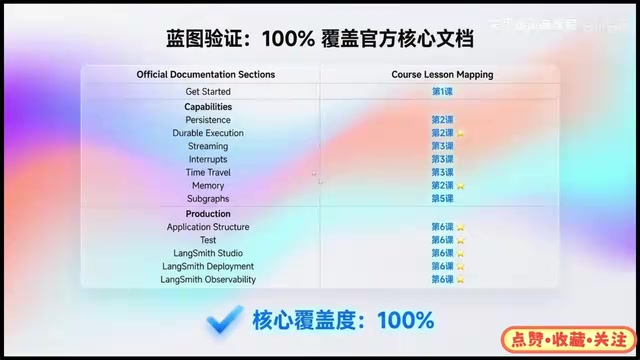
- Lesson 1: Covers LangGraph's foundational framework philosophy, clarifies the difference between Workflows and Agents, introduces each core component in depth, and includes a small hands-on exercise.
- Lesson 2: Focuses on state persistence and memory — why the concept of "state" exists, how state functions within the framework, the Durable Execution feature, and how to manage short-term vs. long-term memory.
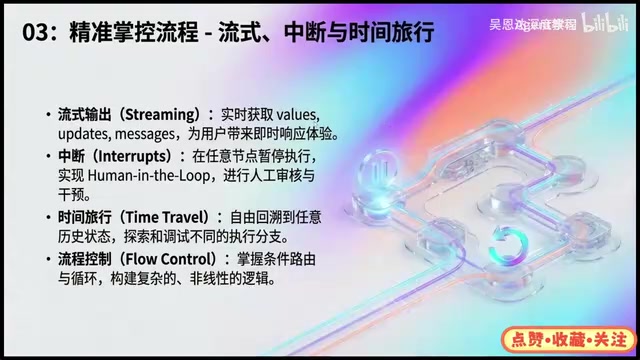
- Lesson 3: Covers streaming output, interrupts, and time travel. Streaming lets you receive Values, Updates, and Messages in real time; interrupts enable Human in the Loop review at any node; time travel lets you rewind to any historical state to explore and debug different execution branches. Conditional flow control is also covered.
- Lesson 4: Covers external tool integration and API calls. While this topic appears in the LangChain course, it's revisited here for learners starting directly with LangGraph.
- Lesson 5: Covers building multi-agent systems, including multi-agent collaboration, supervisor-worker patterns, commander-plus-subnode architectures, subgraph concepts, and various collaboration modes.
- Lesson 6: Focuses on production deployment — the comprehensive hands-on culmination of the entire series.
LangSmith and LangGraph Studio
In the final lesson, LangSmith is used alongside LangGraph to monitor all agent executions. LangGraph now offers LangGraph Studio, which is integrated directly into LangSmith. In Studio, you can develop visually, deploy your defined agent workflows to LangSmith, and perform deep monitoring of the inputs and outputs of every agent action. This toolchain connects development, deployment, and monitoring into a closed loop — an indispensable part of getting to production.
LangSmith is the LLM application observability platform from the LangChain team, offering three core capabilities: Tracing, Evaluation, and Monitoring. On the tracing side, it captures the inputs, outputs, latency, token usage, and cost of every LLM call. On the evaluation side, it supports automated quality scoring of agent outputs. On the monitoring side, you can set alert rules to flag anomalous behavior in production environments. For complex agents like those built with LangGraph — involving multiple nodes and tool calls — plain logging is nearly useless for debugging. LangSmith's visual call-graph view clearly shows the execution order and time distribution of each node, dramatically shortening debug cycles. LangGraph Studio takes this further by visualizing the graph structure itself, allowing developers to observe state transitions between nodes directly in the UI and even manually trigger specific nodes to re-execute.
Prerequisites
To get the most out of this course, you'll need a few foundational skills:
- Python basics: The entire course is taught in Python — this is a hard requirement.
- Docker knowledge: A basic understanding of Docker concepts will help when it comes to deployment.
- API Keys: Have an OpenAI or domestic LLM API Key ready — you'll need to obtain this before starting.
Overall, the value of this tutorial series lies in its systematic coverage of the complete journey: from framework philosophy, state and memory, streaming control, tool integration, and multi-agent systems, all the way to production deployment. For developers looking to transition into or level up their AI engineering skills, LangGraph — as a low-level orchestration framework — is a foundational piece you simply can't skip if you're serious about building complex, production-grade agents.
Related articles

GPT-Next Leak, Gemini 4 Argon Imminent: AI News Roundup
GPT-Next leak suggests extreme efficiency; OpenAI's 28-day shipping pledge boosts speed 50%; Gemini 4 Argon nears release; Anthropic subscription value report sparks debate.

GPT-Next Leaked, Gemini 4 Argon Speeds Up, Fable 5.5 May Launch Today
OpenAI's GPT-Next model leaks, expected to be extremely low-cost and possibly part of the 28-day release plan; Gemini 4 Argon internal testing accelerates, NanoBanana 2.1 is live; Semi Analysis tests show Claude Max's equivalent API value is about 5 times that of ChatGPT Pro; Fable 5.5 may launch today.

Gemini 4 Argon Launches Globally: Key Highlights from the AI Daily Brief
Google opens Gemini 4 Argon globally across Pro and Ultra subscriptions and the API, and demonstrates robot control. This article rounds up open-source models, Agent infrastructure, cost transparency, and safety governance updates.