No API Key Needed! Local 3B Model + MCP Tool Calling Scores 9/10 in Real Test

Local 3B model with MCP-linked N8N tools scored 9/10 in 53 seconds at zero cost.
The article demonstrates how a small local model overcomes the "no access permission" problem. Without tools, a 3B model answered "unable to access" to all 10 store questions; after connecting four tools via MCP (backed by an N8N workflow for orders and invoices), the same model got 9 correct in 53 seconds. The setup runs in Docker with Ollama locally, needs no API Key, and costs $0. Small models need only learn to call tools rather than memorize data, but tool descriptions must be clear and production needs fallback logic.
Why Does Your Local AI "Lack Access Permission"?
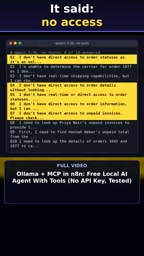
Many people fire up a small model locally and immediately try to use it as an assistant to answer business questions. The result is often disappointing: the model politely replies, "I don't have access permission." This isn't a failure of model capability—it's a lack of a channel to connect to external systems. A 3B-parameter model, without tools, can only admit it can't handle requests like "check my orders."
According to a real test by a YouTube channel, the same free 3B model on the same machine, without tool integration, answered "unable to access" to all 10 store-related questions. This is the first wall most people hit when deploying local AI: the model is an island, unable to read real business data like orders, invoices, or databases.
MCP + N8N: Giving the Model "Hands"
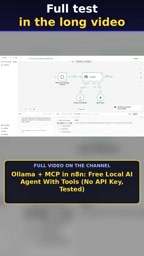
The turning point comes from MCP (Model Context Protocol). Simply put, MCP is a standard protocol that lets models call external tools. The author connected four tools to this 3B model via MCP, backed by an N8N workflow responsible for querying orders and invoices.
N8N plays the "execution layer" here: the model understands the question and decides which tool to call, while N8N actually executes the query and returns structured results. Both run in Docker, with the model deployed locally via Ollama—never touching the cloud, and requiring no API Key. The total cost of this setup is $0.
The value of this division of labor: the small model doesn't need to memorize all business data—it only needs to learn "when to call which tool." The pressure on the context window drops dramatically, and a 3B model can handle tool orchestration tasks that previously required large models.
MCP (Model Context Protocol) was proposed and open-sourced by Anthropic in late 2024, aiming to unify how large language models interact with external tools and data sources. It defines a JSON-RPC-based communication specification that lets models discover, call, and compose external capabilities in a standardized way. Before MCP, every model or framework integrated tools differently, and developers had to write adapter layers repeatedly for different models; MCP abstracts these interfaces into "servers," so a model only needs to support the client protocol to reuse all tools.
N8N is an open-source automation workflow tool, similar to Zapier but self-hostable. It connects various applications and APIs through visual nodes, supporting conditional branching, loops, error handling, and more. In this case, N8N acts as the execution engine of the MCP server: when the model decides to call the "query orders" tool, the request is routed to the N8N workflow, which performs the database query and returns structured data. This layering lets the model focus only on semantic understanding and tool selection, while complex business logic is handled by N8N, reducing the cognitive burden on small models.
Test Results: 9/10 Correct, Completed in 53 Seconds
After integrating MCP tools, the same model with the same 10 questions produced a qualitative change: 9 out of 10 correct, total time 53 seconds.
These numbers deserve a closer look. A 9/10 accuracy rate shows that small models already have practical value in tool-calling scenarios; processing 10 questions involving external queries in 53 seconds—a few seconds per question on average—is perfectly acceptable for a free local solution. More importantly, the model itself wasn't swapped, fine-tuned, or additionally trained—the only change was adding four tool interfaces.
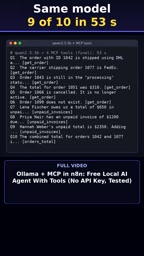
Of course, the one wrong answer reminds us: tool selection by small models isn't foolproof, and production environments still need error handling and fallback logic.
Tool Use refers to the model outputting a structured call request (including tool name and parameters) before generating a response, with an external system executing it and returning the result to the model, which then continues reasoning or generates the final answer based on the result. This mechanism frees the model from memorizing all business data in its parameters, instead fetching real-time information on demand. For smaller models, tool calling significantly expands their capability boundary, because the core challenge shifts from "memorizing knowledge" to "selecting the right tool and constructing the right parameters."
Under the MCP architecture, tool calling typically follows a "discover—select—call—integrate" loop: the model first retrieves the list of available tools and their descriptions via the protocol, then selects a tool based on the user's question and generates parameters; after external execution returns results, the model decides whether to call further or answer directly. The efficiency and accuracy of this loop depend heavily on the clarity of tool descriptions—vague descriptions cause small models to pick the wrong tool or pass wrong parameters, which is why the original article emphasizes that "tool descriptions need to be clear and accurate."
What This Means for Local AI Deployment
In the past, giving an AI agent access to business systems usually meant buying cloud APIs, paying per usage, and sending data out. This real-world test offers another path: local model + MCP + automation workflow, achieving tool calling fully offline at zero cost.
For small and medium merchants, independent developers, or scenarios sensitive to data privacy, this combination is especially attractive. Data like orders and invoices never leaves your own machine, and the model's capability gaps are filled by tools. A 3B model runs fine, N8N Community Edition is free, and Docker provides isolated deployment—the technical barrier is mainly in configuring the MCP-to-N8N integration.
This content comes from a continuously updated N8N troubleshooting series, where the author fixes one problem each day that silently breaks real workflows; this case is marked as the 12th fix in the series. For those building automation pipelines, this kind of "silent failure" experience is often more valuable than feature tutorials.
Limitations to Know Before Building
This path isn't without costs. MCP tool descriptions must be clear and accurate, otherwise small models easily pick the wrong tool; N8N workflow input/output formats must be strictly specified so the model can correctly parse returned results; and a 9/10 accuracy rate means there must be retry-on-failure or human confirmation steps. The number of tools shouldn't be too large at once—four tools is already near the upper limit of the comfort zone for a 3B model.
If you're stuck on "local model has no access permission," this case offers a directly reproducible approach: don't rush to swap in a bigger model—first check whether it has the right tools at hand.
One-line Summary
A local 3B model connected to N8N tools via MCP answered 9 out of 10 questions correctly in 53 seconds at zero cost.
Paragraph Summary
The article presents a real-world test showing how a small local model overcomes the "no access permission" dilemma. Without tools, the 3B model answered "unable to access" to all 10 store questions; after connecting four tools via MCP (backed by an N8N workflow querying orders and invoices), the same model got 9 correct in 53 seconds total. The setup runs entirely in Docker using Ollama locally, requires no API Key, and costs $0. The article notes that small models don't need to memorize all business data—they just need to learn to call tools, drastically reducing context pressure. It also cautions that tool descriptions must be clear, workflow formats strictly specified, and that 9/10 accuracy means production still needs error handling and fallback logic.
Related articles

Gemini 4 Carbon Tops Global Rankings as AI Productivity and Open-Source Ecosystems Surge
Google DeepMind's Gemini 4 Carbon tops global benchmarks, built for complex agents and system security. ByteDance launches Doubao Work integrated with Feishu, Anthropic's AI autonomously breaches 5 system-level attack chains, and ModelBest and Fudan open-source on-device multimodal and image generation models.

Overseas Creator Breaks Down N8n AI Agent Business Playbook: From Tooling to Monetization
An overseas creator breaks down the N8n AI agent business playbook: comparing Zapier, Make, and N8n, detailing four monetizable automation categories—lead capture, WhatsApp follow-up, booking, and content pipelines—plus agency pricing and a sales playbook.

Empacer: The Voice-First AI Assistant for Small Business Owners That Topped Product Hunt
Empacer is a voice-first AI assistant for small business owners: three-question setup, voice requests turned into customer replies, social posts, and invoices—all owner-approved. It won #1 Product of the Day on Product Hunt with 231 upvotes and 47 comments.