OpenAI Codex Is Free Now? Local Models Take Over AI Agents in Practice

Using CCSwitch to disguise an Ollama local model as Claude and drive Claude Code at zero cost—practice and boundaries.
The article introduces a solution for connecting local models to the Claude Code desktop app via the open-source tool CCSwitch: CCSwitch starts a local routing service, intercepts requests sent to the Anthropic API, translates them into an OpenAI-compatible format, and forwards them to Ollama, making Claude Code believe it is still calling the official API—thus enabling its AI Agent capabilities without a paid key. Deployment relies on three components—Claude Code, Ollama, and CCSwitch—and requires configuring a virtualization environment, selecting a model based on VRAM, and setting the local routing address and any API key. Tests show Gemma 4 can complete web page generation tasks, while Qwen 3.5 9B performs poorly in complex logic tasks such as 3D games, indicating that the Agent framework can be unified but the model capability gap directly determines output quality. The author believes this solution suits budget-limited or privacy-sensitive users, but local models still lag behind the cloud in complex reasoning, and the configuration barrier is relatively high.
A Bilibili video demonstrated how to use the open-source project CCSwitch to disguise a local model as Claude, thereby driving the Claude Code desktop app for free. This "bait-and-switch" solution lets an AI Agent automatically modify code, fix bugs, and build websites without a paid API. This article breaks down its principles, deployment steps, and real-world results, and analyzes the feasibility and limits of replacing cloud Agents with local models.
The Core Trick: Making a Local Model "Impersonate" Claude
In the video, the uploader shows how CCSwitch, an open-source tool, connects a local model running on Ollama (such as Qwen 3.5 or Gemma 4) to the Claude Code desktop app. The principle isn't complicated: CCSwitch starts a local routing service that intercepts requests Claude Code sends to the Anthropic API and forwards them to Ollama's local endpoint. Claude Code believes it is still calling the official API, while in reality all inference happens on the local machine.
This means users no longer need a paid API key or a network connection. In the demo, the uploader enters any API key (e.g., 123456) and passes validation, because the request never leaves the local machine. For developers who want to experience a fully automated AI Agent workflow at low cost, this undoubtedly lowers the barrier.
Why Claude Code Is Worth "Taking Over"
Many people mistakenly think Claude Code is just an AI chat tool, but the uploader emphasizes that its real value lies in its AI Agent capabilities—ultra-long context, reading an entire project, analyzing dependencies, modifying files, and executing commands. Say "add a login system to the website," and it will automatically traverse the code structure, install dependencies, and run tests.
That's precisely why connecting it to a local model is meaningful: the Agent's framework and toolchain are preserved, and only the inference engine is swapped. For scenarios where you don't want to pay API fees but need an automated coding assistant, this combination offers another option.
The API compatibility layer is key to understanding the whole solution. Anthropic's Messages API and OpenAI's Chat Completions API differ in request body structure, message role definitions, and tool use field formats: the former uses a top-level system field and a content block array, while the latter uses a system role in messages and function_call. CCSwitch's "disguise" is essentially bidirectional protocol translation—converting the Anthropic-format requests sent by Claude Code into the OpenAI format that Ollama understands, then translating the results back. This also explains why the configuration says "API format: OpenAI-compatible, authentication: Anthropic API Key": the former constrains the downstream, the latter fools the upstream. Once the protocol translation layer has missing fields (e.g., incomplete schema correspondence for tool use), the Agent's tool calls may fail—this is the most common failure point for such solutions.
Full Deployment Flow: Three Components and Key Configuration
The whole solution relies on three components: the Claude Code desktop app (responsible for Agent scheduling), Ollama (running the local model), and CCSwitch (request disguise and forwarding). The uploader walks through the installation step by step in the video and highlights several key points.
Environment Preparation and Model Selection
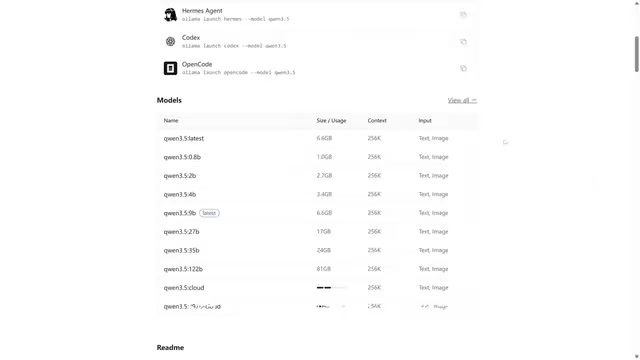
You need to install Git, enable Windows virtualization features (Virtual Machine Platform, WSL), and restart the computer. After installing Ollama, choose a model based on VRAM: 24GB VRAM can run Gemma 4 26B, while 8GB VRAM is better suited to Qwen 3.5 9B (about 6.6GB). The uploader specifically notes that models labeled "Text" are text-only, while "Text+Image" are multimodal—choose as needed.
The relationship between model parameter count and VRAM deserves elaboration. During large model inference, VRAM usage roughly consists of the weights themselves plus the KV Cache: at 4-bit quantization, every 1 billion parameters requires about 0.6GB of VRAM, so a 9B model takes about 6GB and a 26B model about 16GB; add the KV Cache, which grows linearly with context length, plus framework overhead, and you get the empirical values of "24GB for 26B, 8GB for 9B." This also means the longer the context and the more concurrency, the smaller the model you can actually run. In addition, the difference between "Text" and "Text+Image" labels is whether a vision encoder (such as CLIP or SigLIP) is loaded; the multimodal version consumes extra VRAM, so for pure coding tasks the text-only version is more cost-effective.
CCSwitch Configuration and Enabling Routing
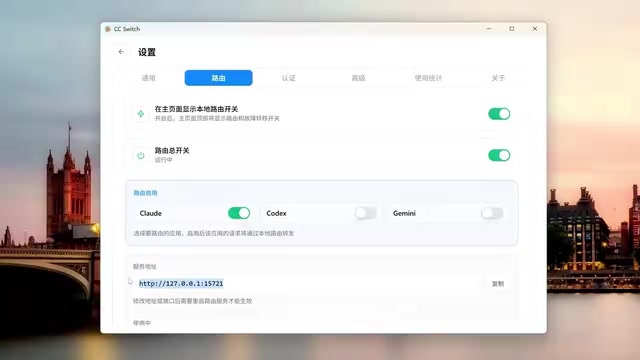
Add a custom provider in CCSwitch, set the request address to 127.0.0.1, choose OpenAI-compatible as the API format, select Anthropic API Key as the authentication method, and enter the local model name as the primary model. Then turn on the main routing switch and Claude route forwarding, and in Claude Code's developer mode enter the gateway address provided by CCSwitch and any API key; export the registry file and restart the client.
The uploader also forces three model options to appear by modifying the registry, making it easy to switch between different local models in Ollama.
Real-World Results: It Can Work, but Model Differences Are Obvious
After configuration, Claude Code successfully called the local model for a self-introduction, and it called itself "Claude Haiku"—the uploader joked that "it really got fooled." In a task to generate a cyberpunk-style personal homepage, Gemma 4 fulfilled requirements such as dynamic background, frosted glass effect, and typewriter animation; but in a 3D parkour game task, the output from Qwen 3.5 9B showed obvious logical flaws (the character could clear obstacles no matter what), while Gemma 4's result was complete and usable.
This reveals a key fact: the Agent framework can be unified, but the capability gap of the underlying model is directly reflected in task completion quality. Small-parameter models are prone to failure in complex logic tasks, and locally deployed "free" is not without cost.
The Boundaries and Use Cases of Local Agents
This solution suits three types of people: developers who want to experience Claude Code Agent capabilities at zero cost, users sensitive to data privacy who don't want to connect to the internet, and AI enthusiasts who enjoy tinkering with local models. But it also has obvious limitations: local models still lag behind cloud large models in complex reasoning and code generation; when VRAM is insufficient, you can only run small models, and results suffer; and there are many configuration steps, which isn't beginner-friendly.
From a broader perspective, tools like CCSwitch reflect a trend: the "shell" and "brain" of AI Agents are decoupling. An Agent's toolchain, interaction interface, and context management can evolve independently, while the inference engine can be flexibly swapped based on cost, privacy, and performance needs. As local model capabilities continue to improve, this hybrid architecture may become a daily choice for more developers.
Note: The original title mentions "OpenAI Codex," but the video actually demonstrates the combination of the Claude Code desktop app and CCSwitch—the two are not the same product, and readers should be aware of the distinction.
Background Supplement
Ollama is an open-source local large model runtime framework that provides a Docker-like command line and REST API interface (listening on port 11434 by default). It can pull and run open-weight models such as Llama, Qwen, and Gemma with one command, and automatically handles quantization, VRAM allocation, and context management. Its key value lies in exposing an OpenAI-compatible /v1/chat/completions interface, allowing any client originally targeting a cloud API to switch to local inference by changing a base_url. The reason CCSwitch can forward requests to Ollama is precisely this standardized HTTP interface layer; in other words, the technical prerequisite for a local model to "disguise" itself as Claude is that Ollama provides a protocol shell isomorphic to the cloud.
Related articles

Free Unlimited Claude Code Solution: Agnes AI + CC Switch Setup Guide
No paid subscription needed — pair the free AI platform Agnes AI with the open-source tool CC Switch to provide a backend for Claude Code, enabling unlimited free calls to text, image, and video models. This guide covers the full setup, test results, and usage boundaries.

A Complete Zero-Cost Guide to Getting Started with Claude Code for Beginners in China
A beginner's guide to Claude Code for users in China: two installation methods (command line and IDE plugin), full configuration steps for replacing the official API with the free domestic LongCat model, and a hands-on demo of building a small tool with natural language, plus tips.

When the NSA Gets Involved: The AI Supply Chain Crisis Behind Open-Source CVEs and API Key Hijacking
Multiple open-source projects disclosed severe CVEs in one day, PHP flaws alarmed the FBI, and Railway and OpenCode were breached with API keys stolen. This article breaks down the vulnerability window, AI-accelerated exploitation, and the AI supply chain crisis behind the API key black market, with a developer defense checklist.