Zero-Code Bioinformatics Analysis with AI Agents: From Workstation Setup to Automated Figures

Use AI Agents with MCP and Skills to let zero-code researchers run the full bioinformatics analysis workflow.
Addressing the pain point in bioinformatics analysis where "ChatGPT only gives code that won't run," the article introduces the AI Agent solution. An Agent can enter the project directory, create and run scripts, check errors, and automatically fix them, forming an execution loop. Its capabilities rest on three concepts: the Agent handles execution, MCP handles connections to external tools like PubMed and the local R environment, and Skills encapsulate standard analysis workflows. The article compares Claude Code and Codex on ease of use, features, and price, and provides installation tips, including Git and Node.js prerequisites, environment variable configuration, and connecting to domestic models like DeepSeek via ccswitch. It then recommends four skill packs — Scientific Agent Skills, Claude Scientific Writer, BioSkills, and Nature Skills — covering the full spectrum of bioinformatics analysis and paper writing, with the ultimate goal of freeing researchers from environment configuration.
Why can't ordinary ChatGPT handle bioinformatics analysis?
Many students doing bioinformatics have had this experience: you ask ChatGPT "help me write code for transcriptome differential analysis," and it gives you a plausible-looking R script; then you ask "how do I draw a volcano plot," and it provides ggplot2 code. But here's the problem — once you have the code, then what? How do you install R? How do you install packages? What if you get an error? For people with no coding background, the sticking point is often not "not knowing the steps," but "knowing them and still not being able to run it."
In the "Zero-Code Bioinformatics Analysis with Agents" course series, Bilibili creator Jeremy points out bluntly: ordinary chatbots can only tell you the rough steps, whereas AI Agents can actually enter your project directory, help you create scripts, run scripts, check output results, and automatically fix errors based on the error messages. The gap between the two is the gap between "armchair theory" and "getting real work done."
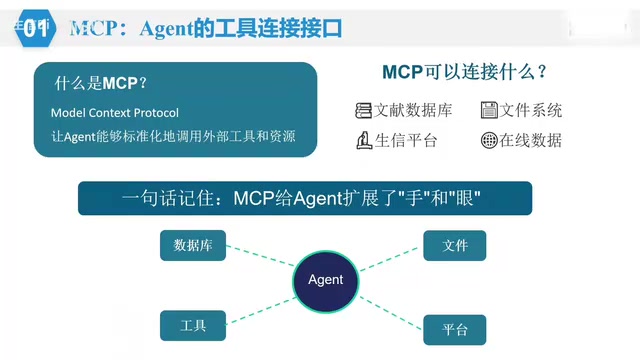
The core value of an Agent is that it's an "analyst on standby": you tell it "based on the expression matrix and grouping information in the current folder, complete differential analysis, KEGG enrichment, and GSEA, organize the results into the result folder, and generate an analysis report," and it will execute step by step on your computer, rather than dumping a piece of code on you that you have to debug yourself.
The three core concepts behind Agents: Agent, MCP, and Skills
To understand why an Agent can get work done, you need to grasp three concepts.
An Agent is the executor. It's smart in itself, but it needs a "workplace" — your project folder. Within it, it reads files, writes code, runs it, checks for errors, and makes modifications, forming a closed loop.
MCP is the standardized interface through which an Agent connects to external tools. No matter how smart an Agent is, it can't conjure literature or data out of thin air. It needs to access PubMed to search literature, call the local R environment to run code, and connect to specialized analysis platforms. Without MCP, the literature citations AI generates are often "fabricated out of the void" — because it only has internal memory and cannot actually access PubMed. Once connected through MCP, search results become real and reliable.
Skills are the professional operating manuals prepared for the Agent. Transcriptome analysis has a standard workflow: data reading, quality control, differential analysis, enrichment analysis, visualization, and report organization. Explaining the workflow to the AI every time is tedious; by encapsulating the standard workflow into a Skill, the Agent can automatically execute according to the SOP when it encounters a similar task.
The relationship among the three can be summarized as: the Agent handles execution, MCP handles tool connections, and Skills handle workflow standardization. This combination means the AI no longer "runs around randomly," but completes tasks step by step within the project directory according to the standard bioinformatics analysis workflow.
MCP (Model Context Protocol) is a communication standard proposed and open-sourced by Anthropic at the end of 2024, aimed at unifying the way large language models connect to external data sources and tools. Before MCP, every tool integration (such as databases, local file systems, third-party APIs) required separately written adapter code, resulting in a closed ecosystem and severe duplicated effort. MCP adopts a client-server architecture: the Agent acts as the client initiating requests, while various tools expose standardized "Resources," "Tools," and "Prompts" in the form of MCP Servers, enabling one-time development and multi-end reuse. For bioinformatics scenarios, this means PubMed search, local R environment invocation, and KEGG database queries can all be encapsulated as independent MCP Servers that the Agent calls on demand, ensuring the authenticity of data sources while greatly reducing integration costs.
Skills are a mechanism for explicitly encapsulating domain knowledge for AI Agents. They are usually organized as Markdown documents plus accompanying scripts and resource files, containing task descriptions, operating steps (SOP), precautions, and a list of callable tools. Compared with writing everything directly into the system prompt, the advantage of Skills lies in on-demand loading: the Agent only reads the corresponding skill when it encounters a relevant task, avoiding context bloat while facilitating version management and community sharing. A Skill is essentially "executable expert experience" — solidifying the workflow standards in a senior analyst's head into an operating manual the Agent can follow. This is also why strongly process-driven work like bioinformatics analysis is particularly well suited to being encapsulated as Skills.
How to choose a local Agent tool: Claude Code vs Codex
The course compares two mainstream local Agent tools.
Claude Code is a mid-tier AI coding Agent built by Anthropic on the Claude model, colloquially called CC. It uses the Claude model by default, but can be switched to other models via environment configuration, such as the domestic DeepSeekAd. Codex is a product developed by OpenAI, requiring a GPT Plus membership or above; there are also tutorials for replacing it with other models.
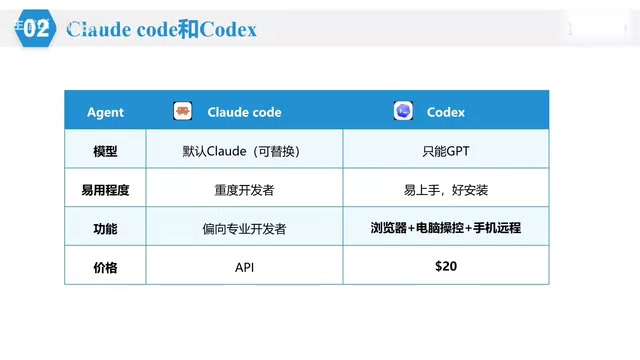
In terms of ease of use, Codex has a desktop design that is beginner-friendly, with conversation like WeChat chat; Claude Code is mainly used in the terminal, which has a certain threshold but offers greater freedom. In terms of functionality, both support Skills and MCP; Claude Code leans toward professional developers, while Codex supports browser access, has a built-in image generation model, and can be remotely controlled via mobile phone. On price, Codex's basic Plus version at $20 per month is sufficient for bioinformatics analysis; Claude Code's subscription has stricter risk controls, domestic IPs are easily restricted, and most people turn to the API, with relay stations and DeepSeek API being more economical options.
For bioinformatics beginners, Codex is faster to get started with; but the core logic of the two is the same — open the terminal, enter the project folder, start the Agent, authorize read/write, and issue the task. Learn one, and you'll naturally know the other.
API (Application Programming Interface) and relay stations are key to understanding the cost structure of using Agent tools in China. Tools like Claude Code and Codex are themselves just clients; the real reasoning capability comes from the large model services behind them, billed by Token (a text measurement unit) when called. Official subscriptions (such as Claude Pro and ChatGPT Plus) use a monthly fee model but have regional restrictions and risk controls; the API approach charges based on actual usage, which is flexible but requires managing keys yourself. The so-called "relay stations" are third-party API proxy services that forward requests to official or compatible interfaces, usually at lower prices and directly accessible in China, but stability and data security must be evaluated on your own. Using compatible APIs of domestic models such as DeepSeek is currently a cost-effective alternative; its interface format is compatible with the OpenAI API, so it can be called directly by most Agent tools.
Installation practice: environment variables are an unavoidable hurdle
Before installing Claude Code, two prerequisites are needed: Git and Node.js. Windows users operate through PowerShell, while Mac users have a built-in terminal. There's a key detail during installation — the installer displays a path that must be saved and manually added to the system environment variables, otherwise the Agent cannot be recognized by the terminal.
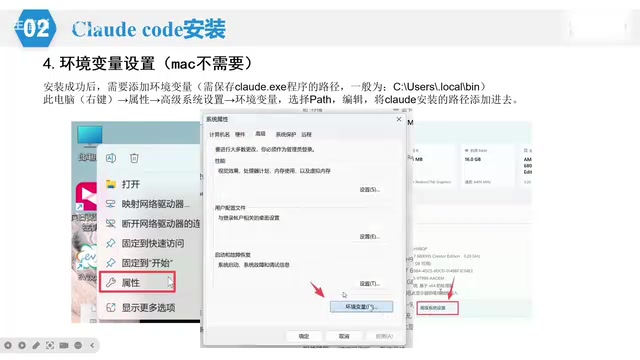
The specific steps are: right-click "This PC" → Properties → Advanced system settings → Environment Variables → find Path under User variables → Edit → New → paste the installation path → Save. After that, enter the startup command in PowerShell; if you see the Agent interface, the installation was successful.
After installation, you also need to configure the large model API. Since Claude access is restricted in China, the course recommends using domestic models such as DeepSeek; through third-party tools like ccswitch, you can switch APIs graphically, fill in the API Key and address, and replace the main model with DeepSeek V4 Pro.
After installation, it's recommended to run a simple test first, such as asking the Agent to "create a folder called bioinformatics-analysis in the current folder" or "randomly generate a set of data, draw a bar chart, and save it as PDF," to confirm the workflow is working properly.
Four bioinformatics-specific Skills that turn the Agent into an expert team
Skills are the real value multiplier of this workflow. The course recommends four skill packs that are particularly useful for bioinformatics analysis.
Scientific Agent Skills is currently the most comprehensive collection of scientific skills, containing 147 skills covering more than 100 scientific databases, spanning bioinformatics, drug discovery, clinical research, machine learning, and data visualization, and can connect to public databases such as PubMed, UniProt, and KEGG.
Claude Scientific Writer focuses on scientific writing, used for academic papers, literature reviews, clinical reports, and other research documents. Its core capability is obtaining real literature from databases such as PubMed, with a built-in paper quality assessment system; it can complete clinical case reports, literature reviews, meta-analyses, and scientific paper writing, with accompanying peer review, PDF/Word processing, and chart generation functions.
BioSkills is a skill pack specifically for bioinformatics analysis, containing 385 bioinformatics skills in 67 categories, making it the most comprehensive bioinformatics skill library currently available. It covers FASTQ sequence input/output, NCBI/UniProt/Blast/SRA database access, SAM/BAM file processing, phylogenetic tree construction, single-cell analysis, transcriptome differential expression, methylation analysis, ChIP-seq, and more.
Nature Skills is designed to address the risk of AI "overstepping and writing nonsense" in scientific content — writing ordinary results as "first revelations" and unverified mechanisms as proven. It has built-in strict boundary rules and evidence verification processes, suitable for SCI paper writing and polishing, Nature-style chart drawing, CNS literature interpretation, reviewer response, intensive paper reading and translation, and group meeting PPT generation.
Once these four Skills are installed, the Agent is essentially equipped with a bioinformatics analysis expert, a paper writing expert, and a strict peer reviewer. Installation is also very "Agent-like" — just type "help me install a certain skill" directly in the dialog box, and the Agent will complete it automatically.
Bulk transcriptome and single-cell analysis are the two core task types that appear repeatedly in the article; understanding their differences helps determine the applicable scenarios of Skills. Bulk RNA-seq sequences a batch of cells together, yielding sample-level average expression, with analysis focused on differential expression (such as DESeq2, edgeR), enrichment analysis (GO/KEGG/GSEA), and visualization; single-cell RNA-seq (scRNA-seq) builds and sequences libraries for each individual cell, with data volume an order of magnitude higher, and the analysis workflow involves quality control filtering, dimensionality reduction and clustering (PCA/UMAP), cell type annotation, pseudotime trajectory, and cell communication, commonly using tools such as Seurat and Scanpy. The two differ greatly in data structure, computational resources, and interpretation logic, so skill packs like BioSkills split skills by category, and the Agent needs to select the corresponding analysis path based on the characteristics of the input data.
The complete roadmap from environment configuration to paper prototype
The course will subsequently center on a real bioinformatics analysis project executed entirely by AI, while adding a step of manually running code to verify AI results, covering the full workflow from R language installation, R package installation, database acquisition, Bulk transcriptome and single-cell code execution, result interpretation, to paper organization.
The significance of this method is not to have AI replace analysis, but to free researchers with no coding background from environment configuration and error debugging, so they can focus their energy on analysis ideas and result interpretation. The Agent handles the "hands," and the researcher handles the "brain" — this may be the most pragmatic way of collaborating on bioinformatics analysis in the AI era.
Related articles

Bilibili's Hit Dify Tutorial: A Practical Guide to Building 20+ AI Apps from Scratch
A distilled guide to Bilibili's top-rated Dify tutorial: Windows + Docker deployment, MySQL connection, five app types, model integration strategy, and publishing.

Agent Skills Beginner's Guide: From Concepts to Multi-Agent Collaboration in Practice
A comprehensive guide to Agent Skills: core concepts, components, the importance of Description, standardization, beginner learning paths, and multi-agent collaboration.

One Neuron Detects Both Cats and Cars? We Reproduced It and Found a New Explanation
The cat-car neuron reinterpreted: researcher Cammarata argues it distinguishes pointy from round, not cats from cars. We reproduced the experiment and found the new explanation holds on most inputs—but cars are the exception. The interpretability debate continues on language models.