#Ollama
100 related articles

Ollama v0.35.0-rc1 Released: MLX Pull Retry Optimization
Ollama v0.35.0-rc1 is out, featuring improved MLX backend pull retry logic with bounded retries and a watchdog mechanism to prevent stalled model downloads on Apple Silicon.

Ollama v0.35.0-rc0 Released: Introduces System One Scoring API
Ollama v0.35.0-rc0 is out, featuring a new System One Scoring API (PR #18606). Learn what changed, what RC means, and whether you should upgrade.

Ollama v0.35.1-rc0 Update: Explicit Model Capability Declaration Mechanism Explained
Ollama v0.35.1-rc0 introduces explicit model capability declarations via PR #18708, replacing fragile architecture metadata matching with clear capability contracts and paving the way for MLX runtime support.

Ollama v0.35.1-rc1 Released: Adds Support for the Clef Model
Ollama v0.35.1-rc1 release candidate adds support for Clef, an audio-language model. Learn what changed, what Clef does, and why model support expansion matters.

Ollama Releases v0.35.1-rc2: Continuous Iteration of the Local LLM Runtime Tool
Ollama releases v0.35.1-rc2, fixing a CI build context issue with a verified GPG signature. Learn what this release candidate means and why Ollama matters for local LLM users.

Ollama Local LLM Deployment Guide: Run Models on Just 6GB VRAM
Learn how to deploy LLMs locally with Ollama — even on 6GB VRAM. Covers the truth about local DeepSeek, VRAM-based model selection, and a complete 4-step install guide.

Moka Chat: One Command to Add MCP Tools to Your Ollama Models
Moka Chat is an MIT-licensed, local-first chat app. One npx command connects Ollama models to MCP tools, with Inspector showing JSON-RPC, token usage, and latency per call. Also supports LM Studio and hosted models.

Run AI Locally on Mac: Complete Ollama Installation and Model Selection Guide
Step-by-step guide to running free local AI on Mac: install Ollama, run DeepSeek in Terminal, set up Open WebUI with Docker, plus model recommendations by RAM.

Getting Started with Local LLM Deployment: Ollama vs. vLLM for Deploying Qwen3
A beginner's guide to local LLM deployment: comparing Ollama and vLLM, covering VRAM trade-offs, high concurrency, and deploying the qwen3-0.6B model with vLLM.

Local Decision Models Come to Ollama: How Nimble Enables Real-Time Task Routing
Ollama now supports local decision models. Nimble + the new /v1/systemone API enable real-time ticket triaging, model routing, and content moderation — all on-device.

Ollama Tutorial: Run Open-Source AI Models Locally for Free — Complete Guide
Complete Ollama tutorial: install and run open-source AI models locally on macOS, Windows, or Linux for free. Covers local vs. cloud models, pricing, and Claude Code integration.

Ollama Billing Bug: DeepSeek-V4.1-Flash Overcharge Fixed and Credits Restored
Ollama confirms a billing rate error on its deepseek-v4.1-flash model overcharged some users. Usage has been reset and overages refunded automatically. Here's what happened.
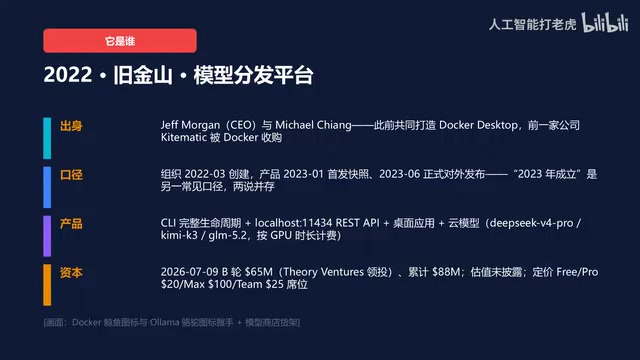
Deep Dive into Ollama: How a 14-Person Team Built the Docker of AI Through Distribution
How Ollama's 14-person team built the Docker of AI through distribution. A deep technical breakdown of its dual inference backends, KV quantization, MTP speedups, real weaknesses, and what its true moat actually is.

DeepSeek Local Deployment Guide: Ollama + API Calls Complete Tutorial
Step-by-step guide to deploying DeepSeek locally with Ollama — covering hardware selection, model download commands, and three API call methods including the OpenAI-compatible interface.

RTX 5060 Ti 16GB Local LLM Selection Guide: Ollama Model Recommendations and Benchmarks
What local LLMs can an RTX 5060 Ti 16GB run? A practical Ollama model selection guide covering VRAM limits, quantization, and recommendations for coding, reasoning, and image generation.
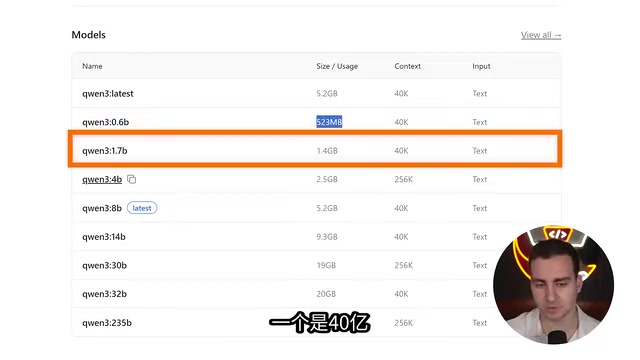
Build a Fully Local AI Agent in Python in 10 Minutes
Learn how to build a fully local AI agent with Ollama and Pydantic AI in under 10 minutes using just a few dozen lines of Python — offline, free, and private.

Import Local GGUF Models into Ollama: Share ComfyUI Models Without Re-Downloading
Already downloaded a GGUF model in ComfyUI but re-downloading it in Ollama? This guide shows you how to import local GGUF models into Ollama via Modelfile to share models and skip redundant downloads.
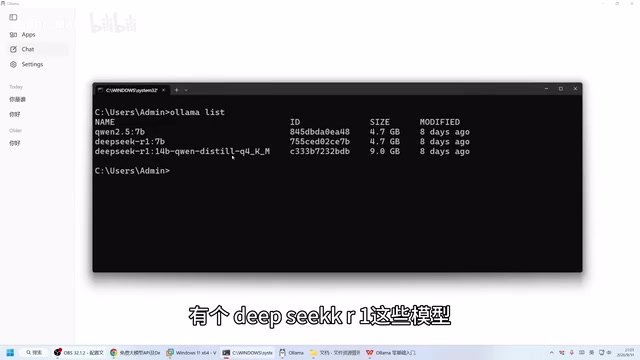
Ollama Beginner's Guide: Run Large Language Models Locally on Your Own Computer
Run LLMs locally with Ollama — fully offline, private, and free. This guide covers installation, CLI and Web UI usage, model download, and hardware requirements.
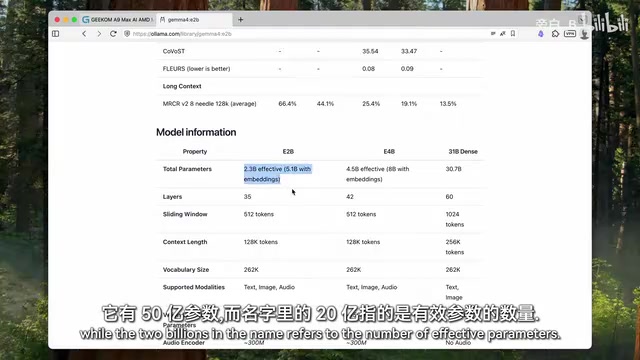
Running Local LLMs on a Regular Home PC: Which Models Are Actually Worth Keeping?
A Bilibili creator tested local LLMs on a Geekom mini PC with 24GB VRAM. MoE models like Gemma 26B hit 31 tok/s; Qwen3 27B runs at 14 tok/s — no workstation needed.
No Frameworks Needed: Build a Local ReAct AI Agent with Python + Ollama
Build a local ReAct AI agent from scratch using pure Python and Ollama — no LangChain, no API keys. Understand the reasoning loop and message management behind AI agents.